
Opening your inventory you'll find the new Back Slot. After equipping your Backpack, you can store items placing items ontop of it and display it on your back for other players to see. Backpacks holding items cannot be taken off unless you place it into the world using Sprint + RClick. Interact with the backpack to see the items inside or Sprint + RClick agian to re-equip!
Show Your True Colors!
 Choose from a variety of new backpacks to clean up your inventory. Leather Backpacks can be dyed any color you can imagine, just like it's armor. Metal Backpacks can be trimmed in a smithing table or used with a Upgrade Template to convert it to a larger and fireproof Netherite Backpack. Ender Backpacks hold a global inventory unique to the player who crafted or trimmed it, and other players can access that inventory if you make extras.
Fill 'er up!
 New items are automatically put into the top of the backpack. Hovering over the backpack you
have equipped previews the items you have inside. If you need to get the chapstick
that might've fallen to the bottom, ask your friend to help out and grab it for you.
Double-check your diamonds after they've been in there though.
Inventory Controls
Insert or take items just by clicking directly onto the equipped backpack. To help move you items around use your Sprint Key + Click as if you were shift clicking items into any other inventory. This key can be bound to something different in the settings. You can press Sprint Key + Right Click on a block to quickly place your backpack and access all of your items.
More than Meets the Eye!
 Decorated Pots and Cauldrons can also be equipped. Pots can store 128 stacks of a single kind of item. Cauldrons hold 24 buckets of any fluid. These types of wearables are too heavy to be placed and can only be taken off by emptying them first.
On Death
Your items will stay safely where you died inside a backpack dropped at your feet. Pots and Cauldrons will drop as an item that can only be picked up with an empty Back Slot. (Hurry Back!)
Let's See You Move!
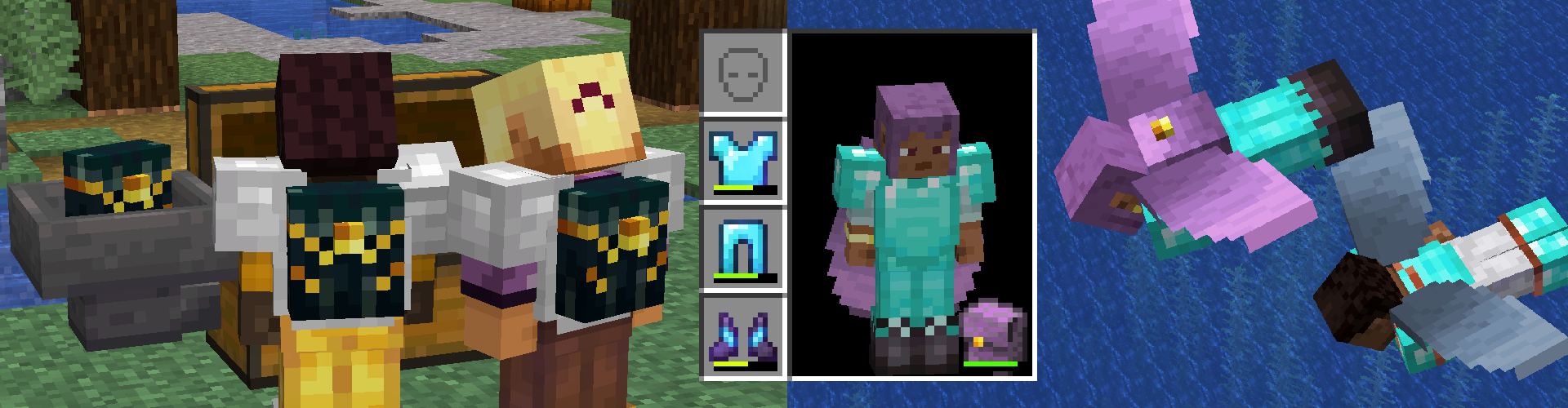 Winged Backpacks allow you to use your elytra with a backpack and Ender Backpacks are bound to a player when crafted or re-trimmed. Unlike Ender Chests, their inventory is unique to that bound player. Share a Ender Backpack with a friend to remotely send items to one another.
Redstone Components
Use Hoppers and Comparators to create complex loaders and contraptions with your backpacks. Using Ender Backpacks can be a means for long ranged redstone or to simply send items back to your base when you no longer need them.
Looking for More?
 Still not enough? That's up to you! You can add as many backpacks as you'd like with properties you decide through Data and Resouce Packs. Read through Custom Backpacks from the wiki to add your own backpack.
Mod Packs
If you are using this mod in a mod pack I would love to hear your feedback! If you need to change any config, check out Configurations from the wiki for a how-to. There it outlines how to use datapacks to make items disable the backslot, or to blacklist items from the Backpack Inventory.
Feedback
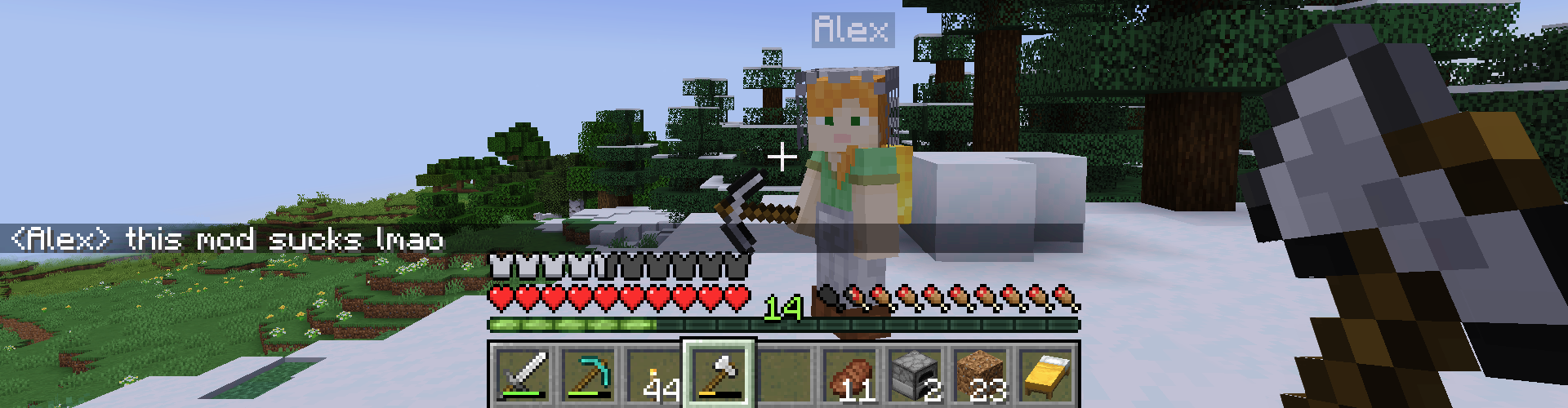 I'm curious how you play with my mod! If you have any suggestions or changes create a new discussion here. I try to respond genuinely to any critisim my mod might get, leave something if it bothers you even if it's not fully thought out (Thats what discussions are for).
If there are any Bugs or Compatibility issues, you can create a new issue here and I'll see what I can do to help! Videos or your crash.log/latest.log help a ton in recreating and squashing bugs.
Check out the Wiki
If you are a mod pack creator, or just a curios player, the wiki is the best place to look deeper into the mod. If you can't find what you're looking for there, leave an issue and I can help you out.
How to Install Beans Backpacks (Legacy) (Mod)
Beans Backpacks (Legacy) by BeansGalaxy is verified for Fabric, Forge across Minecraft versions 1.20.1, 1.20.2 (latest release: 20.1-2.0.2, file size: 1.1 MB). Follow the steps below to install it safely from ModCraft.tv:
- Click the Download button above and select your Minecraft version (1.20.1, 1.20.2) and platform (Fabric, Forge).
- Make sure you have the compatible loader or environment installed for Fabric, Forge.
- Move the downloaded Beans Backpacks (Legacy) file into your Minecraft
.minecraft/modsfolder and launch the game.
All Versions
+ Add Version| Name | Game version | Platforms | Published | Downloads | Actions |
|---|---|---|---|---|---|
| 2mo ago | 132 | ||||
| 2mo ago | 66 | ||||
| 2mo ago | 44 | ||||
| 2mo ago | 33 | ||||
| 2mo ago | 26 | ||||
| 2mo ago | 22 | ||||
| 2mo ago | 19 | ||||
| 2mo ago | 17 | ||||
| 2mo ago | 15 | ||||
| 2mo ago | 13 | ||||
| 2mo ago | 12 | ||||
| 2mo ago | 11 | ||||
| 2mo ago | 10 | ||||
| 2mo ago | 9 | ||||
| 2mo ago | 9 | ||||
| 2mo ago | 8 | ||||
| 2mo ago | 8 | ||||
| 2mo ago | 7 | ||||
| 2mo ago | 7 | ||||
| 2mo ago | 7 | ||||
| 2mo ago | 6 | ||||
| 2mo ago | 6 | ||||
| 2mo ago | 6 | ||||
| 2mo ago | 6 | ||||
| 2mo ago | 5 | ||||
| 2mo ago | 5 | ||||
| 2mo ago | 5 | ||||
| 2mo ago | 5 | ||||
| 2mo ago | 5 | ||||
| 2mo ago | 4 | ||||
| 2mo ago | 4 | ||||
| 2mo ago | 4 | ||||
| 2mo ago | 4 | ||||
| 2mo ago | 4 | ||||
| 2mo ago | 4 | ||||
| 2mo ago | 4 | ||||
| 2mo ago | 4 | ||||
| 2mo ago | 3 | ||||
| 2mo ago | 3 | ||||
| 2mo ago | 3 | ||||
| 2mo ago | 3 | ||||
| 2mo ago | 3 | ||||
| 2mo ago | 3 | ||||
| 2mo ago | 3 | ||||
| 2mo ago | 3 | ||||
| 2mo ago | 3 | ||||
| 2mo ago | 3 | ||||
| 2mo ago | 3 | ||||
| 2mo ago | 3 | ||||
| 2mo ago | 3 | ||||
| 2mo ago | 3 | ||||
| 2mo ago | 3 | ||||
| 2mo ago | 2 | ||||
| 2mo ago | 2 | ||||
| 2mo ago | 2 | ||||
| 2mo ago | 2 | ||||
| 2mo ago | 2 | ||||
| 2mo ago | 2 | ||||
| 2mo ago | 2 | ||||
| 2mo ago | 2 | ||||
| 2mo ago | 2 | ||||
| 2mo ago | 2 | ||||
| 2mo ago | 2 | ||||
| 2mo ago | 2 | ||||
| 2mo ago | 2 | ||||
| 2mo ago | 2 | ||||
| 2mo ago | 2 | ||||
| 2mo ago | 2 | ||||
| 2mo ago | 2 | ||||
| 2mo ago | 2 | ||||
| 2mo ago | 2 | ||||
| 2mo ago | 2 | ||||
| 2mo ago | 2 | ||||
| 2mo ago | 2 | ||||
| 2mo ago | 2 | ||||
| 2mo ago | 2 | ||||
| 2mo ago | 2 | ||||
| 2mo ago | 2 | ||||
| 2mo ago | 2 | ||||
| 2mo ago | 2 | ||||
| 2mo ago | 2 | ||||
| 2mo ago | 2 | ||||
|
B
v2-0.5
|
2mo ago | 2 | |||
|
A
v1.2
|
2mo ago | 2 | |||
|
B
v2-0.4
|
2mo ago | 2 | |||
|
B
v4-0.4
|
2mo ago | 2 | |||
|
A
v1.1
|
2mo ago | 2 | |||
|
B
v2-0.3
|
2mo ago | 2 | |||
|
B
v2-0.3
|
2mo ago | 1 | |||
|
A
v1.0
|
2mo ago | 1 | |||
|
B
v2-0.2
|
2mo ago | 1 | |||
|
B
V2-0.0.2
|
2mo ago | 1 | |||
|
B
v2-0.0.1
|
2mo ago | 1 | |||
|
B
v2-0.0.1
|
2mo ago | 1 | |||
|
A
v0.1.1
|
2mo ago | 1 | |||
|
B
v0.1.0
|
2mo ago | 1 | |||
|
A
v1.2.1
|
2mo ago | 1 | |||
|
A
v1.2.0
|
2mo ago | 1 | |||
|
A
v1.1.1
|
2mo ago | 1 | |||
|
A
v1.1.0
|
2mo ago | 1 | |||
|
A
v1.0.0
|
2mo ago | 1 |


- Fixed Crash when a backpack couldn't determine how large it was.
- Fixed Crash when quick picking up fluid with a cauldron
- Fixed Crash when cauldron couldn't find a textrue for it's stored liquid
- Fixed placed backpacks appearing empty until clicking a slot in it's menu
- Fixed Crash when a backpack couldn't determine how large it was.
- Fixed Crash when quick picking up fluid with a cauldron
- Fixed Crash when cauldron couldn't find a textrue for it's stored liquid
- Fixed placed backpacks appearing empty until clicking a slot in it's menu
- Fixed a networking crash while C2ME is installed and
instant_placeis enabled - Fixed a crash caused by cauldrons attempting to render fluid that does not exist
- Fixed empty buckets being used to fill cauldrons with nothing
- Fixed a crash when cauldrons couldn't find a sound when filled or emptied
- Fixed Winged Backpacks with mending only sometimes would repair themself
- Config Screen is now translatable
- "Backpack Lock" have been renamed to "Lock"
- Locks can now be used to lock all kinds of storage blocks
- Added Back Bundles for donors
- Removed hanging cape below backpack (Bad, Buggy, Bloat)
- Fixed Backpacks disappearing on death with KeepInventory set to true;
- Fixed cauldrons could be equipped as a full stack if shift clicked
- Fixed edge case where you could still equip equipment that's supposed to be blocked by winged backpack
### !! GOODBYE BETA !! :)
- Backpack cape for testing was left enabled
### 20.1-0.30-v2
- Added Config Screen
- Added Option to display your cape below your backpack
- Removed
beansbackpacks:upgraded_backpackitem - Fixed Backpack Menu removing the bottom right most slot when full
- Fixed Backpack would separate from Player's back while shifting
- Double-clicking an item now picks up any matching items in the backpack
- Fixed double-clicking to pick up all items in the backpack menu
- Fixed client crashing from dragging your mouse to split items in the backpack menu
- Fixed equipped backpack was being deleted when shift clicking any empty slot in the inventory
- Fixed "Backpack is already equipped" appearing in the inventory with trinkets installed
- Fixed the backpack becoming hidden when an elytra was equipped with Elytra Slot installed
- Fixed my marriage
- Fixed default config being merged with any edits
- Added new
item_weight_overridecommon config setting - controls how much space an item takes in a backpack inventory
## If you are using Data-Packs to Modify item lists, [read this](https://github.com/BeansGalaxy/Beans-Backpacks-2/wiki/Configurations#data-configurations) to migrate your settings.
- Migrated
data/modifyfiles from Data Packs into Config - The data-pack method will continue to work in this version but will be removed soon.
- Added "Backpack Lock" Item. Used on a placed backpack to lock it. Shift RClick your locked backpack to unlock
- Shift Clicking a Backpack Item no longer locks it.
- Capes now display rolled up on top backpacks
- Backpacks now render at a much greater distance
- Added Config option to override the max_stacks of data-driven backpacks such as Gold & Netherite Backpacks
data_driven_overrides- Added Config option to disable backpack from being rendered and used by other player on the back
always_disables_back_slot- Separated Keybind into in-menu uses & in-world uses
- Added an option to specify the sounds when creating a data-driven backpack.
- Cleaned Up code when rearranging the backpack's menu to *hopefully* prevent crashes when taking items
- Backpack Menu Slots are reorganized each mouse click and not per-frame to *hopefully* prevent crashes when taking items
- Fixed bug causing players not to be able to manually equip backpacks with curios/trinkets
- Fixed crash when sending backpack inventory while a client's player is null
- Lighting in Backpack Menus should be more reliable
- Finalized All Backpack Sounds
- Sound for locking backpacks
- Unique Winged Backpack sound
- Unique Decorated Pot sounds
- Unique Ender Backpack Sounds
- Ender Backpacks now play sounds at all linked inventories
- Added Advancement for a player attempting to access your locked backpack
- Removed the Back Slot from being disabled
- If it would be disabled, it will now not render on your back
- Winged Backpacks & Elytra still cannot be worn together
- Pick-Block with Pots work again
- Fixed Crash on client while accessing ender inventory
- Fixed items disappearing after stacking over 127
- Fixed empty slot in BP menus not disappearing when inventory is full
- Backpacks can now be locked by holding them & right-clicking
- Other players cannot access or equip a locked backpack
- Holding your hotkey with a locked backpack equipped temporarily unlocks it
- Ender Backpacks cannot be equipped while locked
- Animation Changes
- Backpacks do not open slowly if you did not open them
- Perfected* Backpack opening animations
- Added breaking decal to punched backpacks
- Backpacks now take 3 punches to break
- Locked Backpacks take 8 punches
- Reworked Ender Backpacks
- Opening a placed ender backpack visually opens all linked packs
- Ender Backpacks sends less data more frequently and are more reliable
- Ender Inventories are now one single inventory instead of many synced inventories
- Fire burns backpacks slower
- Cactus instantly breaks backpacks
- Sounds are now registered in
:common - Text appears in the inventory while trying to equip something that's blocked by the Back Slot
- Fixed many leather backpack sounds
- Fixed crash caused by players failing to load other back slots
- Fixed dupe with the crafting result slot & shift key


