
ChessCraft
ChessCraft is a Paper plugin that adds in-world chess matches against other players and chess engines. With ChessCraft, players can challenge each other to intense chess battles in a Minecraft environment.
Features
- In-world chess matches, reminiscent of life-size chess boards.
- Pieces: Supports both custom models through a resource pack (linked below), and using textured player heads for resource pack free use.
- Automatic downloading of the correct Stockfish (chess engine powering ChessCraft) executable for your platform.
- Stores history of paused/incomplete and completed matches
- Export matches in PGN format for external analysis
- Elo rating system for PvP matches with server leaderboard
Download
Downloads can be obtained here on Modrinth.
Development builds
Development builds are available at https://jenkins.jpenilla.xyz/job/ChessCraft
Installation
To install ChessCraft, simply drop the plugin into your Paper server's plugins folder.
The configuration can be adjusted at plugins/ChessCraft/config.yml.
By default, ChessCraft will be configured for use with a resource pack containing custom models for chess pieces. It can be downloaded here. You can either have your players manually install it, or set it as your server resource pack/merge its contents into your existing server resource pack.
Usage
First, you must create a chessboard by standing at the desired location for the southwest corner of the board and using the /chess create_board <board_name> <facing> command.
Then, use the /chess challenge player|cpu commands to challenge an opponent. That's all! Now you can right-click the pieces to start making moves!
Chess boards will not automatically place or remove blocks from the world (besides the pieces if configured to use block pieces), they will only manage pieces. This is to allow
building your chess board in any way you like. However, the /chess set_checkerboard command can be used to automatically place blocks for a standard board.


- chore(deps): update plugin me.modmuss50.mod-publish-plugin to v2.2.0 by @renovate[bot] in https://github.com/jpenilla/chesscraft/pull/239
- fix(deps): update dependency org.incendo:cloud-bom to v2.1.0 by @renovate[bot] in https://github.com/jpenilla/chesscraft/pull/238
- chore(deps): update plugin com.gradleup.shadow to v9.6.1 by @renovate[bot] in https://github.com/jpenilla/chesscraft/pull/235
- fix(deps): update dependency org.jdbi:jdbi3-core to v3.54.0 by @renovate[bot] in https://github.com/jpenilla/chesscraft/pull/234
- fix(deps): update dependency org.incendo:cloud-minecraft-bom to v2.0.1 by @renovate[bot] in https://github.com/jpenilla/chesscraft/pull/237
- fix(deps): update dependency org.mariadb.jdbc:mariadb-java-client to v3.5.10 by @renovate[bot] in https://github.com/jpenilla/chesscraft/pull/240
- fix(deps): update flyway to v13 by @renovate[bot] in https://github.com/jpenilla/chesscraft/pull/236
- chore(deps): update gradle to v9.7.1 by @renovate[bot] in https://github.com/jpenilla/chesscraft/pull/241
- chore(deps): update indraver to v4.1.0 by @renovate[bot] in https://github.com/jpenilla/chesscraft/pull/242
- fix(deps): update dependency com.h2database:h2 to v2.5.250 by @renovate[bot] in https://github.com/jpenilla/chesscraft/pull/244
- fix(deps): update dependency com.mysql:mysql-connector-j to v26 by @renovate[bot] in https://github.com/jpenilla/chesscraft/pull/245
- chore(deps): update plugin xyz.jpenilla.run-paper to v3.1.0 by @renovate[bot] in https://github.com/jpenilla/chesscraft/pull/243
- Full Changelog**: https://github.com/jpenilla/chesscraft/compare/v0.5.5...v0.5.6
- fix(deps): update flyway to v12 (major) by @renovate[bot] in https://github.com/jpenilla/chesscraft/pull/217
- fix(deps): update flyway to v12.9.0 by @renovate[bot] in https://github.com/jpenilla/chesscraft/pull/227
- fix(deps): update dependency org.mariadb.jdbc:mariadb-java-client to v3.5.9 by @renovate[bot] in https://github.com/jpenilla/chesscraft/pull/230
- chore(deps): update plugin me.modmuss50.mod-publish-plugin to v2 by @renovate[bot] in https://github.com/jpenilla/chesscraft/pull/229
- chore(deps): update plugin com.gradleup.shadow to v9.4.3 by @renovate[bot] in https://github.com/jpenilla/chesscraft/pull/228
- fix(deps): update dependency com.github.ben-manes.caffeine:caffeine to v3.2.4 by @renovate[bot] in https://github.com/jpenilla/chesscraft/pull/226
- fix(deps): update dependency org.jdbi:jdbi3-core to v3.53.0 by @renovate[bot] in https://github.com/jpenilla/chesscraft/pull/224
- chore(deps): update gradle to v9.6.1 by @renovate[bot] in https://github.com/jpenilla/chesscraft/pull/215
- fix(deps): update dependency org.incendo:cloud-minecraft-bom to v2.0.0-beta.17 by @renovate[bot] in https://github.com/jpenilla/chesscraft/pull/231
- fix(deps): update dependency com.zaxxer:hikaricp to v7.1.0 by @renovate[bot] in https://github.com/jpenilla/chesscraft/pull/232
- Full Changelog**: https://github.com/jpenilla/chesscraft/compare/v0.5.4...v0.5.5
- fix(deps): update dependency org.jdbi:jdbi3-core to v3.52.1 - autoclosed by @renovate[bot] in https://github.com/jpenilla/chesscraft/pull/221
- fix(deps): update dependency org.bstats:bstats-bukkit to v3.2.1 by @renovate[bot] in https://github.com/jpenilla/chesscraft/pull/220
- fix(deps): update flyway to v11.20.3 by @renovate[bot] in https://github.com/jpenilla/chesscraft/pull/212
- fix(deps): update dependency org.mariadb.jdbc:mariadb-java-client to v3.5.8 by @renovate[bot] in https://github.com/jpenilla/chesscraft/pull/211
- chore(deps): update plugin com.gradleup.shadow to v9.4.1 by @renovate[bot] in https://github.com/jpenilla/chesscraft/pull/214
- fix(deps): update dependency com.mysql:mysql-connector-j to v9.7.0 by @renovate[bot] in https://github.com/jpenilla/chesscraft/pull/218
- Full Changelog**: https://github.com/jpenilla/chesscraft/compare/v0.5.3...v0.5.4
- fix(deps): update dependency org.apache.commons:commons-compress to v1.28.0 by @renovate[bot] in https://github.com/jpenilla/chesscraft/pull/172
- chore(deps): update indraver to v3.2.0 by @renovate[bot] in https://github.com/jpenilla/chesscraft/pull/170
- fix(deps): update dependency com.mysql:mysql-connector-j to v9.4.0 by @renovate[bot] in https://github.com/jpenilla/chesscraft/pull/171
- chore(deps): update dependency gradle to v9 by @renovate[bot] in https://github.com/jpenilla/chesscraft/pull/173
- fix(deps): update flyway to v11.11.0 by @renovate[bot] in https://github.com/jpenilla/chesscraft/pull/167
- fix(deps): update dependency org.incendo:cloud-minecraft-bom to v2.0.0-beta.11 by @renovate[bot] in https://github.com/jpenilla/chesscraft/pull/179
- fix(deps): update flyway to v11.11.1 by @renovate[bot] in https://github.com/jpenilla/chesscraft/pull/178
- fix(deps): update dependency org.mariadb.jdbc:mariadb-java-client to v3.5.5 by @renovate[bot] in https://github.com/jpenilla/chesscraft/pull/175
- fix(deps): update dependency com.zaxxer:hikaricp to v7 by @renovate[bot] in https://github.com/jpenilla/chesscraft/pull/168
- fix(deps): update flyway to v11.11.2 by @renovate[bot] in https://github.com/jpenilla/chesscraft/pull/180
- chore(deps): update plugin xyz.jpenilla.run-paper to v3.0.0 by @renovate[bot] in https://github.com/jpenilla/chesscraft/pull/184
- chore(deps): update plugin me.modmuss50.mod-publish-plugin to v1 by @renovate[bot] in https://github.com/jpenilla/chesscraft/pull/183
- fix(deps): update flyway to v11.12.0 by @renovate[bot] in https://github.com/jpenilla/chesscraft/pull/182
- chore(deps): update plugin com.gradleup.shadow to v9.1.0 by @renovate[bot] in https://github.com/jpenilla/chesscraft/pull/181
- chore(deps): update plugin xyz.jpenilla.run-paper to v3.0.2 by @renovate[bot] in https://github.com/jpenilla/chesscraft/pull/191
- fix(deps): update dependency org.incendo:cloud-minecraft-bom to v2.0.0-beta.12 by @renovate[bot] in https://github.com/jpenilla/chesscraft/pull/192
- fix(deps): update dependency org.mariadb.jdbc:mariadb-java-client to v3.5.6 by @renovate[bot] in https://github.com/jpenilla/chesscraft/pull/185
- chore(deps): update gradle to v9.1.0 by @renovate[bot] in https://github.com/jpenilla/chesscraft/pull/187
- chore(deps): update plugin com.gradleup.shadow to v9.2.2 by @renovate[bot] in https://github.com/jpenilla/chesscraft/pull/188
- fix(deps): update flyway to v11.14.0 by @renovate[bot] in https://github.com/jpenilla/chesscraft/pull/186
- fix(deps): update dependency com.h2database:h2 to v2.4.240 by @renovate[bot] in https://github.com/jpenilla/chesscraft/pull/189
- fix(deps): update dependency org.jdbi:jdbi3-core to v3.49.6 by @renovate[bot] in https://github.com/jpenilla/chesscraft/pull/190
- chore(deps): update gradle to v9.2.1 by @renovate[bot] in https://github.com/jpenilla/chesscraft/pull/201
- fix(deps): update dependency org.jdbi:jdbi3-core to v3.50.0 by @renovate[bot] in https://github.com/jpenilla/chesscraft/pull/202
- fix(deps): update dependency com.github.ben-manes.caffeine:caffeine to v3.2.3 by @renovate[bot] in https://github.com/jpenilla/chesscraft/pull/200
- chore(deps): update plugin me.modmuss50.mod-publish-plugin to v1.1.0 by @renovate[bot] in https://github.com/jpenilla/chesscraft/pull/198
- fix(deps): update dependency com.mysql:mysql-connector-j to v9.5.0 by @renovate[bot] in https://github.com/jpenilla/chesscraft/pull/199
- fix(deps): update dependency org.incendo:cloud-minecraft-bom to v2.0.0-beta.13 by @renovate[bot] in https://github.com/jpenilla/chesscraft/pull/197
- fix(deps): update flyway to v11.17.0 by @renovate[bot] in https://github.com/jpenilla/chesscraft/pull/195
- chore(deps): update plugin net.kyori.blossom to v2.2.0 by @renovate[bot] in https://github.com/jpenilla/chesscraft/pull/193
- chore(deps): update plugin io.papermc.hangar-publish-plugin to v0.1.4 by @renovate[bot] in https://github.com/jpenilla/chesscraft/pull/209
- fix(deps): update dependency org.jdbi:jdbi3-core to v3.51.0 - autoclosed by @renovate[bot] in https://github.com/jpenilla/chesscraft/pull/208
- chore(deps): update plugin com.gradleup.shadow to v9.3.0 by @renovate[bot] in https://github.com/jpenilla/chesscraft/pull/207
- fix(deps): update flyway to v11.19.0 by @renovate[bot] in https://github.com/jpenilla/chesscraft/pull/206
- fix(deps): update dependency org.incendo:cloud-minecraft-bom to v2.0.0-beta.14 by @renovate[bot] in https://github.com/jpenilla/chesscraft/pull/210
- Full Changelog**: https://github.com/jpenilla/chesscraft/compare/v0.5.2...v0.5.3
- fix(deps): update flyway to v11.2.0 by @renovate[bot] in https://github.com/jpenilla/chesscraft/pull/119
- fix(deps): update dependency com.mysql:mysql-connector-j to v9.2.0 by @renovate[bot] in https://github.com/jpenilla/chesscraft/pull/122
- chore(deps): update plugin xyz.jpenilla.gremlin-gradle to v0.0.7 by @renovate[bot] in https://github.com/jpenilla/chesscraft/pull/123
- fix(deps): update flyway to v11.3.3 by @renovate[bot] in https://github.com/jpenilla/chesscraft/pull/125
- chore(deps): update plugin com.gradleup.shadow to v8.3.6 by @renovate[bot] in https://github.com/jpenilla/chesscraft/pull/126
- chore(deps): update dependency gradle to v8.12.1 by @renovate[bot] in https://github.com/jpenilla/chesscraft/pull/124
- fix(deps): update dependency org.mariadb.jdbc:mariadb-java-client to v3.5.2 by @renovate[bot] in https://github.com/jpenilla/chesscraft/pull/128
- fix(deps): update dependency org.jdbi:jdbi3-core to v3.48.0 by @renovate[bot] in https://github.com/jpenilla/chesscraft/pull/129
- fix(deps): update dependency com.github.ben-manes.caffeine:caffeine to v3.2.0 - autoclosed by @renovate[bot] in https://github.com/jpenilla/chesscraft/pull/121
- fix(deps): update dependency org.mariadb.jdbc:mariadb-java-client to v3.5.3 by @renovate[bot] in https://github.com/jpenilla/chesscraft/pull/136
- fix(deps): update flyway to v11.5.0 by @renovate[bot] in https://github.com/jpenilla/chesscraft/pull/132
- chore(deps): update dependency gradle to v8.13 - autoclosed by @renovate[bot] in https://github.com/jpenilla/chesscraft/pull/130
- fix(deps): update dependency com.zaxxer:hikaricp to v6.3.0 by @renovate[bot] in https://github.com/jpenilla/chesscraft/pull/134
- chore(deps): update plugin io.papermc.hangar-publish-plugin to v0.1.3 by @renovate[bot] in https://github.com/jpenilla/chesscraft/pull/135
- chore(deps): update plugin org.gradle.toolchains.foojay-resolver-convention to v0.10.0 by @renovate[bot] in https://github.com/jpenilla/chesscraft/pull/139
- fix(deps): update dependency org.jdbi:jdbi3-core to v3.49.0 by @renovate[bot] in https://github.com/jpenilla/chesscraft/pull/137
- fix(deps): update flyway to v11.7.2 - autoclosed by @renovate[bot] in https://github.com/jpenilla/chesscraft/pull/138
- fix(deps): update dependency org.spongepowered:configurate-yaml to v4.2.0 by @renovate[bot] in https://github.com/jpenilla/chesscraft/pull/131
- fix(deps): update dependency net.kyori:adventure-serializer-configurate4 to v4.20.0 by @renovate[bot] in https://github.com/jpenilla/chesscraft/pull/118
- fix(deps): update flyway to v11.8.0 by @renovate[bot] in https://github.com/jpenilla/chesscraft/pull/143
- fix(deps): update dependency org.jdbi:jdbi3-core to v3.49.2 by @renovate[bot] in https://github.com/jpenilla/chesscraft/pull/142
- chore(deps): update dependency gradle to v8.14 by @renovate[bot] in https://github.com/jpenilla/chesscraft/pull/144
- fix(deps): update flyway to v11.8.1 by @renovate[bot] in https://github.com/jpenilla/chesscraft/pull/149
- fix(deps): update dependency org.jdbi:jdbi3-core to v3.49.3 by @renovate[bot] in https://github.com/jpenilla/chesscraft/pull/148
- chore(deps): update plugin xyz.jpenilla.gremlin-gradle to v0.0.8 by @renovate[bot] in https://github.com/jpenilla/chesscraft/pull/150
- fix(deps): update dependency com.mysql:mysql-connector-j to v9.3.0 by @renovate[bot] in https://github.com/jpenilla/chesscraft/pull/145
- fix(deps): update flyway to v11.8.2 by @renovate[bot] in https://github.com/jpenilla/chesscraft/pull/151
- fix(deps): update dependency org.jdbi:jdbi3-core to v3.49.4 by @renovate[bot] in https://github.com/jpenilla/chesscraft/pull/152
- chore(deps): update plugin org.gradle.toolchains.foojay-resolver-convention to v1 by @renovate[bot] in https://github.com/jpenilla/chesscraft/pull/153
- chore(deps): update dependency gradle to v8.14.2 by @renovate[bot] in https://github.com/jpenilla/chesscraft/pull/154
- chore(deps): update plugin com.gradleup.shadow to v8.3.7 by @renovate[bot] in https://github.com/jpenilla/chesscraft/pull/158
- fix(deps): update dependency com.github.ben-manes.caffeine:caffeine to v3.2.1 - autoclosed by @renovate[bot] in https://github.com/jpenilla/chesscraft/pull/156
- fix(deps): update dependency org.jdbi:jdbi3-core to v3.49.5 by @renovate[bot] in https://github.com/jpenilla/chesscraft/pull/157
- fix(deps): update flyway to v11.10.0 by @renovate[bot] in https://github.com/jpenilla/chesscraft/pull/155
- chore(deps): update plugin com.gradleup.shadow to v8.3.8 by @renovate[bot] in https://github.com/jpenilla/chesscraft/pull/160
- chore(deps): update dependency gradle to v8.14.3 by @renovate[bot] in https://github.com/jpenilla/chesscraft/pull/162
- fix(deps): update flyway to v11.10.1 by @renovate[bot] in https://github.com/jpenilla/chesscraft/pull/161
- fix(deps): update dependency org.mariadb.jdbc:mariadb-java-client to v3.5.4 by @renovate[bot] in https://github.com/jpenilla/chesscraft/pull/159
- fix(deps): update dependency com.zaxxer:hikaricp to v6.3.1 by @renovate[bot] in https://github.com/jpenilla/chesscraft/pull/165
- fix(deps): update dependency com.github.ben-manes.caffeine:caffeine to v3.2.2 by @renovate[bot] in https://github.com/jpenilla/chesscraft/pull/164
- fix(deps): update flyway to v11.10.3 by @renovate[bot] in https://github.com/jpenilla/chesscraft/pull/163
- Full Changelog**: https://github.com/jpenilla/chesscraft/compare/v0.5.1...v0.5.2
- fix(deps): update flyway to v10.11.0 by @renovate in https://github.com/jpenilla/chesscraft/pull/56
- fix(deps): update flyway to v10.11.1 by @renovate in https://github.com/jpenilla/chesscraft/pull/57
- chore(deps): update plugin xyz.jpenilla.run-paper to v2.2.4 by @renovate in https://github.com/jpenilla/chesscraft/pull/58
- fix(deps): update flyway to v10.12.0 by @renovate in https://github.com/jpenilla/chesscraft/pull/60
- chore(deps): update plugin xyz.jpenilla.run-paper to v2.3.0 by @renovate in https://github.com/jpenilla/chesscraft/pull/62
- fix(deps): update flyway to v10.13.0 by @renovate in https://github.com/jpenilla/chesscraft/pull/64
- fix(deps): update dependency org.mariadb.jdbc:mariadb-java-client to v3.4.0 by @renovate in https://github.com/jpenilla/chesscraft/pull/65
- fix(deps): update dependency com.mysql:mysql-connector-j to v8.4.0 by @renovate in https://github.com/jpenilla/chesscraft/pull/61
- fix(deps): update dependency org.apache.commons:commons-compress to v1.26.2 by @renovate in https://github.com/jpenilla/chesscraft/pull/66
- chore(deps): update dependency gradle to v8.8 by @renovate in https://github.com/jpenilla/chesscraft/pull/67
- fix(deps): update flyway to v10.14.0 by @renovate in https://github.com/jpenilla/chesscraft/pull/68
- fix(deps): update flyway to v10.15.0 by @renovate in https://github.com/jpenilla/chesscraft/pull/69
- fix(deps): update dependency io.papermc:paper-trail to v1 by @renovate in https://github.com/jpenilla/chesscraft/pull/70
- chore(deps): update plugin io.github.goooler.shadow to v8.1.8 by @renovate in https://github.com/jpenilla/chesscraft/pull/71
- fix(deps): update dependency org.jdbi:jdbi3-core to v3.45.2 by @renovate in https://github.com/jpenilla/chesscraft/pull/72
- fix(deps): update flyway to v10.15.2 by @renovate in https://github.com/jpenilla/chesscraft/pull/73
- chore(deps): update plugin me.modmuss50.mod-publish-plugin to v0.5.2 by @renovate in https://github.com/jpenilla/chesscraft/pull/75
- fix(deps): update flyway to v10.16.0 by @renovate in https://github.com/jpenilla/chesscraft/pull/80
- chore(deps): update plugin me.modmuss50.mod-publish-plugin to v0.6.2 by @renovate in https://github.com/jpenilla/chesscraft/pull/77
- fix(deps): update flyway to v10.17.0 by @renovate in https://github.com/jpenilla/chesscraft/pull/81
- fix(deps): update dependency org.mariadb.jdbc:mariadb-java-client to v3.4.1 by @renovate in https://github.com/jpenilla/chesscraft/pull/79
- fix(deps): update dependency com.mysql:mysql-connector-j to v9 by @renovate in https://github.com/jpenilla/chesscraft/pull/74
- fix(deps): update dependency org.bstats:bstats-bukkit to v3.0.3 by @renovate in https://github.com/jpenilla/chesscraft/pull/88
- chore(deps): update plugin xyz.jpenilla.run-paper to v2.3.1 by @renovate in https://github.com/jpenilla/chesscraft/pull/86
- chore(deps): update plugin me.modmuss50.mod-publish-plugin to v0.7.3 by @renovate in https://github.com/jpenilla/chesscraft/pull/82
- fix(deps): update dependency com.h2database:h2 to v2.3.232 by @renovate in https://github.com/jpenilla/chesscraft/pull/78
- fix(deps): update dependency org.jdbi:jdbi3-core to v3.45.4 by @renovate in https://github.com/jpenilla/chesscraft/pull/83
- fix(deps): update dependency org.incendo:cloud-bom to v2.0.0 by @renovate in https://github.com/jpenilla/chesscraft/pull/89
- fix(deps): update dependency org.apache.commons:commons-compress to v1.27.1 by @renovate in https://github.com/jpenilla/chesscraft/pull/84
- fix(deps): update flyway to v10.17.3 by @renovate in https://github.com/jpenilla/chesscraft/pull/85
- chore(deps): update dependency gradle to v8.10.1 by @renovate in https://github.com/jpenilla/chesscraft/pull/76
- fix(deps): update flyway to v10.18.0 by @renovate in https://github.com/jpenilla/chesscraft/pull/91
- fix(deps): update dependency org.bstats:bstats-bukkit to v3.1.0 - autoclosed by @renovate in https://github.com/jpenilla/chesscraft/pull/95
- chore(deps): update plugin me.modmuss50.mod-publish-plugin to v0.7.4 by @renovate in https://github.com/jpenilla/chesscraft/pull/90
- fix(deps): update flyway to v10.18.1 by @renovate in https://github.com/jpenilla/chesscraft/pull/99
- chore(deps): update dependency gradle to v8.10.2 by @renovate in https://github.com/jpenilla/chesscraft/pull/97
- fix(deps): update flyway to v10.20.0 by @renovate in https://github.com/jpenilla/chesscraft/pull/100
- fix(deps): update dependency org.jdbi:jdbi3-core to v3.46.0 by @renovate in https://github.com/jpenilla/chesscraft/pull/103
- fix(deps): update dependency com.zaxxer:hikaricp to v6 by @renovate in https://github.com/jpenilla/chesscraft/pull/98
- fix(deps): update dependency com.mysql:mysql-connector-j to v9.1.0 by @renovate in https://github.com/jpenilla/chesscraft/pull/102
- fix(deps): update flyway to v10.20.1 by @renovate in https://github.com/jpenilla/chesscraft/pull/104
- fix(deps): update dependency org.mariadb.jdbc:mariadb-java-client to v3.5.0 by @renovate in https://github.com/jpenilla/chesscraft/pull/105
- fix(deps): update dependency org.jdbi:jdbi3-core to v3.47.0 by @renovate in https://github.com/jpenilla/chesscraft/pull/106
- chore(deps): update plugin org.gradle.toolchains.foojay-resolver-convention to v0.9.0 by @renovate in https://github.com/jpenilla/chesscraft/pull/115
- chore(deps): update plugin me.modmuss50.mod-publish-plugin to v0.8.1 - autoclosed by @renovate in https://github.com/jpenilla/chesscraft/pull/110
- chore(deps): update plugin com.gradleup.shadow to v8.3.5 by @renovate in https://github.com/jpenilla/chesscraft/pull/101
- fix(deps): update flyway to v11 (major) by @renovate in https://github.com/jpenilla/chesscraft/pull/112
- fix(deps): update dependency com.zaxxer:hikaricp to v6.2.1 - autoclosed by @renovate in https://github.com/jpenilla/chesscraft/pull/107
- fix(deps): update dependency org.mariadb.jdbc:mariadb-java-client to v3.5.1 by @renovate in https://github.com/jpenilla/chesscraft/pull/111
- chore(deps): update dependency gradle to v8.11.1 by @renovate in https://github.com/jpenilla/chesscraft/pull/109
- Added <move_from> and <move_to> to made-move message by @OakLoaf in https://github.com/jpenilla/chesscraft/pull/114
- chore(deps): update dependency gradle to v8.12 by @renovate in https://github.com/jpenilla/chesscraft/pull/117
- chore(deps): update plugin me.modmuss50.mod-publish-plugin to v0.8.4 by @renovate in https://github.com/jpenilla/chesscraft/pull/116
- fix(deps): update flyway to v11.1.0 by @renovate in https://github.com/jpenilla/chesscraft/pull/108
## New Contributors
- @OakLoaf made their first contribution in https://github.com/jpenilla/chesscraft/pull/114
- Full Changelog**: https://github.com/jpenilla/chesscraft/compare/v0.5.0...v0.5.1
- Download runtime dependencies with gremlin by @jpenilla in https://github.com/jpenilla/chesscraft/pull/25
- Configure Renovate by @renovate in https://github.com/jpenilla/chesscraft/pull/13
- chore(deps): update plugin xyz.jpenilla.run-paper to v2.2.2 by @renovate in https://github.com/jpenilla/chesscraft/pull/27
- chore(deps): update plugin org.gradle.toolchains.foojay-resolver-convention to v0.8.0 by @renovate in https://github.com/jpenilla/chesscraft/pull/30
- chore(deps): update plugin xyz.jpenilla.gremlin-gradle to v0.0.6 by @renovate in https://github.com/jpenilla/chesscraft/pull/36
- fix(deps): update dependency org.apache.commons:commons-compress to v1.26.0 by @renovate in https://github.com/jpenilla/chesscraft/pull/39
- chore(deps): update plugin me.modmuss50.mod-publish-plugin to v0.5.1 by @renovate in https://github.com/jpenilla/chesscraft/pull/38
- Cloud 2 by @jpenilla in https://github.com/jpenilla/chesscraft/pull/32
- Add match history, pausing, exporting, ratings by @jpenilla in https://github.com/jpenilla/chesscraft/pull/40
- fix(deps): update dependency org.jdbi:jdbi3-core to v3.45.0 by @renovate in https://github.com/jpenilla/chesscraft/pull/43
- fix(deps): update flyway to v10.8.1 by @renovate in https://github.com/jpenilla/chesscraft/pull/44
- Record players elo prior to match result by @jpenilla in https://github.com/jpenilla/chesscraft/pull/46
- Move animations by @jpenilla in https://github.com/jpenilla/chesscraft/pull/45
- fix(deps): update flyway to v10.9.0 by @renovate in https://github.com/jpenilla/chesscraft/pull/49
- fix(deps): update flyway to v10.9.1 by @renovate in https://github.com/jpenilla/chesscraft/pull/50
- fix(deps): update dependency org.apache.commons:commons-compress to v1.26.1 by @renovate in https://github.com/jpenilla/chesscraft/pull/51
- fix(deps): update dependency org.jdbi:jdbi3-core to v3.45.1 by @renovate in https://github.com/jpenilla/chesscraft/pull/53
- fix(deps): update flyway to v10.10.0 by @renovate in https://github.com/jpenilla/chesscraft/pull/52
- Make move animations wait on previous animation by @jpenilla in https://github.com/jpenilla/chesscraft/pull/54
## New Contributors
- @renovate made their first contribution in https://github.com/jpenilla/chesscraft/pull/13
- Full Changelog**: https://github.com/jpenilla/chesscraft/compare/v0.4.0...v0.5.0
### Added
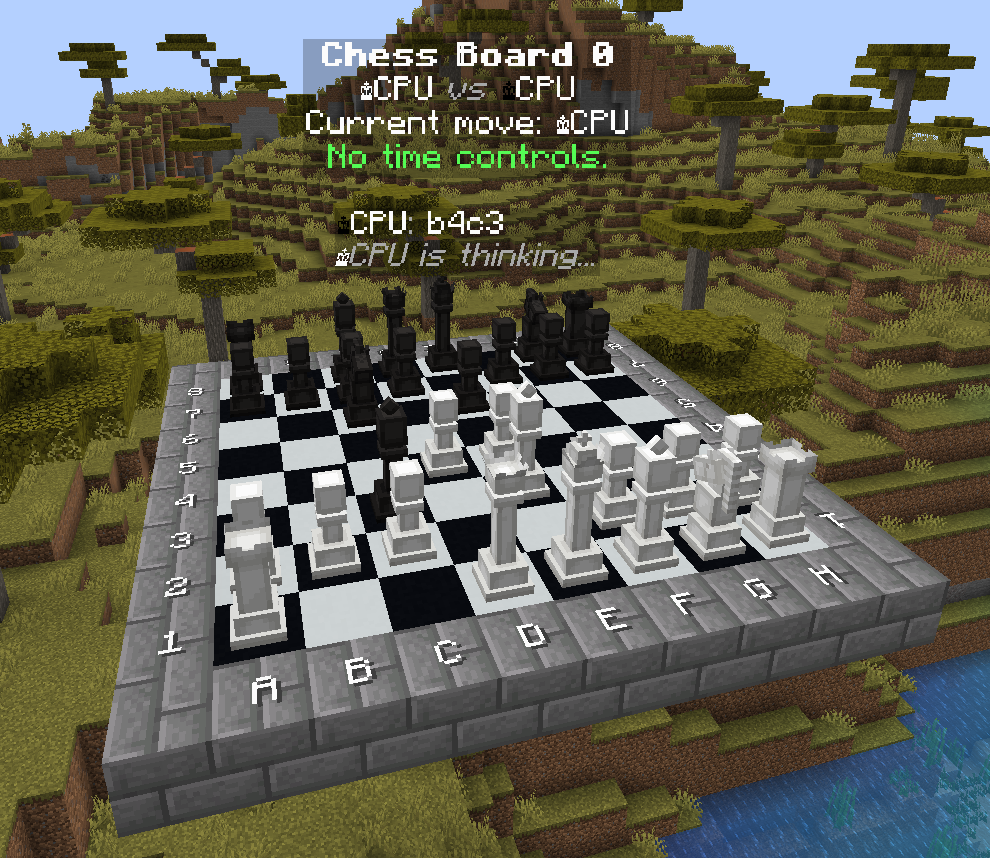
- Board display system
- Currently includes position label, board status, and game message log displays
- See screenshot below
- CPU vs CPU matches through
/chess cpu_match - Automatic CPU vs CPU matches on configured boards when players are nearby
- Fifty-move rule enforcement
- Threefold repetition rule enforcement
- Support for automatic download of Stockfish 16+
/chess cancel_matchadmin command
### Changed
- Reworked UCI queries to send starting position and list of moves instead of FEN
- Command suggestion improvements
- Use [
javacpp-presets/cpu_features](https://github.com/bytedeco/javacpp-presets/tree/master/cpu_features) for processor feature detection - Stockfish 16 is now the default chess engine
### Fixed
- Automatically downloaded engines not being set to executable
- Display entity pieces flashing on moves (fixed by reusing existing entities when possible)
- Orientation issues with display entity pieces across Minecraft versions
### Fixed
DISPLAY_ENTITYpiece handler resulting in upside-down chess pieces in 1.20+
### Fixed
- Automatic downloads of Stockfish versions 15.1 and earlier
- Stockfish removed old downloads from their site, which broke the automatic downloader. We now use archive.org which has many but not all versions archived.
- Automatic downloads of Stockfish versions 16 and newer are not yet implemented. See #17 for more details.
### Added
- Display and Interaction entity based
PieceHandlers, this is now the default mode in the config. This mode will only work on Minecraft 1.19.4+ - Board scaling; 1x scale is the original mode, 2x scale will have 2x2 block positions, 5x 5x5 block positions, etc.
- Only the new Display/Interaction entity
PieceHandlercan properly scale pieces with the board

### Added
- Time controls
/chess denycommand/chess reset_board <board> [--clear]command- bStats
### Changed
- Check for Paper and print a friendly error message when it's missing instead of crashing with a cryptic class loading error
### Fixed
- Resource pack piece models being 1px into the ground
- Chess engine error stream not being handled
Report any bugs or make suggestions at the [issues page](https://github.com/jpenilla/chesscraft/issues)


