
Description
Gallery
Changelog
Versions

Compact Chat is a Minecraft mod that removes duplicate messages from your chat with many options for customization.


Compatibility with other mods
Compact Chat aims to be compatible with other mods, especially those which add timestamps to the start of messages.
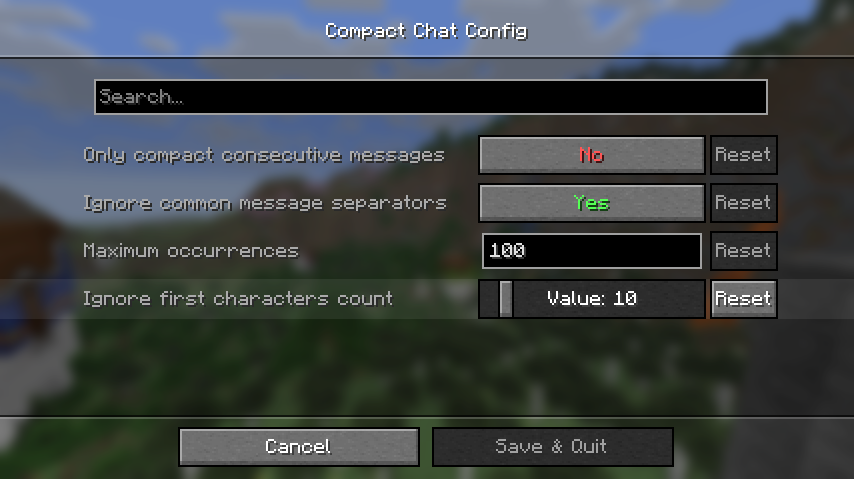
By default, Compact Chat will not compact messages which start with a timestamp, but that behavior can be configured by adjusting the "Ignore first characters count" setting within the configuration screen (requires ModMenu to open!).

If this value is set, Compact Chat will ignore the first characters in the message up until the specified length.
For example, with the setting set to 10 and a message like so:
[20:19:00] <caoimheee> hello!Compact Chat will see it as:
<caoimheee> hello!License
This project is licensed under the MIT license.
All Versions
+ Add Version| Name | Game version | Platforms | Published | Downloads | Actions |
|---|---|---|---|---|---|
| 22h ago | 1 | ||||
| 22h ago | 1 | ||||
| 22h ago | 1 | ||||
| 22h ago | 1 | ||||
|
R
2.1.1
|
22h ago | 1 | |||
|
R
2.1.0
|
22h ago | 1 | |||
|
R
2.0.4
|
22h ago | 1 | |||
|
R
2.0.3
|
22h ago | 1 | |||
|
R
2.0.2
|
22h ago | 1 | |||
|
R
2.0.1
|
22h ago | 1 | |||
|
R
2.0.0
|
22h ago | 1 | |||
|
R
1.3
|
22h ago | 1 | |||
|
R
1.2.1
|
22h ago | 1 | |||
| 22h ago | 1 | ||||
| 22h ago | 1 | ||||
|
R
1.1.2
|
22h ago | 1 | |||
| 22h ago | 1 | ||||
| 22h ago | 1 | ||||
| 22h ago | 1 | ||||
| 22h ago | 1 |
[3.1.0] 3.1.0 for NeoForge 1.21.1+
by caoimhe on Oct 18, 2026
Download
- Made the list of "common message separators" configurable. Common message separators can now be added through the configuration screen, and if the "ignore common message separators" option is enabled, messages containing them will not be compacted.
[3.1.0] 3.1.0 for Fabric 1.21.1+
by caoimhe on Oct 18, 2026
Download
- Made the list of "common message separators" configurable. Common message separators can now be added through the configuration screen, and if the "ignore common message separators" option is enabled, messages containing them will not be compacted.
[3.0.0] 3.0.0 for NeoForge 1.21.1+
by caoimhe on Oct 18, 2026
Download
Compact Chat has been rewritten from the ground up for v3.0 with new features, performance improvements, and many bug fixes.
If you have any issues, feel free to report them on [GitHub](https://github.com/caoimhebyrne/compact-chat/issues), and as always, this release can be downloaded on [Modrinth](https://modrinth.com/mod/compact-chat).
### ⬅️ Version Support
Compact Chat now supports 1.21.1 and higher, and will aim to support these older versions for as long as possible.
Previously, whenever a new Minecraft version released that broke Compact Chat, compatibility would've been dropped for that version. Now, Compact Chat aims to be compatible with as many versions as possible.
Older Minecraft versions may be supported in the future if there is demand, create a [GitHub issue](https://github.com/caoimhebyrne/compact-chat/issues) if you're interested in a particular version!
### 🦊 NeoForge Support
Compact Chat now supports NeoForge alongside Fabric. NeoForge support will be maintained for the same versions as the Fabric mod (1.21.1 and higher).
### 🫂 More options for compatibility with other mods
Compact Chat aims to be compatible with other mods and this release improves that with a new feature!
A setting called "Ignore first characters count" has been added, which lets you specify how many characters Compact Chat should ignore when compacting a message.
For example, with a count of 10, Compact Chat would see
This setting should improve compatibility with most mods that add timestamps to the start of messages, while not breaking any existing functionality.
If you have any issues, feel free to report them on [GitHub](https://github.com/caoimhebyrne/compact-chat/issues), and as always, this release can be downloaded on [Modrinth](https://modrinth.com/mod/compact-chat).
### ⬅️ Version Support
Compact Chat now supports 1.21.1 and higher, and will aim to support these older versions for as long as possible.
Previously, whenever a new Minecraft version released that broke Compact Chat, compatibility would've been dropped for that version. Now, Compact Chat aims to be compatible with as many versions as possible.
Older Minecraft versions may be supported in the future if there is demand, create a [GitHub issue](https://github.com/caoimhebyrne/compact-chat/issues) if you're interested in a particular version!
### 🦊 NeoForge Support
Compact Chat now supports NeoForge alongside Fabric. NeoForge support will be maintained for the same versions as the Fabric mod (1.21.1 and higher).
### 🫂 More options for compatibility with other mods
Compact Chat aims to be compatible with other mods and this release improves that with a new feature!
A setting called "Ignore first characters count" has been added, which lets you specify how many characters Compact Chat should ignore when compacting a message.
For example, with a count of 10, Compact Chat would see
[20:19:00] <caoimheee> hello! as <caoimheee> hello!.
This setting should improve compatibility with most mods that add timestamps to the start of messages, while not breaking any existing functionality.
[3.0.0] 3.0.0 for Fabric 1.21.1+
by caoimhe on Oct 18, 2026
Download
Compact Chat has been rewritten from the ground up for v3.0 with new features, performance improvements, and many bug fixes.
If you have any issues, feel free to report them on [GitHub](https://github.com/caoimhebyrne/compact-chat/issues), and as always, this release can be downloaded on [Modrinth](https://modrinth.com/mod/compact-chat).
### ⬅️ Version Support
Compact Chat now supports 1.21.1 and higher, and will aim to support these older versions for as long as possible.
Previously, whenever a new Minecraft version released that broke Compact Chat, compatibility would've been dropped for that version. Now, Compact Chat aims to be compatible with as many versions as possible.
Older Minecraft versions may be supported in the future if there is demand, create a [GitHub issue](https://github.com/caoimhebyrne/compact-chat/issues) if you're interested in a particular version!
### 🦊 NeoForge Support
Compact Chat now supports NeoForge alongside Fabric. NeoForge support will be maintained for the same versions as the Fabric mod (1.21.1 and higher).
### 🫂 More options for compatibility with other mods
Compact Chat aims to be compatible with other mods and this release improves that with a new feature!
A setting called "Ignore first characters count" has been added, which lets you specify how many characters Compact Chat should ignore when compacting a message.
For example, with a count of 10, Compact Chat would see

This setting should improve compatibility with most mods that add timestamps to the start of messages, while not breaking any existing functionality.
If you have any issues, feel free to report them on [GitHub](https://github.com/caoimhebyrne/compact-chat/issues), and as always, this release can be downloaded on [Modrinth](https://modrinth.com/mod/compact-chat).
### ⬅️ Version Support
Compact Chat now supports 1.21.1 and higher, and will aim to support these older versions for as long as possible.
Previously, whenever a new Minecraft version released that broke Compact Chat, compatibility would've been dropped for that version. Now, Compact Chat aims to be compatible with as many versions as possible.
Older Minecraft versions may be supported in the future if there is demand, create a [GitHub issue](https://github.com/caoimhebyrne/compact-chat/issues) if you're interested in a particular version!
### 🦊 NeoForge Support
Compact Chat now supports NeoForge alongside Fabric. NeoForge support will be maintained for the same versions as the Fabric mod (1.21.1 and higher).
### 🫂 More options for compatibility with other mods
Compact Chat aims to be compatible with other mods and this release improves that with a new feature!
A setting called "Ignore first characters count" has been added, which lets you specify how many characters Compact Chat should ignore when compacting a message.
For example, with a count of 10, Compact Chat would see
[20:19:00] <caoimheee> hello! as <caoimheee> hello!.
This setting should improve compatibility with most mods that add timestamps to the start of messages, while not breaking any existing functionality.
[2.1.1] 2.1.1
by caoimhe on Oct 18, 2026
Download
- Added support for 1.20.6 and higher ([#31](https://github.com/caoimhebyrne/compact-chat/issues/31))
- Fixed a regression for a bug where messages which have timestamps added to them by other mods would not be compacted (by @70CentsApple, [#32](https://github.com/caoimhebyrne/compact-chat/pull/32))
[2.1.0] 2.1.0
by caoimhe on Oct 18, 2026
Download
- Fixed an issue where messages that have been sent over 100 times would not get compacted into a single message. ([#30](https://github.com/caoimhebyrne/compact-chat/issues/30))
- Added the ability to configure the maximum occurrences amount.
- Any message which has an occurrence count above this amount (e.g. 100) will be compacted into one message which says
100+.
[2.0.4] 2.0.4
by caoimhe on Oct 18, 2026
Download
- Fixed an issue where long messages being spammed would cause the game to lag more than it does in vanilla. ([#27](https://github.com/caoimhebyrne/compact-chat/issues/27))
- Message occurrences stop incrementing after 100 occurrences, it will say
100+for anything above 100.
<summary>Minor performance improvements and under-the-hood changes.</summary>
- Messages are now identified by their string contents, and not their
Textinstance, meaning that the mod should be faster in general - but this may not be that obvious.
- We have added a cache to Minecraft’s code which splits a single text message into multiple lines to be displayed, this was an expensive operation, and if it was being run for the same message multiple times (which is the case with Compact Chat, but not in vanilla, due to us removing duplicate messages), it will cause a lot of lag. This cache’s entries are cleared if the entry has not been accessed for over a minute.
[2.0.3] 2.0.3
by caoimhe on Oct 18, 2026
Download
### Changelog
As always, you can also download this release on [GitHub](https://github.com/caoimhebyrne/compact-chat/releases).
- Bumped dependencies and added support for 1.20.4!
As always, you can also download this release on [GitHub](https://github.com/caoimhebyrne/compact-chat/releases).
[2.0.2] 2.0.2
by caoimhe on Oct 18, 2026
Download
- Added compatibility for mods that add timestamps to messages (#23)
- If you're using [Tweakeroo](http://minecraft.curseforge.com/projects/tweakeroo), you need to wait for a new update to be posted which includes a fix to add compatibility for CompactChat and other chat-altering mods. (https://github.com/maruohon/tweakeroo/pull/447)
- Removed dependency on [
owo-lib](https://modrinth.com/mod/owo-lib), and added [cloth-config](https://modrinth.com/mod/cloth-config) as a dependency. - Your configuration files should automatically be migrated, if you get an error in your log that says the migration has failed, [open an issue](https://github.com/caoimhebyrne/compact-chat/issues/new).
[2.0.1] 2.0.1
by caoimhe on Oct 18, 2026
Download
- Add support for 1.20
- You can also download this from [GitHub](https://github.com/caoimhebyrne/compact-chat/releases).**
[2.0.0] 2.0.0
by caoimhe on Oct 18, 2026
Download
- Compact Chat has been rewritten from the ground up
- Most options have remained the same, however some have been removed due to redundancy
- It should now be more reliable, and have an overall better experience!
- Support has been dropped for versions less than 1.19 - **Only 1.19.1+ is supported now!**
- You can also download this from [GitHub](https://github.com/cbyrneee/compact-chat/releases/tag/2.0.0)**.
- CompactChat 1.3 is now here!**
### ⭐️ Features
- Add the ability to only compact consecutive messages (suggested by jn64, issue #11)
### 🐛 Bug fixes and performance improvements
- Improve the way that we store compacted messages
- This should make compact chat more reliable, and hopefully should make it perform better with longer chat histories.
### 🔨 Minor Changes
- Add dutch translations
- Improve the way that we register our configuration
### 📝 Notes
- [fabric-api](https://modrinth.com/mod/fabric-api) and [cloth-config](https://www.curseforge.com/minecraft/mc-mods/cloth-config) are required.
- To configure the mod, you need to install [ModMenu](https://modrinth.com/mod/modmenu).
- There are two seperate jars, one for 1.19 and one for 1.18, *make sure you download the correct one for your version of Minecraft*.
[1.2.1] 1.2.1
by caoimhe on Oct 18, 2026
Download
- CompactChat 1.2.1 is now here!**
### 🐛 Bug fixes and performance improvements
- Fix messages not appearing at all on 1.18
### 🔨 Minor Changes
- Added norwegian translations
- Updated simplified chinese translations
### 📝 Notes
- [fabric-api](https://modrinth.com/mod/fabric-api) and [cloth-config](https://www.curseforge.com/minecraft/mc-mods/cloth-config) are required.
- To configure the mod, you need to install [ModMenu](https://modrinth.com/mod/modmenu).
- There are two seperate jars, one for 1.19 and one for 1.18, *make sure you download the correct one for your version of Minecraft*.
[1.2-1.19.x] v1.2 for 1.19.x
by caoimhe on Oct 18, 2026
Download
- CompactChat 1.2 is now here!**
This version contains a few new features, some bug fixes and general performance improvements.
### Your mod configuration will be reset after installing this update due to using cloth-config instead of the old .properties file.
<br/>
### ⭐️ Features
- Add the option to reset the message counters when joining a new world
- Add the option to clear / not clear the chat history when joining a new world
### 🐛 Bug fixes and performance improvements
- Make
BetterOrderedText#getStringstatic
### 🔨 Minor Changes
- Use
cloth-configfor handling the configuration
### 📝 Notes
- [fabric-api](https://modrinth.com/mod/fabric-api) and [cloth-config](https://www.curseforge.com/minecraft/mc-mods/cloth-config) are required.
- To configure the mod, you need to install [ModMenu](https://modrinth.com/mod/modmenu).
[1.2-1.18.x] v1.2 for 1.18.x
by caoimhe on Oct 18, 2026
Download
- CompactChat 1.2 is now here!**
This version contains a few new features, some bug fixes and general performance improvements.
### Your mod configuration will be reset after installing this update due to using cloth-config instead of the old .properties file.
<br/>
### ⭐️ Features
- Add the option to reset the message counters when joining a new world
- Add the option to clear / not clear the chat history when joining a new world
### 🐛 Bug fixes and performance improvements
- Make
BetterOrderedText#getStringstatic
### 🔨 Minor Changes
- Use
cloth-configfor handling the configuration
### 📝 Notes
- [fabric-api](https://modrinth.com/mod/fabric-api) and [cloth-config](https://www.curseforge.com/minecraft/mc-mods/cloth-config) are required.
- To configure the mod, you need to install [ModMenu](https://modrinth.com/mod/modmenu).
[1.1.2] 1.1.2
by caoimhe on Oct 18, 2026
Download
- CompactChat 1.1.2 is now here!**
### 🔨 Minor Changes
- Stop using SpruceUI for the Mod GUI
- Added official support for 1.19
### 📝 Notes
- To configure the mod, you need to install [ModMenu](https://modrinth.com/mod/modmenu).
- [fabric-api](https://modrinth.com/mod/fabric-api) is also required.
[1.1.1] 1.18.2 build & minor UI changes
by caoimhe on Oct 18, 2026
Download
- CompactChat 1.1.1 is now here!**
### 🐛 Bug fixes
- Change positioning and size of "Done" button in the options screen (0ec7c2d)
### 🔨 Minor Changes
- Added official support for 1.18.2 (5345810)
### 📝 Notes
- To configure the mod, you need to install [ModMenu](https://modrinth.com/mod/modmenu).
- [fabric-api](https://modrinth.com/mod/fabric-api) is also required.
[1.1] Russian translations, bug fixes & more
by caoimhe on Oct 18, 2026
Download
### ⭐️ Features
### 🐛 Bug fixes
### 🔨 Minor Changes
- Reset message counters when F3+D is pressed
### 🐛 Bug fixes
- Fixed custom fonts on messages causing counters to appear as a blank character
### 🔨 Minor Changes
- Added Russian Translations
[1.0.1] Infinite chat history option & more fixes
by caoimhe on Oct 18, 2026
Download
- CompactChat 1.0.1 is now here!**
- Modify the chat infinite chat history's length to be infinite (enabled by default)
- Don't compact messages which contain "---"
- Fix spacing issue with certain servers
If you have any problems, please open an [issue](https://github.com/cbyrneee/CompactChat/issues/new).
- Note: To disable the infinite chat option, you need to access the config screen via [ModMenu](https://modrinth.com/mod/modmenu)*


