


I Editor: A Revolution in the World of Minecraft and Customization

Trailer Update
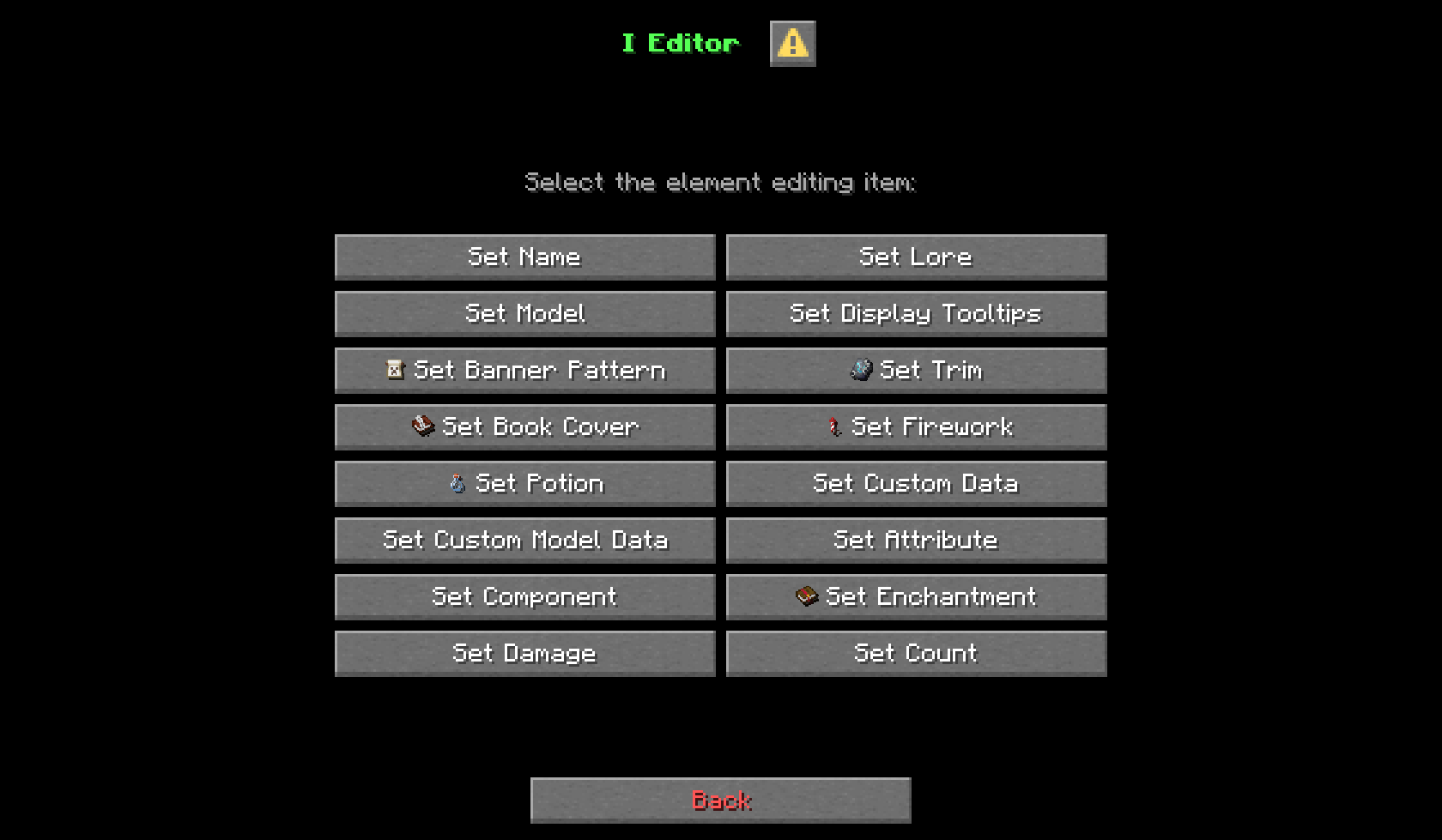
I Editor (Item Editor) - universal editing tool for multiple item elements. The editor is based on the vanilla mechanics of the game, which allow you to change the properties of an object in various ways.
Edit whatever you want, what you don't like about the subject, you can always change or supplement it in a coordinated way.
Editing Elements:
Visual
- Name
- Lore
- Model
- Display Tooltips
- Book Cover
- Firework
Technical
- Custom Data
- Custom Model Data
- Attribute
- Component
- Enchantment
- Potion
- Damage
- Count
⚠️ Important: All editing functions are performed through commands. Make sure command usage is allowed on your server or world to unlock the full potential of this project.

Report Bugs
If you find an error in this project, feel free to visit the GitHub page or write to us in Discord.
👉 GitHub | Discord
How to Install I Editor (Datapack)
I Editor by SayNooty is verified for Datapack, Fabric, Forge, Neoforge, Quilt across Minecraft versions 1.21.10, 1.21.11, 1.21.6, 1.21.7, 1.21.8, 1.21.9, 25w41a, 25w42a (latest release: 1.5.9, file size: 1.1 MB). Follow the steps below to install it safely from ModCraft.tv:
- Click the Download button above and select your Minecraft version (1.21.10, 1.21.11, 1.21.6, 1.21.7, 1.21.8, 1.21.9, 25w41a, 25w42a) and platform (Datapack, Fabric, Forge, Neoforge, Quilt).
- Make sure you have the compatible loader or environment installed for Datapack, Fabric, Forge, Neoforge, Quilt.
- Move the downloaded I Editor file into your Minecraft
.minecraft/saves/<world>/datapacksfolder and launch the game.
All Versions
+ Add Version| Name | Game version | Platforms | Published | Downloads | Actions |
|---|---|---|---|---|---|
| 26d ago | 1 | ||||
| 26d ago | 1 | ||||
| 1mo ago | 1 | ||||
| 1mo ago | 1 | ||||
| 2mo ago | 1 | ||||
| 2mo ago | 1 | ||||
| 2mo ago | 1 | ||||
| 2mo ago | 1 | ||||
| 2mo ago | 1 | ||||
| 2mo ago | 1 | ||||
| 2mo ago | 1 | ||||
| 2mo ago | 1 | ||||
| 2mo ago | 1 | ||||
| 3mo ago | 1 | ||||
| 3mo ago | 1 | ||||
| 3mo ago | 1 | ||||
| 3mo ago | 1 | ||||
| 3mo ago | 1 | ||||
| 3mo ago | 1 | ||||
| 4mo ago | 1 | ||||
| 4mo ago | 1 | ||||
| 4mo ago | 1 | ||||
| 4mo ago | 1 | ||||
| 4mo ago | 1 | ||||
| 4mo ago | 1 | ||||
| 4mo ago | 1 | ||||
| 4mo ago | 1 | ||||
| 4mo ago | 1 | ||||
| 4mo ago | 1 | ||||
| 4mo ago | 1 | ||||
| 4mo ago | 1 | ||||
| 4mo ago | 1 | ||||
| 4mo ago | 1 | ||||
| 4mo ago | 1 | ||||
| 5mo ago | 1 | ||||
| 5mo ago | 1 | ||||
| 5mo ago | 1 | ||||
| 5mo ago | 1 | ||||
| 5mo ago | 1 | ||||
| 5mo ago | 1 | ||||
| 5mo ago | 1 | ||||
| 6mo ago | 1 | ||||
| 6mo ago | 1 | ||||
| 7mo ago | 1 | ||||
| 7mo ago | 1 | ||||
| 7mo ago | 1 | ||||
| 7mo ago | 1 | ||||
| 7mo ago | 1 | ||||
| 7mo ago | 1 | ||||
| 7mo ago | 1 | ||||
| 7mo ago | 1 | ||||
| 7mo ago | 1 | ||||
| 7mo ago | 1 | ||||
| 7mo ago | 1 | ||||
| 7mo ago | 1 | ||||
| 7mo ago | 1 | ||||
| 8mo ago | 1 | ||||
| 8mo ago | 1 | ||||
| 8mo ago | 1 | ||||
| 8mo ago | 1 | ||||
| 8mo ago | 1 | ||||
| 8mo ago | 1 | ||||
| 11mo ago | 1 | ||||
| 11mo ago | 1 | ||||
| 11mo ago | 1 | ||||
| 11mo ago | 1 | ||||
| 11mo ago | 1 | ||||
| 11mo ago | 1 | ||||
| 11mo ago | 1 | ||||
| 11mo ago | 1 | ||||
| last yr. | 1 | ||||
| last yr. | 1 | ||||
| last yr. | 1 | ||||
| last yr. | 1 | ||||
| last yr. | 1 | ||||
| last yr. | 1 |


- Changes**
- Added New Effect «Freezing»
- Changes**
- Added New Effect «Freezing»
- Changes**
- Component ``
Block Transformer`now requires a file name (Example:`minecraft:axe``) with block transformation settings, manual configuration directly in the game is no longer available
- Updated version Fabric ``
0.19.4`>`0.19.5` - Updated version Quilt `
0.29.0`>`0.31.0``
- ``
0.19.3`>`0.19.4``
- Changes**
- The “None” animation type has been added to the “Attack Animation” and “Interact Animation” components.
- Names of exploration maps**
- Jungle Tempe → Jungle Pyramid
- Monument → Ocean Monument
- Trial Chambers → Buried Trial Chambers
- Mansion → Woodland Mansion
- Changes in the names of research maps:**
- Abandoned Campsite → Abandoned Camp
- Ancient City → Buried Ancient City
- Mineshaft → Buried Mineshaft
- Changes:**
- Component **Map Color** has been removed
- Added new markers for the component **Map Decorations**:
- Abandoned Campsite
- Ancient City
- Desert Pyramid
- Mineshaft
- Warm Ocean Ruins
- Added icons for buttons in the selection of the component **Map Decorations** marker
- Added New Components:**
- ``
Attack Animation`: Animating an item on impact - `
Brewing Fuel`: An item used to fuel a potion maker - `
Cushion/color`: a cushion of a certain color (located in the Enity Variant) - `
Cooking Fuel`: an item used as fuel for stoves - `
Interact Animation`: Animating an item on impact - `
Mob Visibility`: mobs that see the player at a certain distance - `
Sign Text`: the text that is displayed on the front or back of the plate - `
Villager Food`: the food that the residents will eat - `
Waxed`: a block that is coated with wax
- Changes:**
- All macro commands for all editing elements have been changed, due to changes in the registry for entering data components from recent snapshots
- Removed the `
Swing Animation`component and replaced it with 2 new`Attack Animation`and`Interact Animation``
- Added New Components:**
- ``
Block Transformer`: the interaction of an item with a block to change the properties of the block - `
Compostable``: an item that is compostable
- Changes:**
- «Signs» atlas has been removed
- Component "Entity Variants" has been renamed to "Entity Variant"
- Changes**
- The "Pot Decorations" component has been changed
- Fields have been added: back, left, right and front
- The pattern selection has been removed, now you need to enter the item ID in the fields that will be on the decorated pot
- Added New Component:**
- Provides Pottery Pattern
This version is mostly technical in nature: there are few innovations, but at the same time, many technical changes have been implemented that have improved the editor's work in many aspects.
- A new component has been added:**
- Bees: allows you to communicate with entities in the bee hive
- Dye: gives the object the properties of a dye
- Changes:**
- Added mini icons on the buttons. They may be missing in some places because no suitable icon was found for it.
- Added text colors for some entity variants
- Added types of name and description for the item: Default (Regular), Atlas, Score and Translate.
- Splitting the name and description into types opens up additional possibilities for editing text and makes working with it more flexible.
- All editing elements have been fully translated into Russian, Ukrainian and Belarusian
- The structure of the file contents in the components section has been changed
- Fixed some bugs with the key for translating component descriptions
- Fixed an error when changing the name of an item, the text was merged
New attributes and a new component are available.


