


Indexer Mod
Indexer is a mod that helps you organize and manage your items. This automation system allows you to filter and automatically distribute the contents of your Chests / Containers, eliminating the need to manually sort your resources.
With Indexer, you can deposit all your items in a central point and the system will take care of distributing them to the appropriate containers according to the filters you have configured, saving you time and keeping your base perfectly organized!
GO TO WEB WIKI📖


Indexer Manager. When you open it, a UI displays all the items connected to the system, allowing you to withdraw them directly into your inventory.

Containers :

Furnace Compatibility
The system automatically detects furnaces and can refill fuel (coal or charcoal) without additional configuration.**

Extractor Block:

Speed Upgrades

- Basic Upgrade: Allows the Controller to transfer up to 5 items at a time per cycle.
- copper Upgrade: Allows the Controller to transfer up to 10 items at a time per cycle.
- Advanced Upgrade: Allows the Controller to transfer up to 20 items at a time per cycle.
- Elite Upgrade: Allows the Controller to transfer up to 64 items at a time per cycle.
- Definitive Upgrade: Allows the Controller to transfer up to 256 items at a time per cycle.
New items Filters to filter by attributes etc...

New Connector improvement to be able to match its filter capacity

New manual where you can see the crafting and a tutorial on how to assemble the indexer system


**Thanks for using this mod <3
By AgustinBenitez**
How to Install Indexer (Mod)
Indexer by AgusTheKing is verified for Fabric, Forge across Minecraft versions 1.20.1, 1.21.1, 1.21.10, 1.21.11, 1.21.2, 1.21.3, 1.21.4, 1.21.5 (latest release: 1.0.7.1, file size: 886 KB). Follow the steps below to install it safely from ModCraft.tv:
- Click the Download button above and select your Minecraft version (1.20.1, 1.21.1, 1.21.10, 1.21.11, 1.21.2, 1.21.3, 1.21.4, 1.21.5) and platform (Fabric, Forge).
- Make sure you have the compatible loader or environment installed for Fabric, Forge.
- Move the downloaded Indexer file into your Minecraft
.minecraft/modsfolder and launch the game.
All Versions
+ Add Version


Fix Crash caused by client-only [https://github.com/AgustinBeniteez/Indexer-mod/issues/13](https://github.com/AgustinBeniteez/Indexer-mod/issues/13)
Fix error recipes
# 1.0.7
New Block indexer Manager [https://github.com/AgustinBeniteez/Indexer-mod/issues/9](https://github.com/AgustinBeniteez/Indexer-mod/issues/9)
## 
## Changes textures
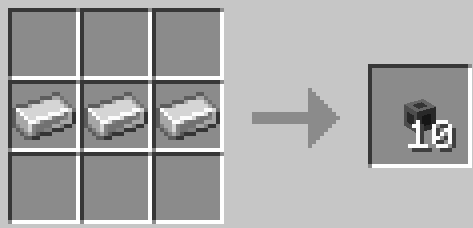
Change Craft pipe:
## fix issue #10 [https://github.com/AgustinBeniteez/Indexer-mod/issues/10](https://github.com/AgustinBeniteez/Indexer-mod/issues/10)
You can sort or search for items and move them to your inventory
## 
## FIX: Chest connection fixed with connectors and maximum range
FIX: Items now insert starting from the first slot in double chests. #11
[https://github.com/AgustinBeniteez/Indexer-mod/issues/11](https://github.com/AgustinBeniteez/Indexer-mod/issues/11) 
## 
## Changes textures
Change Craft pipe:

## fix issue #10 [https://github.com/AgustinBeniteez/Indexer-mod/issues/10](https://github.com/AgustinBeniteez/Indexer-mod/issues/10)
You can sort or search for items and move them to your inventory
## 
## FIX: Chest connection fixed with connectors and maximum range
FIX: Items now insert starting from the first slot in double chests. #11
[https://github.com/AgustinBeniteez/Indexer-mod/issues/11](https://github.com/AgustinBeniteez/Indexer-mod/issues/11) 
## Fixes
- Fixed server-side error with @OnlyIn(Dist.CLIENT)**
- Fixed furnace item extraction issue:**
- (All following changes belong to Version 1.0.6)*
# Changelog — Version 1.0.6
## Fixes
- Connector Filter Items:**
## Dropbox
- New Button:**
- New Dropbox UI:**
- Displays system stats on the right side of the inventory:
- Used capacity
- Upgrade level
- New button to transfer all items to the Dropbox.
- New interface image included.
## System Improvements
- New Textures:**
transfer_speed_upgrade_coppertransfer_speed_upgrade_definitive
- New Progression:**
- Speeds: 5x → 10x → 20x → 64x → 256x
- Upgrade Persistence:**
<img width="478" height="67" alt="{0FA2715B-FC60-4DA9-B985-F4111AD6DC10}" src="https://github.com/user-attachments/assets/aed5088b-90cd-4bf1-a502-7a019a371c94" />
## Interfaces
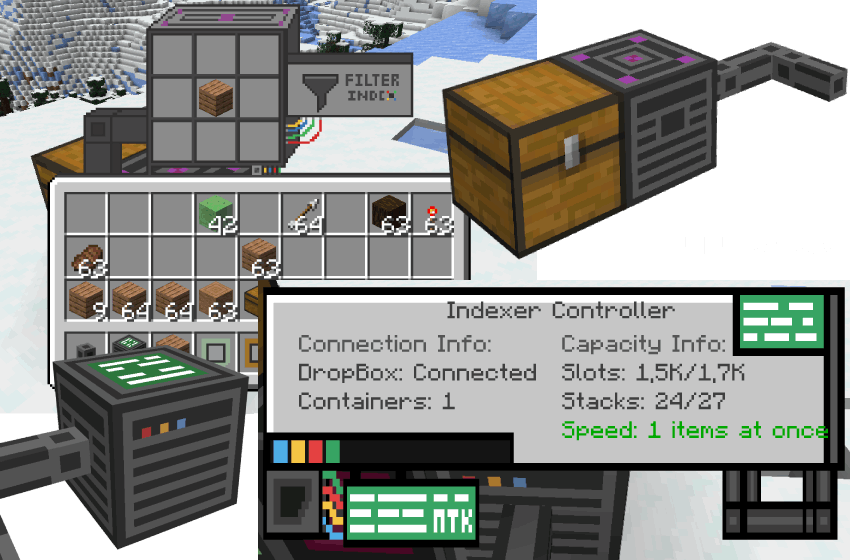
### Indexer Controller UI
- New interface design.
- Added a view of all containers connected to the system.
- New system stats:
- Used capacity
- Dropbox connection status
- Upgrade level
- New interface image included.
## New Items: Filters
<img width="510" height="82" alt="imagen_2025-10-10_234351319" src="https://github.com/user-attachments/assets/27e95109-9dc6-4ec9-ae8b-0da4b5036dbc" />
A new "attribute filter" system has been implemented, allowing items to be filtered not only by exact match but also by attributes, tags, or NBT properties.
### List of Filters:
- Base Filter**
- Name Filter**
(Right-click to set the target name.)
- Attribute Filter**
(Right-click to set the attribute.)
- Custom Tag Blo
## Fixes
- Fixed an issue where mod blocks would drop in Creative Mode.
## Filtering Improvements
- Added the ability to filter more item types.
## UI Improvements
- General UI update.
- Added new block: **UI Controller**.
- Added new block: **UI Connector**.
## Language Support
Added support for multiple languages:
### Spanish
es_es(Spain)es_ar(Argentina)es_mx(Mexico)es_cl(Chile)es_co(Colombia)es_pe(Peru)es_ve(Venezuela)es_uy(Uruguay)es_andaluz(Andalusia)
### English
en_us(United States)en_gb(United Kingdom)en_ca(Canada)en_au(Australia)
### Chinese
zh_cn(Simplified Chinese)
## Upgrade Balancing
- Elite Upgrade**: Increased capacity from **+20** to **+64**.
- Advanced Upgrade**: Increased capacity from **+10** to **+20**.
- Basic Upgrade**: Increased capacity from **+4** to **+5**.
## Optimization 📂
- Optimization and reduction of image sizes.
- Overall mod size reduced from **903.6 KB** to **529.04 KB**.


