
Description
Gallery
Changelog
Versions
 Iris & Oculus Search


A quality-of-life mod that adds a functional search bar directly into the Iris or Oculus shader settings screen, allowing you to find specific shader options instantly.
🔍 Why use this mod?
Tired of clicking through endless pages and sub-menus to find a specific toggle like waving foliage or bloom?
Iris & Oculus Search embeds a search bar right into the shader options GUI. Type what you need, and the menu dynamically filters down to the matching settings. It fully supports Iris on Fabric or NeoForge, as well as Oculus on Forge!
Features
- Search Shader Settings or Search Shader Packs seamlessly in the GUI
- In-GUI Search Bar: Adds a seamlessly integrated text input field directly inside the shader pack options menu and the shaderpack selection screen
- Translation Support: Search in your selected language (if supported by the shader). The mod itself is also translatable. Contribute on Crowdin.
- No Setup Needed: Works completely out of the box with zero configuration files to edit.
- Loader Compatibility: Supports Iris on Fabric and NeoForge, as well as Oculus on Forge.
- Version Support: Compatible from 1.20.1+ up to the latest Minecraft versions.
⚠️ NOTE: This mod requires either Iris or Oculus to be installed as a hard dependency. It will not function without one of them present.
Links
- Support SpacEagle17 on Patreon or Kofi
- Contact: https://euphoriapatches.com/contact
- Discord: https://www.euphoriapatches.com/discord
- Source code of Iris & Oculus Search on GitHub
Sponsored by Ember Host
Looking for an affordable and reliable Minecraft server host? Ember Host offers incredible value and top-tier support!
Click the banner or use code EUPHORIA at checkout for 10% off your first purchase. Plus, 70% of your purchase supports Iris & Oculus Search!

All Versions
+ Add Version| Name | Game version | Platforms | Published | Downloads | Actions |
|---|---|---|---|---|---|
| 1d ago | 1 | ||||
| 1d ago | 1 | ||||
| 1d ago | 1 | ||||
| 1d ago | 1 | ||||
| 1d ago | 1 | ||||
| 1d ago | 1 | ||||
| 1d ago | 1 | ||||
| 1d ago | 1 | ||||
| 1d ago | 1 | ||||
| 1d ago | 1 | ||||
| 1d ago | 1 | ||||
| 1d ago | 1 | ||||
| 1d ago | 1 | ||||
| 1d ago | 1 | ||||
| 1d ago | 1 | ||||
| 1d ago | 1 | ||||
| 1d ago | 1 | ||||
| 1d ago | 1 | ||||
| 1d ago | 1 | ||||
| 1d ago | 1 | ||||
| 1d ago | 1 | ||||
| 1d ago | 1 | ||||
| 1d ago | 1 | ||||
| 1d ago | 1 | ||||
| 1d ago | 1 | ||||
| 1d ago | 1 | ||||
| 1d ago | 1 | ||||
| 1d ago | 1 | ||||
| 1d ago | 1 | ||||
| 1d ago | 1 | ||||
| 1d ago | 1 | ||||
| 1d ago | 1 | ||||
| 1d ago | 1 | ||||
| 1d ago | 1 | ||||
| 1d ago | 1 | ||||
| 1d ago | 1 | ||||
| 1d ago | 1 | ||||
| 1d ago | 1 | ||||
| 1d ago | 1 | ||||
| 1d ago | 1 | ||||
| 1d ago | 1 | ||||
| 1d ago | 1 | ||||
| 1d ago | 1 | ||||
| 1d ago | 1 | ||||
| 1d ago | 1 | ||||
| 1d ago | 1 | ||||
| 1d ago | 1 | ||||
| 1d ago | 1 | ||||
| 1d ago | 1 | ||||
| 1d ago | 1 | ||||
| 1d ago | 1 | ||||
| 1d ago | 1 | ||||
| 1d ago | 1 | ||||
| 1d ago | 1 | ||||
| 1d ago | 1 | ||||
| 1d ago | 1 | ||||
| 1d ago | 1 | ||||
| 1d ago | 1 | ||||
| 1d ago | 1 | ||||
| 1d ago | 1 |


[1.8.3-fabric] Iris Search 1.8.3-fabric
by SpacEagle17 on Oct 14, 2026
Download
### Iris Search 1.8.3
## Changes:

## Changes:
- UX Improvement: Option search results now use a single column when there are only a few results, improving overal readability and reducing clutter. This is based on window height and GUI scale
- Updated several languages thanks to amazing contributors! Contributions are very welcome! [Translations on Crowdin](https://crowdin.com/profile/spaceagle17)

[1.8.3-neoforge] Iris Search 1.8.3-neoforge
by SpacEagle17 on Oct 14, 2026
Download
### Iris Search 1.8.3
## Changes:

## Changes:
- UX Improvement: Option search results now use a single column when there are only a few results, improving overal readability and reducing clutter. This is based on window height and GUI scale
- Updated several languages thanks to amazing contributors! Contributions are very welcome! [Translations on Crowdin](https://crowdin.com/profile/spaceagle17)

[1.8.3-forge] Iris Search 1.8.3-forge
by SpacEagle17 on Oct 14, 2026
Download
### Iris Search 1.8.3
## Changes:

## Changes:
- UX Improvement: Option search results now use a single column when there are only a few results, improving overal readability and reducing clutter. This is based on window height and GUI scale
- Updated several languages thanks to amazing contributors! Contributions are very welcome! [Translations on Crowdin](https://crowdin.com/profile/spaceagle17)

[1.8.2-fabric] Iris Search 1.8.2-fabric
by SpacEagle17 on Oct 14, 2026
Download
### Iris Search 1.8.2
## Changes:

## Changes:
- Improved UX by making typos from synonyms no longer contribute to the search results, it cluttered the results.
- Updated several languages thanks to amazing contributors! Contributions are very welcome! [Translations on Crowdin](https://crowdin.com/profile/spaceagle17)

[1.8.2-neoforge] Iris Search 1.8.2-neoforge
by SpacEagle17 on Oct 14, 2026
Download
### Iris Search 1.8.2
## Changes:

## Changes:
- Improved UX by making typos from synonyms no longer contribute to the search results, it cluttered the results.
- Updated several languages thanks to amazing contributors! Contributions are very welcome! [Translations on Crowdin](https://crowdin.com/profile/spaceagle17)

[1.8.2-forge] Iris Search 1.8.2-forge
by SpacEagle17 on Oct 14, 2026
Download
### Iris Search 1.8.2
## Changes:

## Changes:
- Improved UX by making typos from synonyms no longer contribute to the search results, it cluttered the results.
- Updated several languages thanks to amazing contributors! Contributions are very welcome! [Translations on Crowdin](https://crowdin.com/profile/spaceagle17)

[1.8.1-fabric] Iris Search 1.8.1-fabric
by SpacEagle17 on Oct 14, 2026
Download
### Iris Search 1.8.1
## Changes:

## Changes:
- Added Minecraft 26.3 Support
- Updated several languages thanks to amazing contributors! Contributions are very welcome! [Translations on Crowdin](https://crowdin.com/profile/spaceagle17)

[1.8.1-neoforge] Iris Search 1.8.1-neoforge
by SpacEagle17 on Oct 14, 2026
Download
### Iris Search 1.8.1
## Changes:

## Changes:
- Added Minecraft 26.3 Support
- Updated several languages thanks to amazing contributors! Contributions are very welcome! [Translations on Crowdin](https://crowdin.com/profile/spaceagle17)

[1.8.1-forge] Iris Search 1.8.1-forge
by SpacEagle17 on Oct 14, 2026
Download
### Iris Search 1.8.1
## Changes:

## Changes:
- Added Minecraft 26.3 Support
- Updated several languages thanks to amazing contributors! Contributions are very welcome! [Translations on Crowdin](https://crowdin.com/profile/spaceagle17)

[1.8.0-fabric] Iris Search 1.8.0-fabric
by SpacEagle17 on Oct 14, 2026
Download
### Iris Search 1.8.0
## Changes:

## Changes:
- Added Ctrl+Click on a search result to jump straight to that option's own menu.
- Updated several languages thanks to amazing contributors! Contributions are very welcome! [Translations on Crowdin](https://crowdin.com/profile/spaceagle17)

[1.8.0-neoforge] Iris Search 1.8.0-neoforge
by SpacEagle17 on Oct 14, 2026
Download
### Iris Search 1.8.0
## Changes:

## Changes:
- Added Ctrl+Click on a search result to jump straight to that option's own menu.
- Updated several languages thanks to amazing contributors! Contributions are very welcome! [Translations on Crowdin](https://crowdin.com/profile/spaceagle17)

[1.8.0-forge] Iris Search 1.8.0-forge
by SpacEagle17 on Oct 14, 2026
Download
### Iris Search 1.8.0
## Changes:

## Changes:
- Added Ctrl+Click on a search result to jump straight to that option's own menu.
- Updated several languages thanks to amazing contributors! Contributions are very welcome! [Translations on Crowdin](https://crowdin.com/profile/spaceagle17)

[1.7.1-fabric] Iris Search 1.7.1-fabric
by SpacEagle17 on Oct 14, 2026
Download
### Iris Search 1.7.1
## Changes:

## Changes:
- Added user facing tooltips to inform the user about the new features from 1.7.0 when hovering over the Clear button. Please translate them over at [Crowdin](https://crowdin.com/profile/spaceagle17)

[1.7.1-neoforge] Iris Search 1.7.1-neoforge
by SpacEagle17 on Oct 14, 2026
Download
### Iris Search 1.7.1
## Changes:

## Changes:
- Added user facing tooltips to inform the user about the new features from 1.7.0 when hovering over the Clear button. Please translate them over at [Crowdin](https://crowdin.com/profile/spaceagle17)

[1.7.1-forge] Iris Search 1.7.1-forge
by SpacEagle17 on Oct 14, 2026
Download
### Iris Search 1.7.1
## Changes:

## Changes:
- Added user facing tooltips to inform the user about the new features from 1.7.0 when hovering over the Clear button. Please translate them over at [Crowdin](https://crowdin.com/profile/spaceagle17)

[1.7.0-fabric] Iris Search 1.7.0-fabric
by SpacEagle17 on Oct 14, 2026
Download
### Iris Search 1.7.0
## Changes:

## Changes:
- Search specific submenus using a menu name and colon: add a term to search inside (
water: caustics), use path slashes for nested menus (water/underwater: blue), or leave it empty to list all items (water:). - Start a search with
*to only show options you've changed from the default values (*star, or just*for all of them). Combines with the menu search (*materials: emissive). - Ctrl + F now re-focuses the options search bar instead of closing it when it still contains a search - press it again while the bar is focused to close and clear the search
- Expanded the search term dictionary with many more shader terms and synonyms
- Updated several languages thanks to amazing contributors! Contributions are very welcome! [Translations on Crowdin](https://crowdin.com/profile/spaceagle17)

[1.7.0-neoforge] Iris Search 1.7.0-neoforge
by SpacEagle17 on Oct 14, 2026
Download
### Iris Search 1.7.0
## Changes:

## Changes:
- Search specific submenus using a menu name and colon: add a term to search inside (
water: caustics), use path slashes for nested menus (water/underwater: blue), or leave it empty to list all items (water:). - Start a search with
*to only show options you've changed from the default values (*star, or just*for all of them). Combines with the menu search (*materials: emissive). - Ctrl + F now re-focuses the options search bar instead of closing it when it still contains a search - press it again while the bar is focused to close and clear the search
- Expanded the search term dictionary with many more shader terms and synonyms
- Updated several languages thanks to amazing contributors! Contributions are very welcome! [Translations on Crowdin](https://crowdin.com/profile/spaceagle17)

[1.7.0-forge] Iris Search 1.7.0-forge
by SpacEagle17 on Oct 14, 2026
Download
### Iris Search 1.7.0
## Changes:

## Changes:
- Search specific submenus using a menu name and colon: add a term to search inside (
water: caustics), use path slashes for nested menus (water/underwater: blue), or leave it empty to list all items (water:). - Start a search with
*to only show options you've changed from the default values (*star, or just*for all of them). Combines with the menu search (*materials: emissive). - Ctrl + F now re-focuses the options search bar instead of closing it when it still contains a search - press it again while the bar is focused to close and clear the search
- Expanded the search term dictionary with many more shader terms and synonyms
- Updated several languages thanks to amazing contributors! Contributions are very welcome! [Translations on Crowdin](https://crowdin.com/profile/spaceagle17)

[1.6.1-fabric] Iris Search 1.6.1-fabric
by SpacEagle17 on Oct 14, 2026
Download
### Iris Search 1.6.1
## Changes:
## Changes:
- Made the search bar in the shader selection screen toggle focus by pressing Ctrl + F
- Fixed a bug where Ctrl + F would not work in the shader selection screen on 1.21.11 fabric
- Updated several languages thanks to amazing contributors! Contributions are very welcome! [Translations on Crowdin](https://crowdin.com/profile/spaceagle17)

[1.6.1-neoforge] Iris Search 1.6.1-neoforge
by SpacEagle17 on Oct 14, 2026
Download
### Iris Search 1.6.1
## Changes:

## Changes:
- Made the search bar in the shader selection screen toggle focus by pressing Ctrl + F
- Fixed a bug where Ctrl + F would not work in the shader selection screen on 1.21.11 fabric
- Updated several languages thanks to amazing contributors! Contributions are very welcome! [Translations on Crowdin](https://crowdin.com/profile/spaceagle17)

[1.6.1-forge] Iris Search 1.6.1-forge
by SpacEagle17 on Oct 14, 2026
Download
### Iris Search 1.6.1
## Changes:

## Changes:
- Made the search bar in the shader selection screen toggle focus by pressing Ctrl + F
- Fixed a bug where Ctrl + F would not work in the shader selection screen on 1.21.11 fabric
- Updated several languages thanks to amazing contributors! Contributions are very welcome! [Translations on Crowdin](https://crowdin.com/profile/spaceagle17)

[1.6.0-fabric] Iris Search 1.6.0-fabric
by SpacEagle17 on Oct 14, 2026
Download
### Iris Search 1.6.0
## Changes:

## Changes:
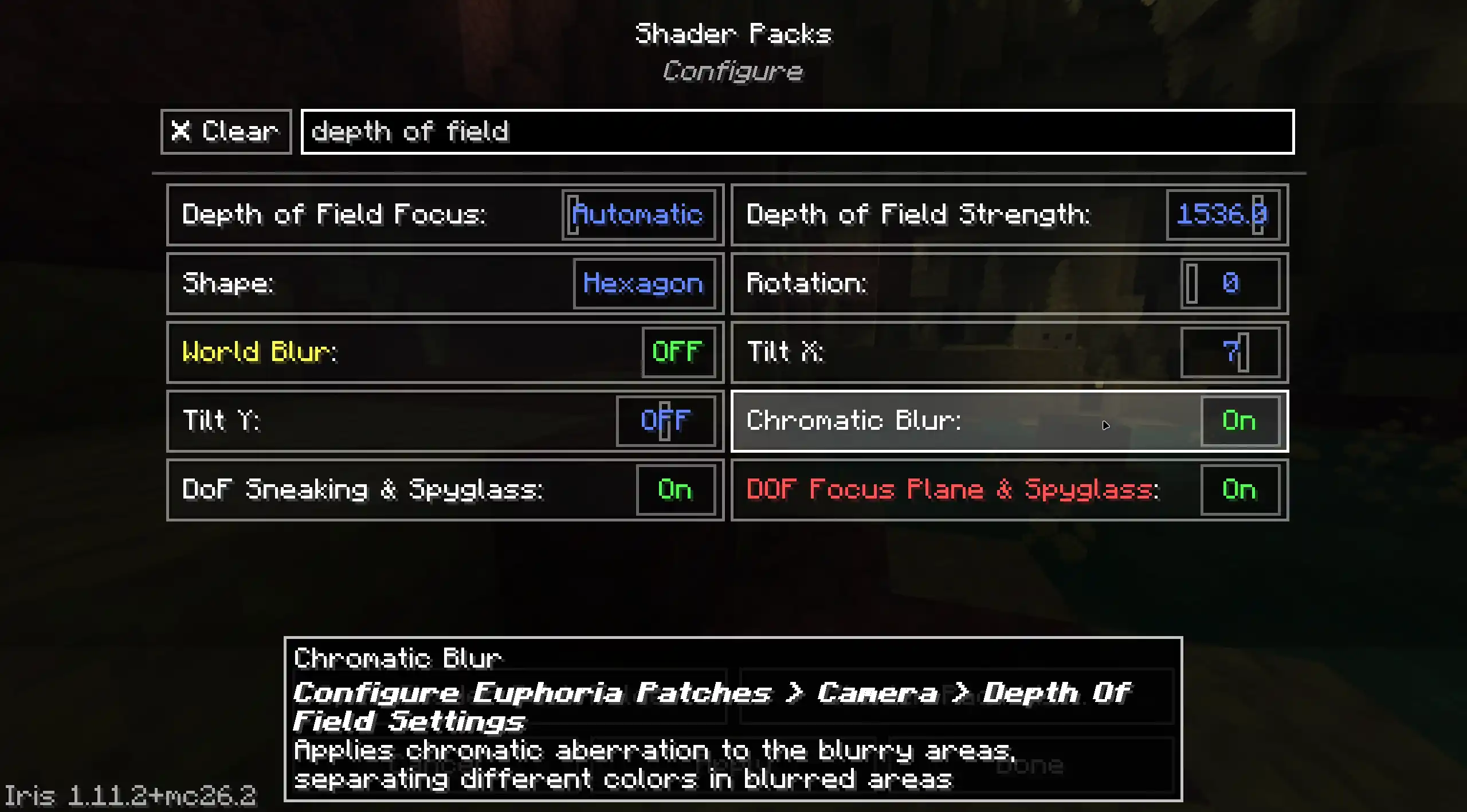
- Search now also shows options whose submenu name matches the query, e.g. searching "depth of field" surfaces everything inside the "depth of field" submenu, even those options which don't have "depth of field" in the name.
- Improved shader term synonyms (like "godrays" or "ao") to still match when typed slightly differently, e.g. singular/plural or with a small typo
- Updated several languages thanks to amazing contributors! Contributions are very welcome! [Translations on Crowdin](https://crowdin.com/profile/spaceagle17)

[1.6.0-neoforge] Iris Search 1.6.0-neoforge
by SpacEagle17 on Oct 14, 2026
Download
### Iris Search 1.6.0
## Changes:

## Changes:
- Search now also shows options whose submenu name matches the query, e.g. searching "depth of field" surfaces everything inside the "depth of field" submenu, even those options which don't have "depth of field" in the name.
- Improved shader term synonyms (like "godrays" or "ao") to still match when typed slightly differently, e.g. singular/plural or with a small typo
- Updated several languages thanks to amazing contributors! Contributions are very welcome! [Translations on Crowdin](https://crowdin.com/profile/spaceagle17)

[1.6.0-forge] Iris Search 1.6.0-forge
by SpacEagle17 on Oct 14, 2026
Download
### Iris Search 1.6.0
## Changes:

## Changes:
- Search now also shows options whose submenu name matches the query, e.g. searching "depth of field" surfaces everything inside the "depth of field" submenu, even those options which don't have "depth of field" in the name.
- Improved shader term synonyms (like "godrays" or "ao") to still match when typed slightly differently, e.g. singular/plural or with a small typo
- Updated several languages thanks to amazing contributors! Contributions are very welcome! [Translations on Crowdin](https://crowdin.com/profile/spaceagle17)

[1.5.1-fabric] Iris Search 1.5.1-fabric
by SpacEagle17 on Oct 14, 2026
Download
### Iris Search 1.5.1
## Changes:
## Fixes
## Changes:
- Updated several languages thanks to amazing contributors! Contributions are very welcome! [Translations on Crowdin](https://crowdin.com/profile/spaceagle17)
## Fixes
- Fixed the search state being preserved when switching shaders. Now it is reset when switching shaders, which is the expected behavior.

[1.5.1-neoforge] Iris Search 1.5.1-neoforge
by SpacEagle17 on Oct 14, 2026
Download
### Iris Search 1.5.1
## Changes:
## Fixes

## Changes:
- Updated several languages thanks to amazing contributors! Contributions are very welcome! [Translations on Crowdin](https://crowdin.com/profile/spaceagle17)
## Fixes
- Fixed the search state being preserved when switching shaders. Now it is reset when switching shaders, which is the expected behavior.

[1.5.1-forge] Iris Search 1.5.1-forge
by SpacEagle17 on Oct 14, 2026
Download
### Iris Search 1.5.1
## Changes:
## Fixes

## Changes:
- Updated several languages thanks to amazing contributors! Contributions are very welcome! [Translations on Crowdin](https://crowdin.com/profile/spaceagle17)
## Fixes
- Fixed the search state being preserved when switching shaders. Now it is reset when switching shaders, which is the expected behavior.

[1.5.0-fabric] Iris Search 1.5.0-fabric
by SpacEagle17 on Oct 14, 2026
Download
### Iris Search 1.5.0
## Changes:

## Changes:
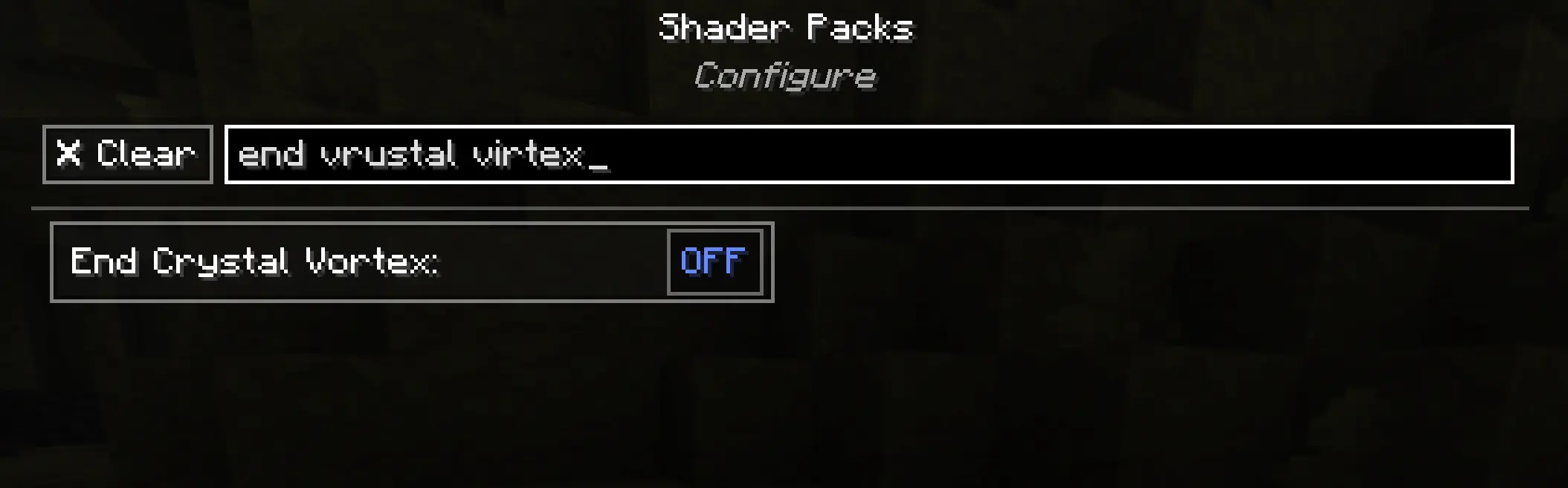
- Shader option search now tolerates small typos as a last resort! Searching "strenght" still finds "Strength".
- Shader option and shader pack search now match multi-word queries regardless of word order! Searching "strength bloom" now finds "Bloom Strength".
- Shader option search now understands common abbreviations! Searching "ao" finds "Ambient Occlusion" and searching "ssr" finds "Screen Space Reflections".
- Updated several languages thanks to amazing contributors! Contributions are very welcome! [Translations on Crowdin](https://crowdin.com/profile/spaceagle17)

[1.5.0-neoforge] Iris Search 1.5.0-neoforge
by SpacEagle17 on Oct 14, 2026
Download
### Iris Search 1.5.0
## Changes:

## Changes:
- Shader option search now tolerates small typos as a last resort! Searching "strenght" still finds "Strength".
- Shader option and shader pack search now match multi-word queries regardless of word order! Searching "strength bloom" now finds "Bloom Strength".
- Shader option search now understands common abbreviations! Searching "ao" finds "Ambient Occlusion" and searching "ssr" finds "Screen Space Reflections".
- Updated several languages thanks to amazing contributors! Contributions are very welcome! [Translations on Crowdin](https://crowdin.com/profile/spaceagle17)

[1.5.0-forge] Iris Search 1.5.0-forge
by SpacEagle17 on Oct 14, 2026
Download
### Iris Search 1.5.0
## Changes:

## Changes:
- Shader option search now tolerates small typos as a last resort! Searching "strenght" still finds "Strength".
- Shader option and shader pack search now match multi-word queries regardless of word order! Searching "strength bloom" now finds "Bloom Strength".
- Shader option search now understands common abbreviations! Searching "ao" finds "Ambient Occlusion" and searching "ssr" finds "Screen Space Reflections".
- Updated several languages thanks to amazing contributors! Contributions are very welcome! [Translations on Crowdin](https://crowdin.com/profile/spaceagle17)



