
About
Allows performing a large-scale filtered search for items in all loaded/generated chunks.
Checks for items in (probably) all "storage" block entities and entities.
Runs on server side. Install on client for some useful keybinds.
YetAnotherConfigLib for config.
Incompatible with c2me (Concurrent Chunk Management Engine).
Usage
Full information - README.
/finditem id <id> - search for items with exact ID.
/finditem name <name> - search for items that contain
/finditem data <data> - search for items that contain string in their NBT/data components.
/finditem loot_table <loot_table> - search for lootable block entities with this loot table.
Special arguments: any, none, none_empty.
/finditem empty - search for empty chests or lootable containers (changed in config).
/finditem summary - collects and prints out information about all existing unique items and loot tables, including counts. Only uses global mode.
Search modes
Normal mode only checks currently loaded chunks & entities, runs instantly.
Global mode can be activated by adding global to the command: /finditem <search_type> <argument> global
Searches all generated chunks in the current dimension, may take a few seconds.
Additional
- You can teleport to search results in order by pressing a keybind (
Nby default). - Mod has keybinds to perform a normal/global item search using the currently held item (unset by default).
- Hovering mouse over the BE/entity names in search results will show the item stacks/loot tables that matched the search parameters.
- Mod will do nested search for shulker boxes and bundles found inside containers.
- Check the config! Useful stuff there.
How to Install Item Finder (Mod)
Item Finder by Vladomeme is verified for Fabric across Minecraft versions 1.20.1, 1.21.1, 1.21.10, 1.21.11, 1.21.4, 1.21.6, 26.3 (latest release: 1.4.1, file size: 71 KB). Follow the steps below to install it safely from ModCraft.tv:
- Click the Download button above and select your Minecraft version (1.20.1, 1.21.1, 1.21.10, 1.21.11, 1.21.4, 1.21.6, 26.3) and platform (Fabric).
- Make sure you have the compatible loader or environment installed for Fabric.
- Move the downloaded Item Finder file into your Minecraft
.minecraft/modsfolder and launch the game.

- 26.3 port. May be janky due to ongoing item stack changes.
/finditem summary Prints out information about all unique existing items and loot tables, including counts. Teleport queue can be started by clicking on an arrow next to an entry. 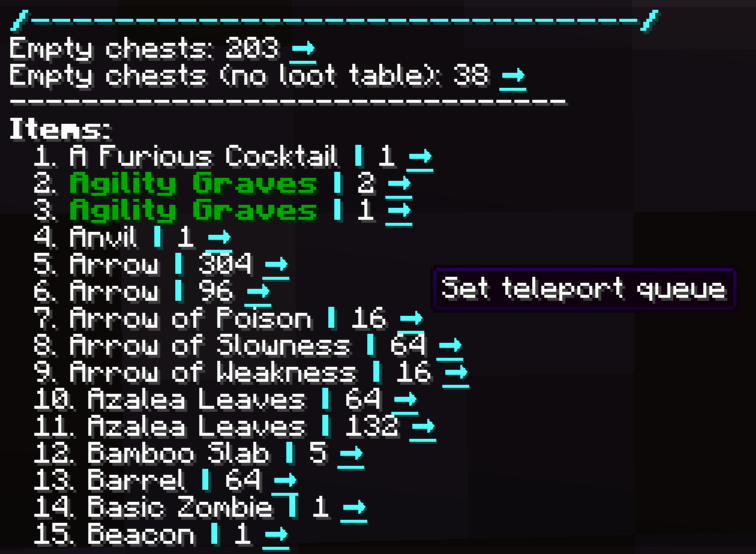
- Added an alias command for empty chest (lootable container) search
/finditem empty [global]- Ported to 1.21.11.
- Global mode name search now additionally checks translation and fallback strings.
- Fixed false positives in normal search caused by empty data components. Old behaviour can be enabled in the config.
- Minor performance improvements.
- Updated to 1.21.10! Data component weirdness continues
- Updated to 1.21.6!
- Global name searching now works with complex item names.
- Chunk data is now saved before running global search.
- Fixed global search becoming unavailable after switching worlds.
- Added an option to scan villager trades (disabled by default);
- Search results can now be sorted by coordinates or container name;
- Updated icon.


