
Description
Gallery
Changelog
Versions
Jade Trades is a NeoForge 1.21.1 addon for Jade. It adds villager trade information to the HUD overlay and provides a toggle-style keybind for marking villager bed and work POIs in the world. The marker can stay active on specific villagers, and pressing the key while looking at a non-villager clears the marks. The mod is intended as a practical debug and utility tool for players who work with villagers frequently.

How to Install Jade Trades (Mod)
Jade Trades by MSTY2003 is verified for Neoforge across Minecraft versions 1.21.1 (latest release: 1.0.0, file size: 26 KB). Follow the steps below to install it safely from ModCraft.tv:
- Click the Download button above and select your Minecraft version (1.21.1) and platform (Neoforge).
- Make sure you have the compatible loader or environment installed for Neoforge.
- Move the downloaded Jade Trades file into your Minecraft
.minecraft/modsfolder and launch the game.

[1.0.0] Jade Trades 1.0.0
by MSTY2003 on May 14, 2026
Download
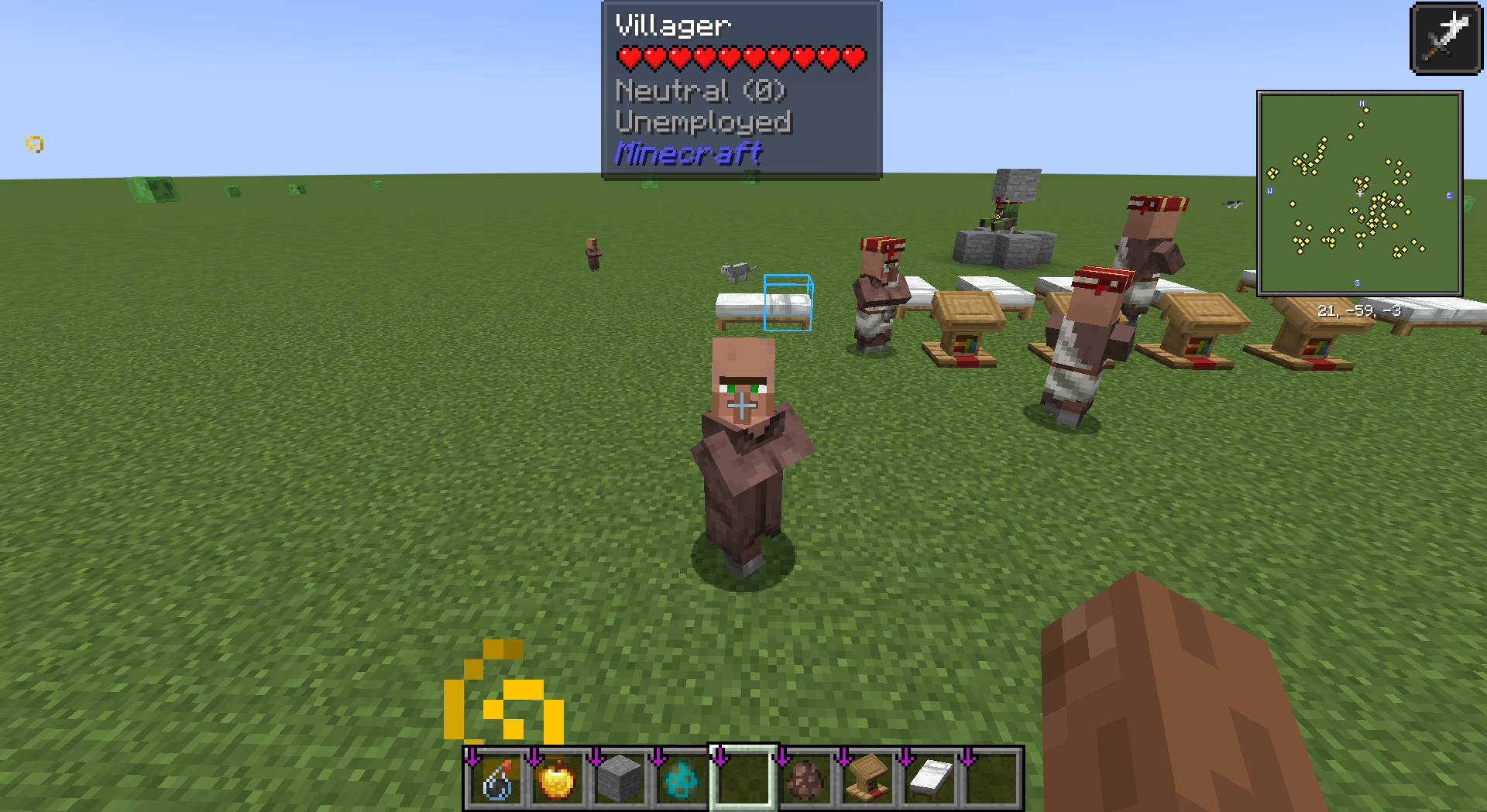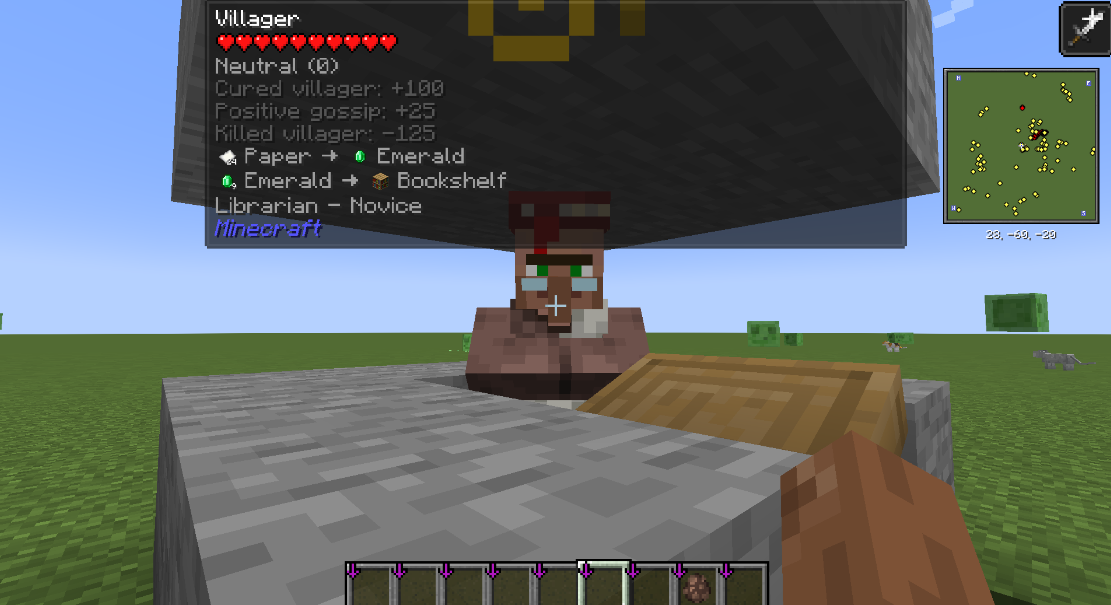
First stable release of Jade Trades for NeoForge 1.21.1.
### New Features
#### 1. Villager Trade HUD (Jade Integration)
#### 2. Villager POI Marker (Bed / Workstation)
#### 3. Reputation Display
#### 4. Tooltip Readability Improvements
#### 5. Localization
## How to Use
### 1. Installation and Requirements
1. Install NeoForge 1.21.1.
2. Make sure Jade is installed (this mod depends on Jade).
3. Put
4. Start the game and enter a world.
### 2. Viewing Trade Information
1. Look at a villager and wait for Jade info to appear.
2. By default, the first 2 trades are shown.
3. Hold Shift to expand the trade list.
4. While holding Shift, use mouse wheel to scroll pages.
### 3. Using the POI Marker
1. Open key settings and find the Jade Trades POI marker keybind.
2. Bind it to a key (it is unbound by default).
3. Press while looking at a villager to mark that villager's bed/workstation.
4. Press again on the same villager to unmark.
5. Press while looking at a non-villager target to clear all marks.
### 4. Reading Reputation
1. Normal view: compact result only (status + total), e.g.
2. Hold Shift: see detailed source breakdown (curing, trading, harming, killing, etc.).
### 5. Tips
First stable release of Jade Trades for NeoForge 1.21.1.
### New Features
#### 1. Villager Trade HUD (Jade Integration)
- Shows villager trades directly in Jade tooltip/HUD.
- Default mode shows the first 2 trades.
- Hold Shift to expand the full trade list.
- In Shift mode, mouse wheel scrolling is supported for paging.
- Scroll position resets automatically when switching target villagers.
#### 2. Villager POI Marker (Bed / Workstation)
- Adds a configurable keybind (unbound by default).
- Key behavior is toggle-based:
- Press while looking at a villager: mark or unmark that villager.
- Press while looking at a non-villager: clear all marks.
- Renders villager POI boxes in world space:
- Bed: blue
- Workstation: orange
- Supports villagers without workstation POI (bed can still be shown).
- Uses server-to-client synchronization for reliable rendering.
#### 3. Reputation Display
- Shows player-to-villager reputation.
- Normal mode: compact status + total value (for example:
Friendly(130),Neutral(0)). - Shift mode: detailed contribution breakdown (curing, trading, harming, killing, etc.).
- Discount detail lines are removed to keep the tooltip focused.
#### 4. Tooltip Readability Improvements
- Fixes overflow when expanded Shift tooltip becomes too long.
- Uses visible-line-based paging to avoid going beyond HUD height.
#### 5. Localization
- Adds Chinese localization (
zh_cn). - Adds English localization (
en_us). - Covers keybinds, hints, reputation labels, and detailed contribution texts.
## How to Use
### 1. Installation and Requirements
1. Install NeoForge 1.21.1.
2. Make sure Jade is installed (this mod depends on Jade).
3. Put
jade-trades-1.0.0.jar into your mods folder.4. Start the game and enter a world.
### 2. Viewing Trade Information
1. Look at a villager and wait for Jade info to appear.
2. By default, the first 2 trades are shown.
3. Hold Shift to expand the trade list.
4. While holding Shift, use mouse wheel to scroll pages.
### 3. Using the POI Marker
1. Open key settings and find the Jade Trades POI marker keybind.
2. Bind it to a key (it is unbound by default).
3. Press while looking at a villager to mark that villager's bed/workstation.
4. Press again on the same villager to unmark.
5. Press while looking at a non-villager target to clear all marks.
### 4. Reading Reputation
1. Normal view: compact result only (status + total), e.g.
Friendly(130).2. Hold Shift: see detailed source breakdown (curing, trading, harming, killing, etc.).
### 5. Tips
- If POI does not show immediately, keep looking at the villager briefly so synced data can arrive, then press the marker key.
- If trade list is long, hold Shift and use mouse wheel paging.


