


Minecraft's food system has always been simple: eat until you're full.
Nourished turns food into a configurable nutrition system for NeoForge 1.21.1. Track six food groups, build a varied diet, manage your calorie intake, and deal with the consequences of neglecting your nutrition.
Everything is modular and configurable, so Nourished can be adapted to your modpack or server rather than forcing a single way of playing. This applies across config, datapacks, KubeJS, custom nutrients, custom milestones, food overrides, compatibility, module toggles, and the in-game appearance editor.
🟢 Recommended Version Always use the newest version of Nourished. Newer releases may include major feature, UI, compatibility, and bug-fix improvements over previous versions. Older versions are primarily intended for compatibility with existing modpacks.
⚠️ Upcoming Change: Classic UI Removal The Classic UI will be removed in Nourished 0.2.8-beta.
The newer Dynamic UI is now the recommended interface and will become the standard going forward. If you are still using the Classic UI, we recommend switching to the Dynamic UI before upgrading to 0.2.8.
✨ Dynamic UI
diet screen

Mini HUD

Dynamic UI is Nourished's modular interface system, designed to make the HUD and diet screen highly configurable without relying on hardcoded layouts.
UI elements are organized into independent modules that can be customized individually, including their position, size, colors, and other visual properties. This allows the interface to be adjusted to fit different screen resolutions, UI layouts, and player preferences.
The system is designed to be extensible, making it possible to add new UI modules and customization options without rebuilding the entire interface.
Features:
- Modular UI components
- Movable UI elements
- Adjustable module sizes
- Configurable colors
- Independent module configuration
- Reusable UI architecture
- Designed for future customization options
- Used by both the Nourished HUD and Diet Screen
- Per-row dragging: reposition individual nutrient rows independently within the HUD box
- Fine-grained visibility rules: auto-hide zero-value bars, or hide/show bars above custom thresholds
- Shared edit-mode tabs for the Nutrient HUD, Calorie Log, and Activity Log panels, so only one is ever open at a time
Dynamic UI replaces Nourished's older interaction-based UI controls with a proper modular editing system, providing a cleaner foundation for expanding UI customization over time.
📸 Screenshots were taken with the PureBDCraft resource pack & custom edits. The UI works with vanilla textures, but will appear in the default Minecraft style.
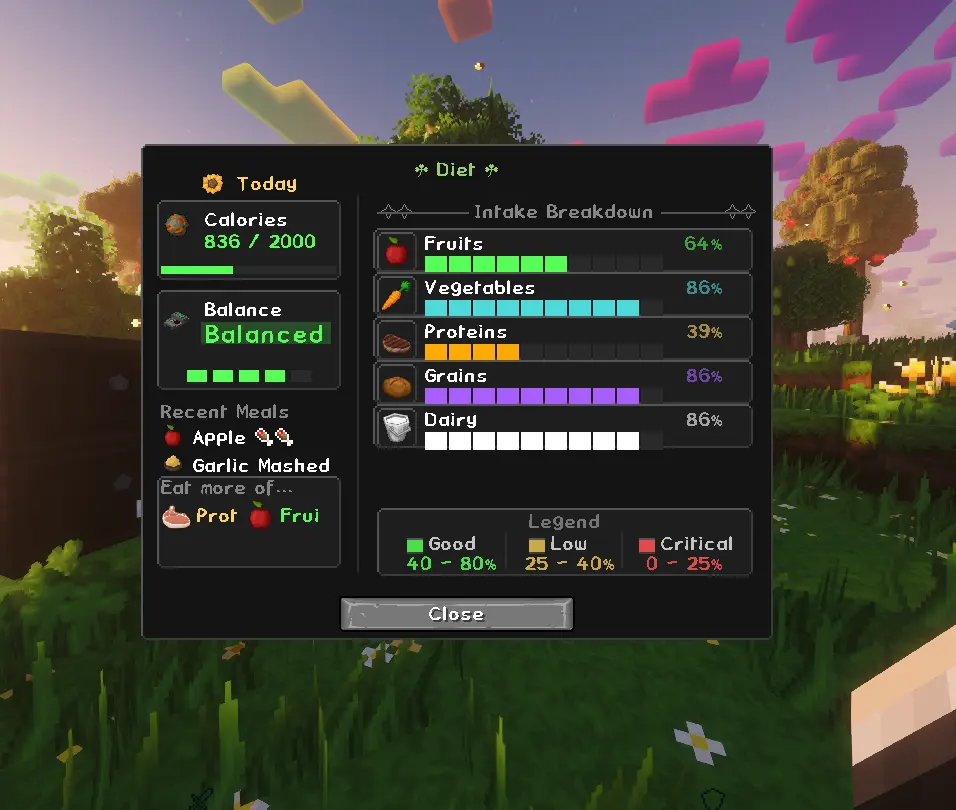
Diet Screen
| What you see | What it means |
|---|---|
| Trend arrows | Whether each group is rising or falling |
| Balance score | How evenly distributed your nutrition is |
| Active effects | What your current diet is doing to you |
| Calorie tracking | Daily calorie intake at a glance |
| Recently eaten | What you've eaten recently |
| Neglected categories | What you should probably eat next |
🎨 In-Game Appearance Editor
Every panel has its own Appearance window, opened alongside edit mode, for styling it without ever touching a config file.
Per-panel styling
- Background: opacity and shade
- Border: opacity and shade
- Text & icon brightness
- Vertical layout toggle (stack bars vertically instead of horizontally)
Per-nutrient bar colors
Every nutrient bar gets its own color slot, independent of the others. Recolor Grains, Vegetables, Proteins, Fruits, Sugars, and Dairy individually to match your pack or taste.
Glow
Each nutrient bar has its own glow, independently toggleable and tunable:
- Glow color
- Glow strength
Pulse / flash
Bars that are critical or low can pulse to draw your eye, tied into the same visibility system that auto-hides or reveals bars at custom thresholds.
Every setting here writes straight to config in the background, so anything you set through the in-game editor is saved automatically and shows up the same way in config/nourished/ if you'd rather hand-edit it later.
🏆 Milestones & Achievements
Eating consistently pays off over time. Nourished tracks cumulative intake for each food group and grants milestone rewards as you build healthy habits.

Each food group has its own three-tier progression:
- Beginner
- Journeyman
- Master
There is also a hidden Perfectly Balanced milestone for maintaining all five balance-tracked food groups (Grains, Vegetables, Proteins, Fruits, and Dairy — Sugars sits outside the balance system) at once.
Milestones grant temporary buffs and unlock entries in your Advancements tab.
Milestone goals, reward effects, and durations are fully configurable. Modpack authors can also register entirely custom milestones through datapacks.
❤️ What You Gain
When all five balance-tracked food groups — Grains, Vegetables, Proteins, Fruits, and Dairy — are above 75%, you receive:
- Health Boost I: passively while balanced
- Regeneration I: passively while balanced
Let any single group drop below 25%, and a neglect penalty kicks in:
| Group | Neglect Penalty |
|---|---|
| 🌾 Grains | Weakness I |
| 🥦 Vegetables | Slowness I |
| 🥩 Proteins | Mining Fatigue I |
| 🍎 Fruits | Unluck I |
| 🍬 Sugars | — |
| 🥛 Dairy | — |
Sugars and Dairy have no penalty effect by default. The Sugars group is still tracked and factored into your overall balance score, even though it sits outside the Health Boost/Regeneration buff above.
This behavior is configurable.
🏃 Activity-Driven Nutrients
Your body doesn't just burn energy from being hungry; it burns energy from doing things now.
Nourished tracks your actual activity and factors it into your nutrient needs.
Activity Costs
- Sprinting & swimming drain nutrients faster the longer you keep them up.
- Mining costs a small amount of nutrients per block broken.
- Combat costs nutrients per kill.
- Starvation applies a one-time penalty when a nutrient drops into a critical range.
Every activity module is independently toggleable. Turn off combat costs, disable starvation penalties, or run the entire system; it's up to you.
Each module's cost and HUD color are configurable.
Everything is backed by real per-player tracking:
- Distance sprinted
- Distance swum
- Blocks mined
- Kills
- Starvation events
Activity data is recorded day-by-day rather than simply estimated.
Activity Log HUD

The Activity Log HUD is optional and can be repositioned, resized, or hidden entirely. Each statistic includes a live bar relative to your own personal best.
Milestones can also be set on activity trackers through datapacks or KubeJS, allowing modpack authors to reward goals such as the following:
- Sprint 10,000 blocks
- Swim 5,000 blocks
- Mine 10,000 blocks
- Land 500 kills
This option can be turned off in the configs.
🔥 Calories
Calories are the backbone of Nourished's nutrition system.
Every food you eat adds to or subtracts from your daily calorie total, and staying within your calorie goal matters alongside hitting your nutrient targets.
Live Tracking
Your calorie total updates in real time and persists across sessions, with complete history retained for previous days.
Calorie HUD Panel

The Calorie Log HUD is optional and can be repositioned, resized, or hidden entirely.
A compact, draggable overlay displays the following:
- Today
- Yesterday
- Previous days
Each day is shown as a percentage of your calorie goal, with the display changing once you go over your target.
Eat-Food Notifications
Eating something that changes your calorie total now produces a quick on-screen notification showing the food's name and calorie change.
You can see exactly what just happened without opening a menu.
Diet Screen Integration
The diet screen ties everything together with:
- Full calorie breakdown
- Recent meals
- Daily calorie balance
- Foods you may want to eat to round out your diet
Every panel can be independently repositioned, resized, and scaled.
Like everything else in Nourished, calorie goals and thresholds are configurable, and the system is datapack- and KubeJS-friendly for modpack authors who want to tune it further. This option can also be turned off in the configs.
🍽️ Variety Is Always Rewarded
Eating the same food repeatedly becomes less effective over time, so rotating what you eat always pays off.
Nourished uses a memory system that naturally fades over time. Foods you've avoided recover their full nutritional value as your food memory fades.
The result is simple:
The more varied your diet, the more effective it becomes.
🍽️ Eating at Full Saturation
Vanilla Minecraft prevents you from eating when your hunger and saturation are already full.
Nourished allows you to continue eating for nutritional purposes even when your saturation bar is full.
Light foods such as berries and snacks can be eaten for their nutrients without restoring saturation, while heavier meals follow vanilla eating rules by default.
Both behaviors are configurable through:
enableBlockHeavySourcesenableBlockLightSource
Server administrators have full control over how these eating restrictions behave.
🥩 Raw Food & Gut Health
Eating raw or undercooked food has consequences.
Nourished tracks a gut health value for every player. Gut health degrades when you eat raw food and recovers over time through cooked food and dietary variety.
Raw Food Tiers
Raw foods are classified into four tiers:
| Tier | Effect |
|---|---|
| Fine | No penalty |
| Mild | Minor debuff, short duration |
| Medium | Moderate debuff, longer duration |
| Severe | Strong debuff, extended duration |
Eating the same raw food repeatedly within its memory window increases your sensitivity to it. The more you repeatedly eat the same raw food, the worse the penalty becomes.
Gut health recovers passively and recovers faster when you:
- Eat cooked food
- Maintain dietary diversity
Resistance can also be built over time, reducing the scale of raw-food penalties.
Everything is configurable, including:
- Raw-food tiers
- Effect durations
- Nutrient penalties
- Recovery rates
- Resistance
- Module behavior
Configuration is handled through:
config/nourished/raw_food.json
🤝 Mod Compatibility
Nourished works with modded food items that use vanilla FoodProperties.
You do not need to write integration code for basic nutrition tracking.
Bundled compatibility data helps foods from popular farming and cooking mods appear on your nutrient bars out of the box.
For edge cases, server owners can adjust behavior through configuration files and tags.
| Mod | Status |
|---|---|
| Farmer's Delight | ✅ Supported |
| Pam's HarvestCraft 2 | ✅ Supported |
| Croptopia | ✅ Supported |
| Farm & Charm | ✅ Supported |
| Butchery | ✅ Supported |
| Herbs & Harvest | ✅ Supported |
| Spice of Life: Onion | ✅ Supported |
| KubeJS | ✅ Scripting hooks |
| JEI / REI / EMI | ✅ Tooltips in recipe viewers |
| Other mods with edible food items | ✅ Works with standard food items |
🔧 Configurable for Your Server
Everything ships with sensible defaults.
Server owners and modpack authors can tune Nourished without touching Java.
Module Controls
- Toggle individual modules on or off
- Enable or disable the HUD
- Configure nutrient decay
- Configure activity-driven costs
- Enable or disable effects
- Enable or disable gut health
Nutrient Configuration
- Adjust decay rates
- Adjust thresholds
- Configure critical values
- Configure low and excess thresholds
Effects
Add, remove, or replace effects through:
config/nourished/effects.json
Eating Rules
Configure:
enableBlockHeavySourcesenableBlockLightSource
Data & Overrides
Customize:
- Food values
- Food overrides
- Nutrient colors
- Scanner specifications
- Compatibility settings
- Presets
- Module locks
All configuration lives under:
config/nourished/
Config Sharing
Save and share complete configuration snapshots using a single share code.
🔍 The Food Scanner
Use:
/nourished scan_analysisto analyze all loaded food items and generate classification reports under the following:
config/nourished/scanner_analysis/Scanner Output
The scanner produces:
multi_value_recommendations.json: foods confidently assigned to one or more nutrient groupsunassigned_sources.txt: foods that could not be classified automatically and need manual reviewscanner_metrics.txt: summary statistics across the full item registry
Recommended tag entries can be copied into your datapack to make classifications permanent.
Unassigned items can be manually tagged using the example below.
📁 Data & Overrides
Most customization happens inside:
config/nourished/after the first launch.
This includes:
- Effects
- Food values
- Food overrides
- Colors
- Presets
- Module locks
- Scanner configuration
- Compatibility settings
Nourished also ships bundled defaults under:
data/nourished/These include nutrient tags, compatibility entries, and presets.
Advanced pack authors can override supported data through datapacks where applicable. Configuration files remain the primary method for server-side tuning.
The in-game food scanner can help inspect and assign foods in singleplayer and write generated tag files into the world's datapack folder for manual review.
Example: Adding a Food to a Nutrient Tag
Create the following file inside your datapack:
your_datapack/
└── data/
    └── nourished/
        └── tags/
            └── item/
                └── nutrients/
                    └── vegetables.json
{
"replace": false,
"values": [
{
"id": "pamhc2foodextended:honeyglazedcarrotsitem",
"required": false
}
]
}"replace": false means your entries are merged with Nourished's defaults rather than replacing them.
📜 KubeJS Support
Nourished provides optional KubeJS integration for modpack authors.
KubeJS must be installed separately.
Scripts go in:
kubejs/server_scripts/
kubejs/startup_scripts/
KubeJS support is split across two layers:
- MariesLib provides generic value-tracking events through
MarieEvents.*. - Nourished provides nutrition-specific aliases through
NourishedEvents.*.
Server Scripts: Nutrition Events
NourishedEvents.nutrientChanged(event => {
    if (event.nutrientKey === 'proteins' && event.newValue < 0.25) {
        event.player.tell('Eat some protein!')
    }
})

NourishedEvents.nutrientModifier(event => {
    if (event.nutrientKey === 'vegetables') {
        event.amount *= 2
    }
})

NourishedEvents.foodEaten(event => {
    event.nutrientDeltas.forEach((value, key) => {
        console.log(key + ': ' + value)
    })
})
Also available:
nutrientCriticalnutrientExcessrawFoodPenaltygutHealthChanged
Important:
sourceConsumedis a generic MariesLib event and does not exposenutrientKeyornewValue. UsenutrientChangedwhen you need nutrition-specific information.
Generic MariesLib Events
MariesLib's own value-tracking events (valueChanged, valueDeltaModifier, valueCritical, valueExcess, sourceConsumed, decayTick, playerSynced) power the framework internally. They are not currently exposed as standalone KubeJS bindings — for KubeJS scripting, use the NourishedEvents.* aliases above, which cover the same data for nutrition purposes.
Startup Scripts: Register Custom Nutrients
NourishedAPI.registerNutrient({
    id: 'omega3',
    displayName: 'Omega-3',
    color: 0x4AA3FF,
    decayRate: 0.0012,
    critical: 0.12,
    low: 0.30,
    excess: 0.90
})
See API.md on GitHub for the full event and binding reference.
💾 Old UI (Legacy)
The Old UI is Nourished's legacy interface — the original HUD and diet screen layout from before Dynamic UI existed. It's retained for compatibility with older setups and is no longer receiving new UI features.
Maintained for backward compatibility only. Planned for removal in 0.2.8-beta.
⚙️ Requirements
| Requirement | Version |
|---|---|
| Minecraft | 1.21.1 |
| NeoForge | 21.1.x |
| Marie's Lib | v0.1.2-beta+ |
| Cloth Config | Required at runtime |
| Modonomicon | Required — in-game guide |
| Java | 21 |
Important: Marie's Lib is a required dependency. Patchouli has been fully replaced by Modonomicon, which is now a required dependency.
🛠️ Support & Feedback
Found a bug, have a suggestion, or need help?
- GitHub Issues: report bugs and feature requests
- Discord: support and development updates
Please include logs, screenshots, or reproduction steps when reporting an issue.
📜 License
MIT License
Nourished is free to use in modpacks, forks, and addons.
How to Install Nourished (Mod)
Nourished by kgbcupcake is verified for Neoforge across Minecraft versions 1.21.1 (latest release: 0.2.7-beta.2, file size: 3.8 MB). Follow the steps below to install it safely from ModCraft.tv:
- Click the Download button above and select your Minecraft version (1.21.1) and platform (Neoforge).
- Make sure you have the compatible loader or environment installed for Neoforge.
- Move the downloaded Nourished file into your Minecraft
.minecraft/modsfolder and launch the game.
All Versions
+ Add Version| Name | Game version | Platforms | Published | Downloads | Actions |
|---|---|---|---|---|---|
| 1mo ago | 1 | ||||
| 2mo ago | 1 | ||||
| 2mo ago | 1 | ||||
| 3mo ago | 1 | ||||
| 4mo ago | 1 | ||||
| 4mo ago | 1 | ||||
| 5mo ago | 1 | ||||
| 5mo ago | 1 | ||||
| 5mo ago | 1 | ||||
| 5mo ago | 1 | ||||
| 5mo ago | 1 | ||||
| 5mo ago | 1 | ||||
| 5mo ago | 1 | ||||
| 5mo ago | 1 | ||||
| 5mo ago | 1 | ||||
| 5mo ago | 1 | ||||
| 5mo ago | 1 | ||||
| 5mo ago | 1 | ||||
| 5mo ago | 1 | ||||
| 5mo ago | 1 | ||||
| 5mo ago | 1 | ||||
| 6mo ago | 1 | ||||
| 6mo ago | 1 | ||||
| 6mo ago | 1 | ||||
| 6mo ago | 1 | ||||
| 6mo ago | 1 | ||||
| 6mo ago | 1 | ||||
| 6mo ago | 1 | ||||
| 6mo ago | 1 | ||||
| 6mo ago | 1 | ||||
| 6mo ago | 1 | ||||
| 6mo ago | 1 | ||||
| 6mo ago | 1 |


A big UI overhaul. Nearly every box on the HUD and Diet Screen can now be moved, resized, restyled and recolored in-game. The guide book has also moved from Patchouli to Modonomicon.
## ⚠️ Read before updating
- Beta:** Some of your old layout and color settings may reset.
- New required dependencies:** **Modonomicon** and **MariesLib 0.1.2-beta or newer**.
- Patchouli is no longer needed**, and the old Patchouli book is gone.
Please report anything odd on the issue tracker or Discord.
## Highlights
- New guide book (Modonomicon):** chapters for Getting Started, How It Works, Food Safety, Food Groups and Compat Mods. Compat pages only appear for mods you have installed.
- Fully customizable Diet Screen:** drag, resize and restyle every box (Calories, Balance, Recent Meals, Eat More, Active Effects and each Intake Breakdown row). Text, icons, bars and header can each be moved separately.
- New editor hub:** all Diet Screen box settings live in one resizable window with a sidebar, replacing the stack of tabs.
- Glow and Pulse:** every box can glow, and its border can "breathe" in its own colors. Choose Smooth, Heartbeat or Flash; all boxes pulse in sync.
- In-game color editing:** a Colors tab changes every HUD and Diet Screen color, and the color picker can save favorites.
## Added
- All boxes**
- Style options: background and border opacity and shade, text and border shadow, border and bar glow
- Separate Text size, Icon size, Bar size and brightness sliders
- Header (title) size and Hide Header, including on the Diet Screen itself
- A single "Reset This Module" button
- Resizing snaps to the size of neighboring boxes when you're close
- Nutrient HUD**
- Move Nutrient: drag a nutrient's whole row to reorder rows
- Per-nutrient bar glow
- Hide Bars, Hide Text, Hide Icons and Hide Window
- Scrolls when it's shorter than its rows
- Diet Screen**
- Intake Breakdown rows: bar fill color, icon border color, icon size and a Move Icon toggle
- Active Effects: icons and +/- markers can be moved, hidden and resized separately from effect names
- Activity Log and Calorie History start as tabs on the left in edit mode, using the same click-to-open style as the settings windows
- Gameplay**
- "Free Bites Before Diminishing" setting: how many times a food can be eaten at full value
- For addon devs**
- New
NourishedRegisterEventfor registering nutrients, foods and effects in one place - Full
docs/ADDON_GUIDE.mdwith an example addon - "Nourished Test" Command Center tab with Registration Report and Check Held Food
- KubeJS
registerNutrientnow acceptsiconandtags
## Changed
- HUD panels have rounded corners
- Calorie History reads "1 day", "2 days", etc., and the HUD shows "Veggies"
- Nutrients always draw in their own color (no more threshold tinting)
- Each nutrient's color is now set on its own Intake Breakdown row instead of one long list
- The Diet Screen editor panel grows when you drag
## Bug Fixes
- Fixed a dedicated-server startup crash
- Client-only color definitions for the Calorie HUD and Activity Log HUD are now registered only on the client.
- Prevents Calorie HudScreen and ActivityLog HudPanel from being loaded during dedicated server initialization.
- Fixes the RuntimeDistCleaner crash caused by attempting to load net.minecraft.client.player. LocalPlayer on a dedicated server.
- Tested on a NeoForge dedicated server and confirmed successful startup
> This is a big one. New activity-driven nutrient system (mining, combat, sprinting, swimming, starvation) with its own HUD panel and trackers, food-eaten notifications, a unified "edit all HUDs" mode, a full visual restyle across every HUD panel, and a Command Center that's now a proper command launcher. Underneath it, MariesLib got a major rework to its recipe/keyword classification merge closing the long-standing calzone/createfood multi-value bug plus a batch of new generic UI, tracking, and sync subsystems that all of the above is built on.
## Nourished changes
### Added
- Food-eaten notifications**: eating a food that actually changes calories or nutrients now shows a client-side notification above the XP bar (name + calorie delta, e.g., "Veggie Salad +203 Calories"). Rapid consecutive eats merge into one notification slot instead of stacking. Only fires on real eating events, decay ticks, login, and state-refresh syncs never trigger it.
- Activity-driven nutrients**: five new independently toggleable modules:
SprintDecayModule,SwimDecayModule,MiningModule(per-block cost),CombatModule(per-kill cost),StarvationModule(one-time penalty when a nutrient crosses critical). New config category for toggles, costs, and per-module HUD log colors. Config migrated off TOML onto a JSON registry (ActivityDrivenNutrientRegistry) with datapack override support, synced via MarieLib's new generic config-sync mechanism.
- Activity Log HUD panel**: new draggable/resizable panel (default keybind
K) showing recent activity effects.
- Five new daily trackers:
activity/mining_blocks,activity/combat_kills,activity/starvation_crossings,activity/sprint_distance,activity/swim_distance. Sprint/swim now tracks real blocks moved (with teleport/dimension-change/discontinuity guarding) instead of ticks active. All five wired into MarieLib's new tracker-milestone system and exposed to KubeJS viaNourishedAPI.registerTrackerMilestone"
- Command Center is now a command launcher.** "Nourished Tools" category: Export All, Audit Tags, Debug Activity Log, Reload, Invalidate Cache, Unassigned Sources, NBT Paths, List Profiles, My Profile. "Framework" category: Status, Mods, API, Registries. All run as real network-dispatched commands with permission checks, same as typing them.
- Unified HUD editing**: new global "edit all HUDs" keybind (
EDIT_ALL_HUDS) toggles edit mode on the Calorie HUD, Activity Log HUD, and nutrient HUD together. The nutrient HUD joined the same group.
- Diet Screen, Calorie HUD, and Activity Log HUD panels each gained their own scale-config card for adjusting text scale/padding via sliders, auto-shown alongside edit mode. New
OPEN_SCALE_CONFIG "keybind" for the Diet Screen's version.
- All three HUD panels now snap to each other's edges when dragged/resized (MarieLib's new SnapRegistry`).
- Nutrient HUD migrated onto the same content-scale system as the other panels.
- Adde
## Highlights
- New dynamic UI system**: HUD and Diet Screen are now fully draggable, resizable, and persistent. Rearrange modules, resize boxes freely on both axes, and your layout saves automatically. Don't want it? The classic UI is fully restored and toggleable via
hudClassicMode/dietScreenClassicModein config, both systems are supported side by side, so you're never forced onto the new one. The new dynamic UI system is still **WIP**, so expect ongoing changes, visual tweaks, and the occasional weird edge case as it continues to mature. The classic UI will continue to be maintained and supported alongside it.
- Exclude items from tracking**: new
excluded_items.jsonlets you fully exclude specific items from nutrient tracking (decoy items, non-food edibles, whatever shouldn't move a bar), independent of value overrides. Vanilla hunger/saturation is unaffected.
- Hide the Diet Screen inventory icon**: new config option to hide the inventory-button icon if you'd rather open the Diet Screen with the keybind only.
## Added
hudClassicMode/dietScreenClassicModeconfig toggles: switch either UI back to the classic renderer independentlyexcluded_items.json, full item exclusion from nutrient tracking- Config option to hide the Diet Screen icon in the inventory
- Per-item food overrides can now replace both nutrient bar weights and full source deltas (calories + nutrients)
- Free spatial HUD panel resizing on every edge/corner, independent of content scale
- Per-box zoom for Diet Screen left-column boxes (double-click to enter, scroll to adjust)
- Graceful overflow handling, Diet Screen boxes shrink and reflow smoothly instead of popping in/out as the panel resizes
- Community-tag and keyword-suffix fallback classification for recipe ingredients missing a confirmed nutrient tag
## Changed
- Config overrides (
food_overrides.json,source_classifications.json,excluded_items.json) moved toconfig/nourished/overrides/, **update any datapacks/scripts referencing the old path** food_overrides.json's nutrient overrides now merge with normal classification instead of fully replacing it, set only what you want to override, everything else still classifies normally- Updated to match MariesLib's restructured packages and renamed classes (see MariesLib 0.1.1-beta.4 changelog)
## Fixed
- Fixed the Diet Screen keybind opening a duplicate screen instead of closing it when pressed while already open
- Fixed
food_overrides.jsonnot actually applying at runtime (it was defined but never wired into resolution) - Fixed classic HUD/Diet Screen left-edge resize getting stuck at an oversized margin
- Fixed several Diet Screen resiz
## Changes
- Improved compatibility handling for modded food items with incomplete recipe definitions
- Refined fallback classification when recipe inheritance is unavailable
- Better logging and trace output for resolver cache misses
- Improved stability of nutrient inference pipeline for composite foods
## Improvements
- More consistent behavior when recipe graphs are missing or incomplete
- Clearer distinction between:
- recipe-based classification
- inference-based classification
- cached external classification
- Milk Bottles Now Register Dairy vaules.
## Fix / Known Issue Note: Source Inspector Debug Trace
> Some Create cutting board recipes are not exposed as standard recipe entries.
- The /source_inspector debug output may show incorrect values in Weighted Totals and Why X Won when an item’s classification is changed by a recipe-level override.
- This is caused by the trace displaying intermediate keyword-scoring results even after a later override is applied. The override is correct and fully reflected in-game, this issue only affects the debug visualization.
- If you see mismatched breakdowns (correct final category but inconsistent intermediate values), that’s the cause.
> No gameplay impact. Debug trace fix coming in the next update.
Example:
createfood:hamburger_onion→ missing protein classificationcreatefood:hamburger_onion_lettuce→ works when ingredient chain is explicit
### Cause
- Create cutting board recipes do not register as standard recipe sources, breaking inheritance resolution.
### Impact
- Some composite foods may be misclassified or partially unclassified
### Status
- Not fixable in this release
- Requires Synthetic Recipe Resolver (future system)
- Confirmed via trace dumps and reproduction
This update focuses on improving food classification accuracy, expanding modpack customization, and continuing the migration of shared infrastructure into the Marie ecosystem.
## Highlights
### Per-Item Nutrient Weights
Nourished now supports per-item nutrient weight files.
Instead of relying solely on tags, individual foods can now bias how strongly they contribute to multiple nutrient groups. This allows much finer balancing without creating large numbers of explicit overrides.
Bundled weight files are included for:
- Farmer's Delight
- Croptopia
- Pam's HarvestCraft 2
This should significantly improve the accuracy of many complex meals.
### Improved Export & Configuration Tools
Export commands have been refactored and cleaned up.
A new
SOURCE_CLASSIFICATIONS_README.md is bundled with the mod to document the source classification format and make creating overrides much easier for modpack authors.The Food Override documentation has also been updated to better explain the available export workflows.
### Better Classification Pipeline
Several internal improvements have been made to the classification system.
Highlights include:
- Recipe inheritance now runs through MarieLib's shared resolver.
- Expanded bundled nutrient tags.
- Improved multi-nutrient balancing through weight files.
- Reduced duplicate and incorrect bundled classifications.
These changes should result in more accurate nutrient assignments across supported food mods.
### Architecture Changes
Shared infrastructure continues moving out of Nourished and into the Marie ecosystem.
This release removes several internal systems from Nourished in favor of MarieLib, reducing duplicated code and allowing future Marie-based mods to reuse the same framework.
Configuration validation is now handled through MarieLib, and recipe inheritance is provided by the shared runtime.
### Compatibility Changes
Compatibility integrations have been separated from Nourished as part of the ongoing framework refactor.
Support for:
- Legendary Survival Overhaul
- Peak Stamina
- Spice of Life: Onion
has been moved into **Marie's Compat**, a new companion mod dedicated entirely to compatibility between Marie-based mods and other popular Minecraft mods.
Keeping compatibility in its own project allows integrations to be updated, expanded, and maintained independently of Nourished itself.
- Marie's Compat will be available soon.**
## Upgrade Notes
If updating from **0.2.6-beta.3**:
- Update **MarieLib** to **0.1.1-beta.2** or newer.
/nourished validatehas been replaced with:
``
/marieslib validate nourished
has been replaced by source_classifications.json`.Thanks again to everyone testing beta builds and reporting issues. Many of the improvements in this release were driven directly by
...
- Requires MarieLib 0.1.1-beta.1+**: update MarieLib on Modrinth before launching this version.
### Highlights
- Food saturation now affects nutrient gain**: high-saturation meals finally contribute more to nutrient bars than low-saturation snacks with the same hunger restore (see Fixed below)
- Nutrient export for modpack authors** - categorized food reference files + GUI button +
/nourished export_all - Per-nutrient response curves**: opt-in diminishing returns, confidence gating, synergy presets (off by default)
- Config validation framework**: 10 validators, auto-run on load,
/nourished validate - Tag audit tooling** - bundled tags vs live inference;
/nourished audit_tagswritestag_audit_report.json
### Added
#### Nutrient export (modpack authors)
- MarieLib export resolver
nourished_nutrients— per-item nutrients + calories from the live classification cascade - Categorized export to
config/nourished/nourished_nutrients_export/(one JSON per nutrient key:fruits.json,proteins.json, etc.) via **Export All Foods** (Scanner tab, singleplayer with an active world) or/nourished export_all(op 2) /marieslib dump nourished_nutrients— single-file export toconfig/nourished/nourished_nutrients_export.json(MarieLibid/dataformat; same live data, different layout)config/nourished/OVERRIDES_README.md— auto-created on first load when missing; documentsfood_overrides.jsonand the export-to-override workflow
#### Per-nutrient response curves (opt-in, off by default)
NutrientCurveRegistrywith presets:FLAT,DIMINISHING,CONFIDENCE_GATED,SYNERGY, plus custom grid support- Override stack: bundled defaults →
config/nourished/nutrient_curves.json→ datapack → KubeJS (NourishedAPI.registerNutrientCurve) - General tab:
enableNutrientCurvesanddefaultCurvePreset - Nutrients tab: per-nutrient preset picker
- When curves are off, legacy flat scale/clamp math is unchanged
#### Config validation framework
- Ten MarieLib
ConfigValidatorregistrations (nutrients.json,colors.json,food_overrides.json,scanner_spec.json, source overrides/values, effects, food values, locks, raw food config) - Runs automatically after initial registry load; FAIL/WARN counts log to the server console
/nourished validate(op 2) — per-validator status and findings- Client toast on FAIL directing you to run the command
#### Tag audit tooling (modpack authors)
TagInferenceMismatchRule: bundled tag vs live runtime inferenceNamespaceBiasRule: bundled tag vs scanner namespace weights/nourished audit_tags,/nourished audit,/nourished tag(aliases, op 2)/marieslib audit_tags nourished- same quiet chat behavior- Writes
config/nourished/tag_audit_report.json; chat shows only the report path
#### Commands
/nourished set_all <value> <player>(op 2) - set every registered nutrient bar to the same fill (0.0–1.0) without clearing diminishi
## Added
- Added full milestone system:
- 18 per-nutrient milestones
- Beginner, Journeyman, and Master tiers
perfectly_balancedcross-group milestone- Datapack support
- Added Diet Screen Edit Mode:
- Press
Jwhile the Diet Screen is open - Drag, resize, and reposition UI elements
- Layout, scale, and opacity persist
> Just A Note That the only two thing that are resizable with inside of the Diet Screen are recent meals & Eat More> I do plan on making the whole Diet Screen Configurable.
- Added per-nutrient HUD color customization
- Config screen preview
- Updated default nutrient colors
- Added template export commands:
/nourished export_effects_template/nourished export_values_template/nourished export_colors_template
## Fixed
- Fixed decay rate config being ignored
- Fixed KubeJS nutrients/classifications not persisting after reload
- Fixed API registered classifications not applying
- Fixed HUD colors resetting on load
- Fixed per-nutrient decay overrides not applying
## Changed
Nkey now opens the Diet Screen instead of the config screen
## Requirements
⚠️ Requires **MarieLib 0.1.0-beta.5+**
### Fixed
- Milestone advancement tab not appearing, bundled milestone JSON files were missing the required
marie_schema_versionfield, causing all 16 milestone definitions to fail datapack validation silently
No other changes from
0.2.6-beta.1. If you installed beta.1 and didn't see the "Nourished Milestones" tab in your Advancements screen, this fixes it.- Requires MarieLib 0.1.0-beta.4+**
## Milestones & Achievements
- 18 per-nutrient milestones across Fruits, Vegetables, Proteins, Grains, and Dairy, beginner → journeyman → master tier chains
- perfectly_balanced cross-group milestone fires when all groups reach master-tier cumulative intake
- Milestone advancement tree displays correctly in the Advancements tab under "Nourished Milestones"
- Food tooltips show "Counts toward: X beginner" for the next incomplete milestone tier
## Datapack Effects
- Datapack effect overrides now correctly replace bundled effects instead of duplicating them
- /nourished export_effects_template: generates a starter effects datapack in your world folder
- /nourished export_values_template: generates a starter values datapack
- All template exports include _comment_* documentation fields
## HUD & Colors
- Dairy color updated to cream (#E8D5B7)
- Grains color updated to amber (#D9A521)
## Fixes
- Milestone system not loading from datapacks at all: registerReloadListener was never wired
- Milestone cumulative goals corrected to realistic values: 0.5 beginner / 2.0 journeyman / 5.0 master
- HUD bars showing white: nutrient colors from nutrients.json now correctly apply to bars and tooltips
## Removed
- test_fruits example milestone replaced by the full tier chain
- Sugars milestone files removed: no sugars nutrient in this release, planned for a future version
## Requires
- MarieLib 0.1.0-beta.3+
- This is the refactor release.** Nourished now **hard-depends on [MarieLib 0.1.0-beta.1+](https://modrinth.com/mod/marieslib)**. Install MarieLib before or alongside this version .
Shared infrastructure (scanner, tracking, datapacks, compat framework, registries, client widgets, most public API) lives in MarieLib. Nourished keeps nutrition gameplay, config, and datapacks.
### What changed
- Architecture**: duplicate API/registry/scanner code removed;
NourishedAPIdelegates to MarieLib. - Config**: four module toggles renamed in
nourished-common.toml(legacy JSON keys still accepted). - Scanner/datapacks**: bundled
scanner_spec.jsonuses MarieLib schema keys; delete old generated config to regenerate. - Compat**: Nourished-owned compat catalog; LSO, Peak Stamina, and Spice of Life Onion hooks moved here.
- KubeJS**: new server events and
NourishedAPIbindings (optional; Nourished still loads without KubeJS).
### Fixed
- Preset registry init crash on load.
- Client code updated for MarieLib API renames.
- KubeJS events expose
event.playeron key nutrition events.
### Upgrading from any earlier Nourished
1. **Install MarieLib**: required from this version onward.
2. Delete
config/nourished/scanner_spec.json before first launch.3. Review
nourished-common.toml if you customized module toggles (four keys renamed).4. Run
/nourished reload or rejoin to refresh cached state.[Full changelog](https://github.com/kgbcupcake/nourished/blob/main/CHANGELOG.md)
### Dev-Notes
So the reasoning behind this refactor is Nourished was becoming more of a framework than it was a nutrition mod I decided to split it, which will make it easier for me to work on features for nourished.
## Multiplayer
- Fixed a critical dedicated server synchronization issue where clients could simulate nutrition using local config values instead of the server-authoritative configuration. Multiplayer nutrition is now fully server-authoritative.
- Config snapshot is guaranteed to arrive before diet data on join, so simulation never starts with wrong values
- Client state resets fully on disconnect server config no longer bleeds into the next session
- /nourished reload now re-syncs config and full diet state to all connected players
## Raw Food
- Added enableGutHealth toggle gut health tracking and recovery can now be disabled independently of raw food penalties
## Stability
- Network protocol bumped to version 3 version mismatches between client and server now produce a clear warning and discard the packet instead of silently corrupting state
## Notes
- For detailed technical changes, implementation notes, and developer-facing updates, see the full changelog on GitHub.
### Diagnostics & Classification Tracing
- Added ClassificationTrace infrastructure for food classification diagnostics.
- Added step-by-step classification tracing and human-readable trace reports.
- Added runtime tracing for signal aggregation, winner selection, and confidence scoring.
- Added confidence and uncertainty propagation.
### Classification Improvements
- Added archetype match evidence capture.
- Added token demotion and negative keyword tracing.
- Improved held-item diagnostics and classification explainability.
### Recipe Diagnostics
Added detailed reporting for:
- NO_RECIPE_FOUND
- NULL_RECIPE_MANAGER
- INGREDIENT_CAP_EXCEEDED
- CONFIRMED_THRESHOLD_FAILED
- NUTRIENTS_BELOW_THRESHOLD
- RECIPE_EXCEPTION
### Fixes
- Fixed duplicate config reload cycles during world initialization.
- Removed legacy HUD threshold migration code.
- Improved datapack validation logging and error reporting.
### Notes
- This release introduces Nourished's diagnostic foundation, providing visibility into classification decisions, recipe analysis, and future validation tooling.
- For detailed technical changes, implementation notes, and developer-facing updates, see the full changelog on GitHub.
- Fixed the Diet Screen being affected by Minecraft's Menu Background Blur setting. The UI Should now render sharply regardless of your blur setting, with the world still visible behind the panel.

A stability focused update improving nutrition synchronization,
effect consistency, and API reliability.
### Fixed
- Nutrition changes now synchronize correctly between server and client.
- Nutrition effects are immediately re-evaluated after API-driven diet changes.
- Fixed several edge cases that could cause temporary diet desynchronization.
### Improved
- Hardened public API against invalid player references.
- Added safeguards around API registration lifecycle handling.
- Cleaned up recipe inheritance debugging code.
### Developer Notes
- Nutrient Synergies, Food Synergy Bonuses, and Milestone Rewards remain
- experimental API systems and are not yet active in the core gameplay pipeline.
### Full Changlog
- See the full changelog on GitHub for detailed technical notes and implementation changes.


