

Add spice to your world, with giant peppers of molten (or frozen!) rock that fall from the sky!
This mod adds meteors, chunks of rock that randomly fall from the sky every now and then, exploding on impact and leaving useful resources in the impact craters they make. The explosions are even better than vanilla's ones!
You will be able to craft lasers to defend yourself from the destructive power of these touchy sky rocks, or maybe you could find some cuteness inside some them! Meow!

Video showcase of version 0.1.0 of the mod by Boodlyneck: https://www.youtube.com/watch?v=LWCvP63pooQ
This mod is extremely configurable, meaning that you can adjust it however you like. Would you like more metors at night? Cool! Would like them not to explode anything? Done! And a lot of other settings!
Inspired by the old meteor mods and commissioned by SlayerTheChikken
 The best way to enjoy this mod is with other people on a server, so you can use the code EMALIGHTDEV on Nodecraft for discount!
Also checkout the Tekxit modpack: 
A fan of cool mods? Take a look at what else i've developed, might find something intresting like LightWithn which adds powers unique to each and every player!
Feature list
Meteor sizes
Meteors can spawn in a variety of different sizes, the bigger the size the bigger the damage and the "structure" that will be left behind. You can adjust which size of meteors is able to spawn and how frequently the meteors spawn.
Customizable meteors
You can add your own meteor structures using a datapack, like the example one! You can specify in which size category your structure can be spawned, and if it's special or not. (special ones have a lower chance of appearing). They are NBT structure files, like the ones from the Structure Block. See example datapack
Lasers blocks
They are used to defend your base from the falling meteorites, by shooting a laser at the meteor and destroying it while midair
There are two tiers of lasers:
- The basic one has a shorter, but still very considerable range by default (you can change it in the config file!). It also has a loger cooldown time (3s by default, you can even disable it all together) and won't be able to destroy meteors past a certain size (up to sizes that are 1/3 smaller than the biggest, configurable too)
- The advanced laser, bigger area coverage, shorter cooldown time and can destroy every type of laser. You will however need to gather some meteorich chunks to craft meteoric alloy in order to power up your basic laser to this advanced version
You can interact with the lasers using a Focusing Lenses item to make them display the area that they are currently covering. When a meteor hits this area the laser activates and explodes the meteor.
Items
This mod also adds a few items, Meteoric Chunks which can be obtained when breaking (without Silk Touch) the Meteoric Rock that spawns when meteors explode on land. This can be tuned into 9 raw iron or used to craft Meteoric Alloy. You will need to combine 2 Meteoric Chunks with 2 Iron Ingots to obtain 2 of the alloy, which you can then use in the crafting for the Advanced Laser. Then we have the Focusing Lenses, which are used in the crafting of the two lasers. They require lime glass, amethyst, and quartz.
Meteoric Rock block (1.5.0+)
Now the meteor entity and the meteoric rocks have 3 stages of texture: HOT MID and NORMAL, with the latter being the usual one. The meteoric rock now starts in the HOT state, and degrades all the way to NORMAl with time, cooling down. When HOT it damages players each time like a magma block, when MID it does only sometimes, and NORMAL does nothing.
Using snowballs on the block will make it tick down one state, while using a flint and steel will make it go up in hotness. You can make a state permanent by using an Echo Shard on the block.

Meteor structure - Customizable meteors!
The ones that spawn when a meteor explodes. They are located in the folder /data/ohmymeteors/structure(s if below mc1.21) and you can customize them using a datapack. They are the same files that you get out of the Structure Block in vanilla. From version 1.2.0 there is an easier way to add custom meteors with a command, see more below in the command section!


And an example datapack is located here. If you want to remove default structures from spawning, you can add a structure file (copy one of the default ones for instance) and name it ignore_<nameofthestructuretoremvoe>.nbt, or if you want to ignore all of the use ignoredefault.nbt.
These structures can also contain entities, like the:
Meteor cat
A cute kitty could be travelling the galaxy at any given moment. And it could land on your minecraft world (as long as you don't shoot it down with a laser that is). They can survive in the fire, have a 15HP instead of 10HP, and if you so chose to dispose of them, they will drop some meteoric chunks (reminding you of your cruelty and cosmic-feline-bloodstained hands)
Meteor showers!
Meteor showers are a rare occurrence where a cluster of meteors fall together at the same time. Three types of meteor showers have been added:
- 'instant' where all the meteors fall at the same time around a central point
- 'delayed' with each meteor spawning a bit after the next one
- 'delayed directioned' with each meteor spawning after the next one but with all meteors following the same general trajectory

Config file
From version 1.5.0 you will need to install FzzyConfig, but in exchange you will get a beautyfull config menu screen which you can open from the mod menu. If you are a server admin or you have the ohmyemeteors.config.edit permission you can edit the server config file directly in game.
The file is located at /config/ohmymeteros/ohmymeteors_config.toml it contains a lot of settings that you can adjust to your liking.
You can reload the config in game using /omm reload or by saving your changes.

Config file version 1.5.0
# Don't change this! Version used to track needed updates.
version = 8

# Meteor Spawning

[meteorSpawning]
# Expressed as '1 in <x>' chances of spawning a meteor each tick (similar to randomTickSpeed). Setting it to a negative value will disable natural meteor spawn. For example, by default it has a chance of 1 in 30000, so 0.03%, or 1/30000
meteor_spawn_chance = 30000
# Should the spawn rate be different during the night?
modify_spawn_chance_at_night = false
# The chance for a meteor to spawn at night if enabled. Expressed as in 1 in <x> chances, as described above.
meteor_night_spawn_chance = 10000
# The chance of spawning a special meteor structure in a certain size category (for example the meteor cat meteor), on top of the normal meteor spawn chance. (works like the other chances, aka 1 in <x> probability)
special_meteors_chance = 10
# Should huge meteors be able to spawn? They are meteors bigger than the maximum size of the big ones
spawn_huge_meteors = true
# The chance for a spawned meteor to be of huge size. Expressed as in 1 in <x> chances. (on top of the 'normal' spawning chance)
huge_meteor_chance = 100
# Expressed in blocks, represents the min distance (as in a radius) from the origin of the meteor (like a player) in which the meteor wont' spawn in. (Remember that it has an angled trajectory so it could end up in that area regardless)
min_meteor_spawn_distance = 5
# Expressed in blocks, represents the max distance (as in a radius) from the origin of the meteor (like a player) in which a meteor can spawn in. (Remember that it has an angled trajectory so it could end up in that area regardless)
max_meteor_spawn_distance = 25
# The world height (y level) at which meteors spawn in the world
meteor_spawn_height = 300
# Should there be a cooldown between a meteor spawning one meteor and then another?
should_cooldown_between_meteors = true
# The minimum time interval (in seconds) between spawning a meteor and then another
min_meteor_cooldown_time = 20
# The higher the value the less the meteor will go diagonally, and will keep mostly vertical. (randomness remains so it's not 100%). Generally, you should remain between 1 and 10.
meteor_dispersion_factor = 3.1
# A list of the IDs of the dimensions in which meteors can or cannot naturally spawn in (see mode setting below), vanilla or not.
spawn_dimensions = [
    "minecraft:overworld",
    "minecraft:the_end"
]
# If set to false will behave like a blacklist, aka meteors won't spawn in those dimensions. If true will behave like a whitelist, meteors will spawn ONLY in those dimensions.
dimension_list_mode = true
# A map consisting of dimension:chance of spawning. The dimension must one in which the meteor can spawn in as specified above, otherwise meteors won't spawn at all. This chance will ALWAYS override the default if present. The spawn chance works as described above.
dimension_chances = { "minecraft:the_end" = 300000 }
# The same as above but with a possibly different chance at night if enabled
dimension_night_chances = { "minecraft:the_end" = 100000 }
# A list of the IDs of the biomes in which meteors can or cannot naturally spawn in (see mode setting below), vanilla or not.
biome_spawn_list = [ "minecraft:cherry_grove", "minecraft:soul_sand_valley", "modname:modbiome" ]
# If set to false will behave like a blacklist, aka meteors won't spawn in those biomes. If true will behave like a whitelist, meteors will spawn ONLY in those biomes.
biome_list_mode = false
# A map consisting of biome=chance of spawning. The spawn chance works as described above. The meteors must be able to spawn in those biomes, otherwise they won't!
biome_chances = { "minecraft:desert" = 29990, "modname:modbiome" = 2025 }
# The same as above but with a possibly different chance at night if enabled
biome_night_chances = { "minecraft:desert" = 9995, "modname:modbiome" = 2025 }
# The smallest size a natural meteor can have when spawned in. Cannot go below 1
natural_meteor_min_size = 1
# The biggest size a natural meteor can have when spawned in. Cannot go above 50.
natural_meteor_max_size = 10
# The maximum size of meteor that can be considered small, and that will spawn a small meteor structure upon impact
max_small_meteor_size = 4
# The maximum size of meteor that can be considered medium, and will spawn a medium meteor structure upon impact
max_medium_meteor_size = 7
# The maximum size of meteor that can be considered big, and will spawn a big meteor structure upon impact. Only these can spawn a meteor cat by default.
max_big_meteor_size = 20
# The max size limit of how big a huge meteor can be
huge_meteor_size_limit = 40

# Meteor Behaviour

[meteorBehaviourSection]
# A factor to ADD to the explosion power (by default, the power is equal to the meteor size), thus increasing the damage and radius of the explosion. Also supports negative numbers
explosion_power_modifier = 0
# A factor to MULTIPLY the explosion power (by default, the power is equal to the meteor size), thus increasing the damage and radius of the explosion.
explosion_power_multiplier = 1.0
# Should meteors be able to destroy blocks on impact?
meteor_griefing = true
# Should meteors spawn the meteor structure after impact?
meteor_structure = true
# Should the meteor structure only replace air blocks?
only_replace_air = false
# Should scatter meteors be spawned when a Basic laser destroys a bigger meteor?
spawn_scatter_meteors = false
# Should the meteors that come out of a bigger meteor when it's broken be able to destroy blocks on impact?
scatter_meteor_griefing = true
# Should the meteors that come out of a bigger meteor when it's broken be able to destroy spawn structures on impact?
scatter_meteor_structure = true
# Should the meteors that come out of a bigger meteor when it's broken only replace air blocks for their structure?
scatter_only_replace_air = true
# Should meteors explode when they come into contact with an entity? (if true you could use an arrow to make the meteor explode for example)
explode_on_entity_collision = false
# Should fire be spawned on meteor impact? (it looks cool!)
spawn_fire_with_meteor = true
# If true will use a spherical explosion instead of the vanilla cubical one. These look nicer at higher explosion power/ranges, but after power 100 become a bit laggy.
use_better_explosions = true
# A factor to ADD to the speed at which the meteor falls downwards. It is added to a randomly generated number between 1 and 0. Also supports negative numbers (the meteor may go upwards tho!)
downwards_speed_modifier = 0
# A factor to MULTIPLY the speed at which the meteor falls downwards. It is added to a randomly generated number between 1 and 0
downwards_speed_multiplier = 1.0
# Should meteors be (more or less) directed towards the nearest player?
homing_meteors = false
# If true meteors will try to load chunks like enderpearls, hopefully making contact and exploding
meteors_load_chunks = false
# How many chunks should be loaded before the meteors gets discarded? Aka how many loaded chunks are too many? (Each chunk is 16 blocks
chunk_loading_limit = 25

# Notifications

[notificationSection]
# Should players get a message in chat/hotbar when a meteor spawns?
announce_meteor_spawn = false
# Should players get a message in chat/hotbar when a meteor is destroyed?
announce_meteor_destroyed = false
# Should the (^above^) announcement be displayed above the hotbar in the actionbar or in chat?
actionbar_announcements = true
# If announcements are enabled, should they also display the (approximate) coordinates of the meteor being spawned/destroyed?
announce_location = true
# Should the explosion sound of the meteor be heard by all players online?
global_explosion_sound = false
# Should the explosion sound of the meteor be heard by all players around a certain area from the impact point?
area_explosion_sound = false
# The radius in blocks of the area in which the sound of the meteor will be heard if the option above is true
area_explosion_sound_radius = 500
# Set this to true to have more info while debugging
verbose = false

# Lasers

[lasersSection]
# The radius in blocks of the xz area covered by the Basic laser block, where meteors will be blown up
basic_laser_area_radius = 32
# How many blocks up from the position of the basic laser should meteors be checked for? (note that the detection box is only 2 blocks thick, not the whole way)
basic_laser_height = 64
# The radius in blocks of the xz area covered by the advanced laser block, where meteors will be blown up
advanced_laser_area_radius = 48
# How many blocks up from the position of the advanced laser should meteors be checked for? (note that the detection box is only 2 blocks thick, not the whole way)
advanced_laser_height = 64
# Should the laser be in a cooldown where it can't fire, after it has just fired?
should_basic_laser_cooldown = true
# How many seconds should this cooldown last?
basic_laser_cooldown = 5
# Should the laser be in a cooldown where it can't fire, after it has just fired?
should_advanced_laser_cooldown = true
# How many seconds should this cooldown last?
advanced_laser_cooldown = 3

# Visuals

[visualsSection]
# Should meteor and laser particles be forced? They will be rendered further away and look better, but if there are too many of them you may want to disable this for lag reasons. Note: some particles will never displays as forced, like the lasers target box
use_forced_particles = true
# Note: this setting influences client AND server performance a lot. It is a serverside setting.
# FANCY: the best particle animations, when spawning a lot of meteors can be laggy,
# LESS: a compromise, a bit less lag with still good looking particles ,
# MINIMAL: a compromise, a lot less laggy with some particles,
# NONE: most performant, no particles will be sent to clients
particles_mode = "FANCY"
# How far should meteors be rendered. WARNING: YOU NEED TO RESTART YOUR SERVER AND CLIENT IF YOU CHANGE THIS VALUE in order for it to take effect. It is multiplied by the 'entity' render distance of the server
meteor_render_distance = 200
# If true, makes the sky glow a certain color when a meteor passes by. This only applies if the meteor is in rendering range and not world or server wide.
meteor_skyglow = true
# Chose how the meteor entity projectile looks.
# DYNAMIC_AUTO: The texture goes from normal to hot the closer it gets to ground level or the longer it travels even horizonatally
# DYNAMIC_HEIGHT: The texture goes from normal to hot the closer it gets to ground level
# DYNAMIC_DISTANCE: The texture goes from normal to hot the more it travels
# NORMAL: Fixed texture on the Normal one
# MID: Fixed texture to the Mid level of hotness texture
# HOT: Fixed texture to the Hot level of hotness texture
meteor_texture_mode = "DYNAMIC_AUTO"
# The distance in blocks between texture changes from mid to hot when the meteor texture mode is set on DYNAMIC_DISTANCE (or auto using distance)
texture_change_distance_hot = 70
# The distance in blocks between texture changes from normal to mid when the meteor texture mode is set on DYNAMIC_DISTANCE (or auto using distance)
texture_change_distance_mid = 70

# The color to apply to the sky when a meteor passes by if it's enabled. By default it's a lightblue-cyan color. Bear in mind that Minecraft still applies its own colors, so some shades (like green) work less well than others (blue)

[visualsSection.meteor_skyglow_color]
# Red component, 0 to 255
r = 4
# Green component, 0 to 255
g = 141
# Blue component, 0 to 255
b = 161

# Meteor Showers

[meteorShowerSection]
# If true, there will be a chance that meteor showers will spawn (a lot of meteors spawning at the same time & place. It can also sometimes cause brief lag spikes, nothing too dramatic tho)
meteor_showers_enabled = true
# The chance for a meteor shower to spawn (on top of the normal meteor spawning chance, so it's meteor_spawn*meteor_shower_spawn)
meteor_shower_chance = 100
# The minimum number of meteors that are going to spawn in the meteor shower.
min_meteors_in_shower = 5
# The maximum number of meteors that are going to spawn in the meteor shower.
max_meteors_in_shower = 15
# The delay (in ticks) between each meteor that gets spawned in delayed and direction delayed meteor shower
meteor_shower_delay_ticks = 15
Commands
They are are a few commands:
/omm spawn <size> [velocity]Will spawn a meteor in your looking direction with the specified size and the optionally specified velocity/omm spawn randomWill spawn a random meteor in a random direction in a random postiont around you/omm spawn naturalWill spawn a meteor as if it had spawned naturally/omm spawn shower [instant|delayed|delayed_directioned]Will spawn a meteor shower as if it had spawned naturally, with the specified type of shower./omm config reloadWill reload the config file/omm config preset <preset>Will edit the config file to adjust to the preset. Two presets are currently available,performanceandno_griefing
Adding custom meteor structures/schematics
/omm custom And its sub commands will allow you to generate a datapack and add your meteor structures directly in game without needing to touch any files. You can then open the datapack folder and send the datapack to your friends if you want to!
Adding a new meteor
/omm custom add <type_of_schematic> <structureId/schemId> <size> <special>
type_of_schematic: is the type of schematic/structure file that is going to be used to spawn the meteor's structure. Three types are currently supported thanks to SchemConvert, and they are:
structureblock: the vanilla.nbtstructure files that you can create using a structureblockworldedit_schematic: worldedit's.schemfiles which you can create with the//schemcommandlitematica_schematic: litematica's.liteschemfiles Especially for the schematic files it's important to not move them from where they are generated
structureId/schemId: is the name of the structure/schematic file that you want to use. You don't need to specify the extension (like .schem or .nbt). This name is the same one that will be used by the meteor strucuture id, but you can change it later with the edit command if needed
size: the size correspondig to this new meteor structure, can be SMALL,MEDIUM,BIG,HUGE
special: weather or not this is a special meteor aka if this structure has a lower than normal chance of appearing
Removing default meteors
/omm custom ignoredefaults [true|false] If you set ignoredefaults to true this mod's default meteors will be disabled and only custom ones will be used. Make sure to add at least one meteor structure per category otherwise it will give an error.
Removing meteor structures
/omm custom remove <structureId> <size> <special> If you want to remove a meteor that you have previously added you can use this command. You will need to specifiy the structure's name, the corresponding size and if it is a special meteor
Editing meteor structure
/omm custom edit <originalName> <ogSize> <ogSpecial> <newName> <newSize> <newSpecial> You can use this command to edit a structure file name, class and if it's a special one or not. Pretty intuitive by now i think.
Seeing which meteors you have added so far
/omm custom display_current Will display all the meteors corresponding to a certain size and special. It will also display if you have currently disabled default meteors or not
Mod compatibility
You can use Flan and YetAnotherWorldProtector to define regions where meteors won't spawn or explode. Now you will be able to use either Flan or YAWP to define regions where meteors can't spawn or explode. Flan has its own global setting, while to disable the meteor spawning in YAWP you will need to set the flag explosions-entities to denied.
From version 1.5.0 onwards you can also use OPAC to define a claim in which meteors won't spawn or explode, by enabling the "Allow blocks from explosion" flag.
License
MIT
Credits
SlayerTheChikken for some assets and the idea of the mod Explodee mod (by KnownSH) for the code of the spherical explosions https://github.com/KnownSH/Explodee SchemConvert to allow the conversion between schematic formats https://github.com/PiTheGuy/SchemConvert
All Versions
+ Add Version| Name | Game version | Platforms | Published | Downloads | Actions |
|---|---|---|---|---|---|
| 4mo ago | 1 | ||||
| 4mo ago | 1 | ||||
| 4mo ago | 1 | ||||
| 5mo ago | 1 | ||||
| 5mo ago | 1 | ||||
| 5mo ago | 1 | ||||
| 5mo ago | 1 | ||||
| 5mo ago | 1 | ||||
| 6mo ago | 1 | ||||
| 7mo ago | 1 | ||||
| 7mo ago | 1 | ||||
| 7mo ago | 1 | ||||
| 7mo ago | 1 | ||||
| 7mo ago | 1 | ||||
| 7mo ago | 1 | ||||
| 7mo ago | 1 | ||||
| 7mo ago | 1 | ||||
| 7mo ago | 1 | ||||
| 8mo ago | 1 | ||||
| 8mo ago | 1 | ||||
| 8mo ago | 1 | ||||
| 8mo ago | 1 | ||||
| 8mo ago | 1 | ||||
| 8mo ago | 1 | ||||
| 8mo ago | 1 | ||||
| 8mo ago | 1 | ||||
| 8mo ago | 1 | ||||
| 8mo ago | 1 | ||||
| 8mo ago | 1 | ||||
| 8mo ago | 1 | ||||
| 8mo ago | 1 | ||||
| 9mo ago | 1 | ||||
| last yr. | 1 | ||||
| last yr. | 1 | ||||
| last yr. | 1 | ||||
| last yr. | 1 | ||||
| last yr. | 1 | ||||
| last yr. | 1 | ||||
| last yr. | 1 | ||||
| last yr. | 1 | ||||
| last yr. | 1 | ||||
| last yr. | 1 | ||||
| last yr. | 1 | ||||
| last yr. | 1 | ||||
| last yr. | 1 | ||||
| last yr. | 1 | ||||
| last yr. | 1 | ||||
| last yr. | 1 | ||||
| last yr. | 1 | ||||
| last yr. | 1 | ||||
| last yr. | 1 | ||||
| last yr. | 1 | ||||
| last yr. | 1 | ||||
| last yr. | 1 | ||||
| last yr. | 1 | ||||
| last yr. | 1 | ||||
| last yr. | 1 | ||||
| last yr. | 1 | ||||
| last yr. | 1 | ||||
| last yr. | 1 | ||||
| last yr. | 1 | ||||
| last yr. | 1 | ||||
| last yr. | 1 | ||||
| last yr. | 1 | ||||
| last yr. | 1 | ||||
| last yr. | 1 | ||||
| last yr. | 1 |


Please make a backup of the config file before updating!
A number of changes had to be made for this version:
- No config GUI, it isn't supported for 1.19.2. The new config settings have been added to the old config file format, which is now version 8, and has been restructured to be divided in sections more or less. You can still find it in the ususal place. Please report any bugs you may find
- No dependency on FzzyConfig as a reusult
- No config preset command
- Fixed meteor_explosion_safe tag not working correctly
### Config
The config has been overhauled, with a new config GUI based on FzzyConfig. Now you can edit
all the maaaany settings of this mod directly in game, even serverside! (to edit a server's config you will need admin permissions)
I've also added quite a few new settings, and commands to switch to some config presets like no griefing and performance.
To open the config install Modmenu and open the config as you normally would (or go to the file location, which is the same but has a new extension, .toml). A new screen will open listing a few sections in which the many
settings have been put. Alternatively, you can use the searchbar to search for the desired setting.
To edit the config on a server you will need to have the
ohmymeteors.commands.config permission,or be an operator.
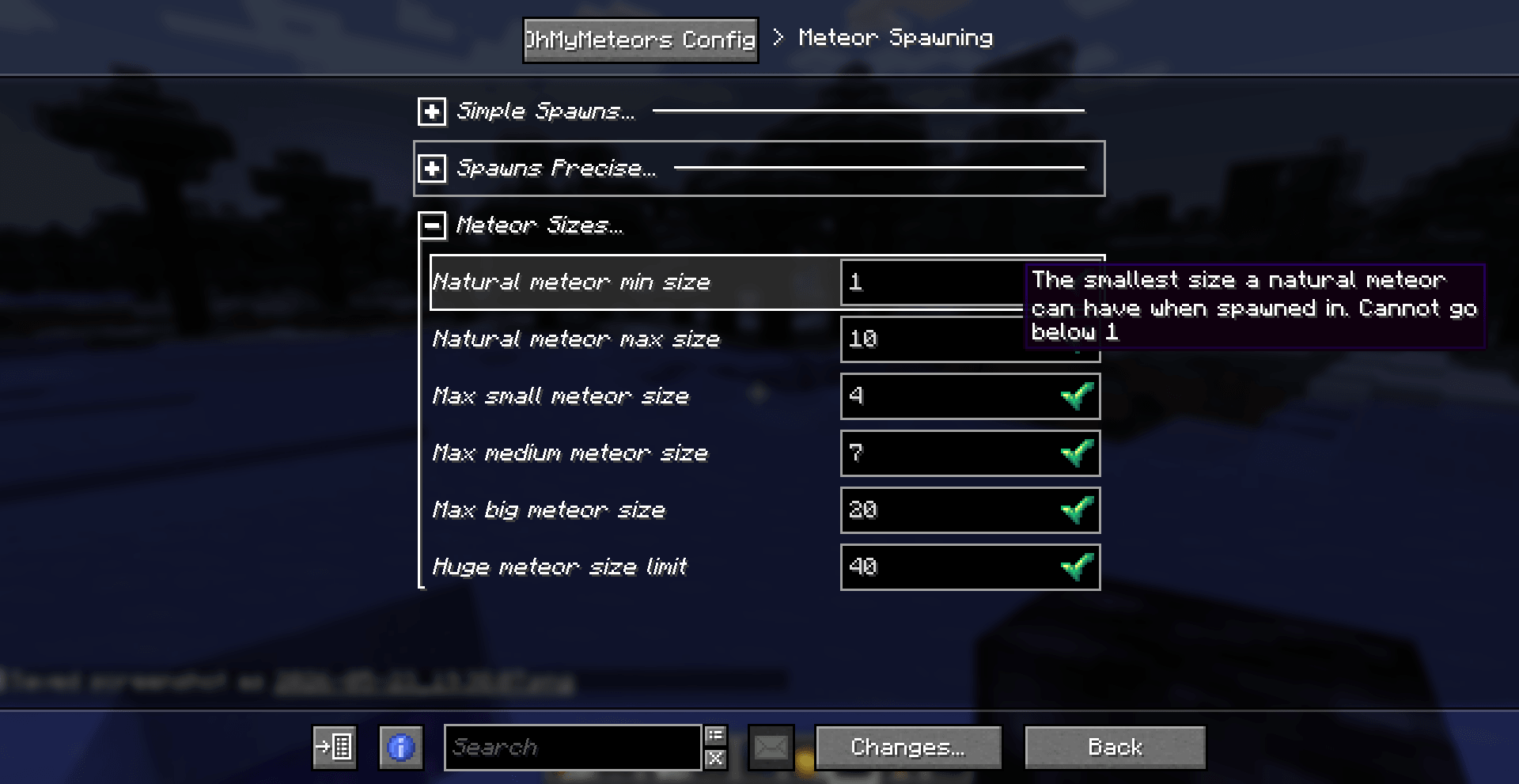
Your old config file will be automatically updated to the new format, but please **make a backup of your settings before updating!!!**
If anything goes wrong, open an issue on Github
#### Settings
A bunch of new settings have been added:
dimension_list_mode: A toggle black/whitelist mode for how the list of dimensions in which meteors can (or cannot) spawn, like the one for the biomesexplosion_power_multiplier: a multiplier for the explosion powerspawn_scatter_meteors: Weather or not scatter meteors should spawn in generaldownwards_speed_multiplier: a multiplier for how quick the meteors fallmeteors_load_chunks: weather or not meteors should try to load chunkschunk_loading_limit: the max number of chunk a meteor can load before being discardedverbose: if true gives more info for debuggingparticles_mode: Performance related settings, controls how many particles are sent to the client and thus shown (the lower the better TPS & FPS)meteor_texture_mode: A setting for the meteor texture and how and if it changestexture_change_distance_hot & _mid: related to the setting above
Some settings were adjusted:
- The laser cooldowns have been adjusted, the default for the basic is now 5 and for the advanced it's 3
- Fixed wrong default for the default speed multiplier
### Visuals
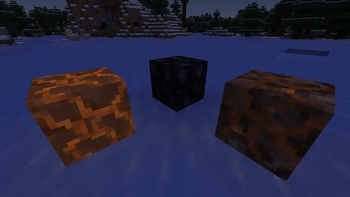
Now the meteor entity and the meteoric rocks have 3 stages of texture: HOT MID and NORMAL, which is the usual one.
The meteor entity can dynamically change texture based on how much it travels, going from NORMAL to HOT.
The meteoric rock now starts in the HOT state, and degrades all the way to NORMAl, cooling down. When HOT it damages players each time like a magma block
when MID it does only sometimes, and NORMAL does nothing.
Using snowballs on the block will make it tick down one state, while using a flint and steel will make it go up in hotness. You can make a state permanent by using an Echo Shard on the block.
### Performance and bugfixes
The performance should now be much better, especially if you set the particle mode in the config to MINIMAL
Fixes:
- Fixed meteors destroying armor stands, leaves and other entities in protected chunks/regions
- Removed Garbage Collection calls (don't remember why they were there) to improve performance
- Meteors won't spawn anymore when the game is frozen with /tick freeze
### Misc
- Added compat with Open Parties and Claims, you can set  this option on ON to prevent meteor spawning
- And hopefully with Entity Texture Features as well, to make the meteor emissive.
- Also meteors that go above 2500y will be discarded
Bear in mind that neither Flan nor YAWP have updated yet so they are incompatible at the moment
I've polished a lot of the visuals to make big space rocks that hit you in the face even prettier!
I polished so much I now crave for some potato-derived alcoholic beverage. Without speaking Russian tho.
### Visuals (optionally vibrant)
Fixed the meteor model, now it's not asymmetrical anymore (I don't know how nobody noticed until now)
and also resolved the z-fighting problem. But now it's also... **ANIMATED**! Woo. The meteor model
will now spin around when falling down, for a _much_ nicer effect.

On top of that particles have been significantly reworked, now the plumes of smoke are actually colored in the tones
of red and orange, to have a more "fiery" look. Some of them will be bigger than the others, and the flash
particles used now scale with the size of the meteors and are colored in reddish-orange to simulate more
of incandescent air resistance.
### QOL
Added a bunch of new features to tweak the mod to your liking
- Added option to never spawn meteors naturally, by setting the chance of spawning in the config file to -1 (or other negative numbers)
- Added a warning message sent to OP players when the join for when the config file corrupts and is regenerated
- Added the block tag
meteor_explosion_safe, add this to blocks that you want to make invulnerable to meteor explosions (both the explosion itself and the structure) - Chests, Barrels (in theory, other mods' ones as well), Hoppers, Droppers, Dispenser and Shulker Boxes are now immune to meteor explosions by default (they have the above tag by default)
- Updated some default config values. Now the meteor spawn chance is a lower, since I've seen people having them a little too frequently. The meteor spawn distance as also been increased a bit. Increased the default HUGE size. This change will not affect already changed values in your config.
- Added better error messages when trying to spawn a meteor with /omm spawn while inside regions, dimensions or biomes that don't allow it.
- Added a setting for the meteor dispersion factor, aka how much diagonally will the meteors go. Higer values mean the meteor will go more vertical, with lower ones it will go more horizontal (and thus land further from the spawn point)
- Added a setting to prevent the fire spawning alongside the explosion
### Bugfixes
- Fixed ConcurrentException issue that could lead to crashes in some cases
- Fixed crash and config rest when updating the config file to newer versions
#### Code stuff for developers
Now the code is much more mod addon-friendly, with a bunch of changes such actually have extendable entity and model, and a lot of other stuff.
If interested, check the github commit logs. Quite a few changes under the hood were made here.
In game it will still display as 1.3.0
If it still crashes with some mods please download https://modrinth.com/mod/structureplacerapi/version/2.0.0+1.20.1+forge as well. I am not usre if can do anything about this crash, so that's it sorry.
Woo! Colorful skies time! A bit of a smaller update but with some nice touches
### Meteor sky glow
Now when meteors rain down towards your lands you will sky the sky light up of different color, similar to what happens
IRL, like that Portugal meteor video from a couple years ago. Of course the effect can be disabled in the config, and
you can even change the color if you want! This effect will be applied only to players which can actually *see* the meteor,
so only in the meteor renderer distance (which can be modified in the config file). This was suggested by reddit user u/JuryLucky726,
thank you!

### Meteor explosion on entity collision
Now (moving) meteors can now explode if they come into contact with an entity, be it a player or another projectile!
This option if turned off by default, you can enable it in the config file!
### Config
Added a few new config options, related to two feature above and an extra one dedicated to the possibility of modifying the
delay between meteor spawns in the delayed meteor shower types
### Bugfixes!
I brought in the best pokemon bug catchers from Virdian forest for this one!
- Fixed meteors downwards speedmodifier not working (again, thank you u/JuryLucky726)
- Fixed potential crash when using a max number of meteors in a meteor shower that was lower than the minimum
- Fixed homing meteors not working properly anymore
- Fixed meteors of size 1 and 2 still spawning a block regardless even if the onlyReplaceAir option was set to true in the config
### Misc
- Clarified what "1 in x" means in the config file regarding chances (thanks u/jeleuri)
- Removed some leftover debug logging
- Now meteors that are still (summoned ones) won't emit particle effects
- Added a few methods that could help in addon creation, and also fixed forcing the entitytype in the constructor (dev stuff, look at commits if interested!)
- Removed /omm spawn random command, it broke and did not have any real purpose anymore
This is true port to Neoforge, not like earlier versions which needed Connector. That said it might still cause issues, so please report any bugs or missing stuff and be patient!
For the rest of the changes, read https://modrinth.com/mod/ohmymeteors/version/1.2.0+1.21
My neighbour's cat ate update 1.1.0, sorry!
## Meteor showers!
A new feature which allows meteor showers to spawn!
Meteor showers are a cluster of meteors that fall together at the same time. Three types of meteor showers have been added:
instantwhere all the meteors fall at the same time around a central pointdelayedwith each meteor spawning a bit after the next onedelayed directionedwith each meteor spawning after the next one but with all meteors following the same general trajectory
## Easier custom meteors - /omm custom command
A new command has been added to facilitate the creation of new meteors!
You can use the new
/omm custom command to add structure/schematics to a datapack generated by the mod. Simply set the category of the meteor and if it should be a special one or not and let the command do the rest.#### Adding a new meteor
/omm custom add <type_of_schematic> <structureId/schemId> <size> <special>type_of_schematic is the type of schematic/structure file that is going to be used to spawn the meteors structure. Three types are currently supported thanks to SchemConvert, and they are:structureblock: the vanilla.nbtstructure files that you can create using a structureblockworldedit_schematic: worldedit's.schemfiles which you can create with the//schemcommandlitematica_schematic: litematica's.liteschemfile
Especially for the schematic files it's important to not move them from where they are generated
structureId/schemId: is the name of the structure/schematic file that you want to use. You don't need to specify the extension (like .schem or .nbt). This name is the same one that will be used by the meteor strucuture id, but you can change it later with the edit command if neededsize: the size correspondig to this new meteor structure, can be SMALL, MEDIUM, BIG, HUGEspecial: weather or not this is a special meteor aka if this has a lower than normal chance of appearing#### Removing default meteors
/omm custom ignoredefaults [true|false]If you set ignoredefaults to true this mod's default meteors will be disabled and only custom ones will be used. Make sure to add at least one meteor structure per category otherwise it will give an error
#### Removing meteor structures
/omm custom remove <structureId> <size> <special>If you want to remove a meteor that you have previously added you can use this command. You will need to specifiy the structure's name, the corresponding size and if it is a special meteor
#### Editing meteor structure
/omm custom edit <originalName> <ogSize> <ogSpecial> <newName> <newSize> <newSpecial>You can use this command to edit a structure file name, class and if it's a special one or not. Pretty intuitive by now i think
#### Seeing which meteors you have added so far
/omm custom display_currentWill display all the meteors corresponding to a certain size and special. It will also display if you have currently disabled default meteors or not
## New config options
A new config option to display where meteors spawn and land has been added. For meteor showers there will only be one message, the shower's spawning location.
Another new config option allows you to have meteor structures replace only air blocks.
Config options for how many meteors can be in a meteor shower, their chance of spawning etc have also been added.
### Misc
Fixed a bug where adding the ignoredefaults.nbt file while not providing any valid structures will cause the game to crash.
Fixed the small meteors embedding too much in the terrain and kind of disappearing inside it
The jar file has gotten a bit fatter
- Updated to 1.21.9/.10
EDIT NOTE: this version has been built wrong, please use [this version](https://modrinth.com/mod/ohmymeteors/version/1.0.0+1.21.1) which is the same, but fixed!
EDIT NOTE: this version has been built wrong, please use [this version](https://modrinth.com/mod/ohmymeteors/version/1.0.0+1.21.1) which is the same, but fixed!
This was a rather big update, improving a lot of stuff and adding some nice features:
- Meteor terrain-embedding
Now the meteor will embed proeprly in the terrain when they hit the ground, without akwardly floating midair occasionally. They will also be affected by their velocity and direction of the fall.
- Meteor explosions
By default the explosion shape has been changed to a sphere which makes craters nicer, especially at high power levels & meteor sizes. (i mean with big meteors we just had a square hole so...). If you still prefer the vanilla explosion, you can toggle it in the config file.
(Thanks to [explodee](https://github.com/KnownSH/Explodee) for the code/inspiration!)
- Better meteor rendering
Now meteors are rendered much further away by default, so they won't disapper randomly anymore. If you need to, you can configure how far away they render in the config file (bear in mind that you will need to restart client & server after you make this change!)
Meteors will also go a bit into the terrain (visually) before exploding, instead of exploding as soon as their hitbox reaches the ground. Makes for a nicer effect especially with bigger meteors.
- Added a way to remove default meteor structures
Now you can remove one or multiple (or all) of the default meteor structures (or even non default ones if you need to).
To do this, you will need to insert another structure file (copy one of the default ones, like the error one!) named
``
ignore_<structuretoignore>.nbt
  For example:
ignore_small_meteor_0.nbt
If possible you should insert it in the same folder of the structure you want to remove (in our example you should put in the /small/ folder)
If you want to ignore all of the default structures add a structure with the filename:
ignoredefault.nbt
Remember to add your custom structures tho, otherwise only an error structure is going to spawn!
You can see the default structures [here](https://github.com/TeamChikken/OhMyMeteors/tree/1.21/src/main/resources/data/ohmymeteors/structure)
- Mod comapt with Flan & YetAnotherWorldProtector
Now you will be able to use either Flan or YAWP to define regions where meteors can't spawn or explode. Flan has its own global setting, while to disable the meteor spawning in YAWP you will need to set the flag to denied.
- Tags for bypassable blocks instead of just leaves
Added a new tag for blocks that will be bypassed by meteors instead of exploding, like the leaves config option (which has been discontinued). The tag is called
`
ohmymeteors:meteor_bypasses
ohmymeteors:meteor_bypasses_and_destroy
By default, it now also includes ice blocks and snow layers.
- Misc
Fix: Special meteors now correctly spawn less often that non-special meteors.
Fix: The Translations: Added uk_ua translation, thanks to StarmanMine142
Updated structureplacerapi to 1.1.6
- You can now use
/omm spawn naturalto spawn a meteor in the world, just as if it would have naturally spawned (aka it will find a random player and spawn the meteor in their realtive vicinity)
Added config option to increase the speed at which meteors fall down
Added config option to set in which dimension and which biomes meteors can spawn in, and with which chances
- You are now able to restrict meteor spawning in different dimensions (even modded ones!), and optionally set a custom spawning chance for each dimension, with the option to set its night chance as well.
- You are also able to set up a similar thing with biomes. Depending on your needs the list of biomes will be treated as a blacklist (aka meteors won't spawn in the listed biomes) or as a whitelist (meaning meteors will ONLY spawn in those biomes). You can even set up different spawning chances per each biome, provided you configured so the meteors can spanw in such biome. Custom biomes from other mods are also supported.
- The spawning chance order is biome>dimension>default
- Added support for custom meteors structures using a datapack! You can add whatever structure you want to spawn when a meteor of a certain sizes hits the ground and explodes. You can use .nbt (structure block) files, and if you put them inside the /special/ folder (see [example datapack](https://github.com/TeamChikken/OhMyMeteors/releases)) they will have a lower (configurable) chance of spawning, like the meteor cat.
- Added a few more config options, such as making the sound of a meteor explosion be hearable at a configurable distance. Another setting will allow you to add a modifier to the explosion power of a meteor
- Added compatibility with ModMenu, where the config file will be opened
- Added /omm config open command to open the config file if you are in singleplayer mode. (if you are on a server, you will need to manually edit the server's config file)
- Fixed a bug where the meteor could sometimes explode twice
- Added permission for the commands *ohmymeteors.command.config* and *ohmymeteors.command.spawn*


