
Rebrand
Rebrand is a light-weight mod for Fabric that allows you to hide and customize your client brand.
Whenever you connect to a multiplayer server, your client sends a message to the server containing a "brand". This brand would normally contain "vanilla", but Fabric and other mod loaders often fill it with information about the mod loader itself. Some servers use this to identify modded clients, and this can increase the risk of your account being banned from the server. Rebrand fixes this by hiding the mod loader information, and allowing you to set it either to the vanilla default, or a custom brand.
Installation
Download the latest release of Rebrand for your client version, and drag it into your ./minecraft/mods folder.
Optional Dependencies
Rebrand has support for Mod Menu, and can be configured via the mod list when this mod is installed.
Configuration
Rebrand can be configured by editing the rebrand.toml file in the .minecraft/config folder.
enable: Enables and disables Rebrand. Default: truebrandName: The brand name to send to the server. Default: vanilla
When using Mod Menu, the configuration file will be updated when you save the mod's config.
How to Install Rebrand (Mod)
Rebrand by kaylendog is verified for Fabric across Minecraft versions 1.18.2, 1.19.2, 1.19.4, 1.20.1, 1.20.2, 1.21.1, 1.21.3, 1.21.4 (latest release: 2.0.5+1.21.8, file size: 115 KB). Follow the steps below to install it safely from ModCraft.tv:
- Click the Download button above and select your Minecraft version (1.18.2, 1.19.2, 1.19.4, 1.20.1, 1.20.2, 1.21.1, 1.21.3, 1.21.4) and platform (Fabric).
- Make sure you have the compatible loader or environment installed for Fabric.
- Move the downloaded Rebrand file into your Minecraft
.minecraft/modsfolder and launch the game.
All Versions
+ Add Version- Support for Minecraft 1.21.8
- Support for Minecraft 1.21.5
- Support for Minecraft 1.21.4
- Support for Minecraft 1.21.3
- You can now change the title and version displayed in the Minecraft window to whatever.
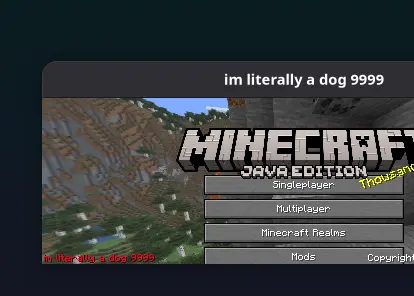
- You can now change the text displayed in the bottom left of the main menu to whatever.
- Update to 1.20.2 by @iffyspeak-chroma in https://github.com/kaylendog/rebrand/pull/18
## New Contributors
- @iffyspeak-chroma made their first contribution in https://github.com/kaylendog/rebrand/pull/18
- Full Changelog**: https://github.com/kaylendog/rebrand/compare/1.1.1...1.1.2
- feat(lang): :globe_with_meridians: Added Italian language support by @Nukecraft5419 in https://github.com/kaylendog/rebrand/pull/12
- fixed an incorrect mixin target causing crashes
## New Contributors
- @Nukecraft5419 made their first contribution in https://github.com/kaylendog/rebrand/pull/12
- Full Changelog**: https://github.com/kaylendog/rebrand/compare/1.1.0...1.1.1
- Support for 1.20.1
- Adds Ghost Mode, allowing you to hide from server-side client scrapers.
## What's Changed
- Update for 1.19.2 by @kaylendog in https://github.com/kaylendog/rebrand/pull/2
- Updated to 1.20.1 by @R4z0rX in https://github.com/kaylendog/rebrand/pull/8
- Create fr_fr.json by @Calvineries in https://github.com/kaylendog/rebrand/pull/6
- Create es_ar.json by @R4z0rX in https://github.com/kaylendog/rebrand/pull/10
## New Contributors
- @kaylendog made their first contribution in https://github.com/kaylendog/rebrand/pull/2
- @R4z0rX made their first contribution in https://github.com/kaylendog/rebrand/pull/8
- @Calvineries made their first contribution in https://github.com/kaylendog/rebrand/pull/6
- Full Changelog**: https://github.com/kaylendog/rebrand/compare/1.0.2...1.1.0
- Add 1.19.4 support
- Switch to Java 17 build
- Initial release
- Support for Minecraft 1.19.2


