
ShulkerPeek: Shulker Box Tooltip Preview
See inside any shulker box without opening it.
ShulkerPeek is a client-side shulker box tooltip preview mod for Fabric, Forge, and NeoForge. Hover over any shulker box in your inventory and instantly see its full shulker box contents displayed in a clean 9x3 visual grid. The tooltip background tint matches the box dye color so you can see inside shulker boxes at a glance no placing, no opening, no guessing.
The fastest way to manage shulker box storage in survival, technical play, or any modpack with heavy item management.
How the shulker box tooltip preview works
When you hover over a shulker box item, ShulkerPeek checks for stored inventory data. If data is found, the standard tooltip is replaced with a fully rendered shulker box contents grid showing all 27 slots. Box title, stack counts, and background color tint are all optional and configurable.
Everything runs client-side only. ShulkerPeek reads item data already present on the client and renders it visually. It does not send data to servers and requires no server-side installation works on any server you join.
Features
See shulker box contents on hover without placing or opening the box
Full 9x3 visual grid matching the real shulker inventory layout
Shulker box tooltip background tint matched to the dye color
Optional box title or custom name shown above the contents grid
Optional item stack count overlays on each slot
Shift-to-show mode so the shulker preview only appears when holding Shift
Keybind toggle to enable or disable the shulker tooltip instantly in-game
Config file at config/shulkerpeek.json for manual editing
In-game config screen on Forge and NeoForge via the Mods menu
Perfect for shulker box storage management
ShulkerPeek is built for players who carry many shulker boxes and need fast identification. Instead of placing and opening multiple boxes to find the right one, hover and see inside shulker boxes in seconds.
Large shulker box storage systems in survival worlds Technical Minecraft and building playthroughs with sorted item storage Modpacks with heavy inventory and item management Multiplayer servers where quick inventory sorting matters
Configuration
| Setting | Default | Description |
|---|---|---|
| Enabled | true | Master on/off toggle |
| Require Shift | false | Show shulker box tooltip on hover by default |
| Show title | true | Display box name above the contents grid |
| Show item counts | true | Stack size overlay on each slot |
| Color tint strength | medium | Intensity of the dye color tint |
| Slot background darkness | medium | Visibility of individual slot backgrounds |
Config file: config/shulkerpeek.json
In-game config screen available on Forge and NeoForge.
Requirements
Fabric version: Fabric Loader and Fabric API required Forge version: no extra dependencies required NeoForge version: no extra dependencies required
What ShulkerPeek does not do
ShulkerPeek does not modify, move, or duplicate any items. It does not add blocks, items, or recipes. It does not require placing the shulker box. It does not send any data to servers. It is a purely visual, read-only shulker box tooltip enhancement with no effect on gameplay.

All Versions
+ Add Version| Name | Game version | Platforms | Published | Downloads | Actions |
|---|---|---|---|---|---|
| 1mo ago | 1 | ||||
| 1mo ago | 1 | ||||
| 1mo ago | 1 | ||||
| 4mo ago | 1 | ||||
| 4mo ago | 1 | ||||
| 4mo ago | 1 | ||||
| 4mo ago | 1 | ||||
| 4mo ago | 1 | ||||
| 4mo ago | 1 | ||||
| 4mo ago | 1 | ||||
| 4mo ago | 1 | ||||
| 4mo ago | 1 | ||||
| 7mo ago | 1 | ||||
| 7mo ago | 1 | ||||
| 7mo ago | 1 | ||||
| 7mo ago | 1 | ||||
| 7mo ago | 1 | ||||
| 7mo ago | 1 | ||||
| 7mo ago | 1 | ||||
| 7mo ago | 1 | ||||
| 7mo ago | 1 | ||||
| 7mo ago | 1 | ||||
| 7mo ago | 1 | ||||
| 7mo ago | 1 | ||||
| 8mo ago | 1 | ||||
| 8mo ago | 1 | ||||
| 8mo ago | 1 |


Feature port to MC 26.3 ("Wilderness Bound") with all fixes from v1.3.0 included.
### ✨ What's New
- Market info in the tooltip** — when a server shop or economy mod adds Seller / Price / Quantity lines to a container's tooltip, ShulkerPeek now surfaces them inside its preview UI (ported from Container Preview; toggle: "Show market info", on by default)
- All v1.3.0 features and fixes** ported to Minecraft 26.3
- The empty-box label is now translatable (
shulkerpeek.empty)
### 🐛 Bug Fixes
- Hardened the Fabric mixin: full method descriptors, explicit priority, and MixinExtras
@ModifyReturnValueinstead of destructive cancellable injects - Replaced the tooltip cache's mutable-keyed
WeakHashMapwith a bounded identity cache (no more orphaned entries, zero steady-state allocation) - Fixed NeoForge metadata: malformed Minecraft version range, restored the mod icon (
iconFile;logoFileis deprecated in 26.3) - Fixed Forge legacy mappings block and stale
pack.mcmeta(min_format/max_formatschema for 26.3) - Config screens auto-center and fit at all GUI scales; market toggle added to all three loaders
### ⚙️ Changes
- Toolchain: Gradle 9.6.0, Java 25, Forge 26.3-66.0.3, NeoForge 26.3.0.16-beta, Fabric Loom 1.17.21, Fabric Loader 0.19.5, Fabric API 0.161.0+26.3, ModMenu 21.0.0
- SDL input support (GLFW was removed in 26.3) — the keybind now uses InputConstants scancodes
- Removed the unused
fabric-item-api-v1dependency
Feature port to MC 26.3 ("Wilderness Bound") with all fixes from v1.3.0 included.
### ✨ What's New
- Market info in the tooltip** — when a server shop or economy mod adds Seller / Price / Quantity lines to a container's tooltip, ShulkerPeek now surfaces them inside its preview UI (ported from Container Preview; toggle: "Show market info", on by default)
- All v1.3.0 features and fixes** ported to Minecraft 26.3
- The empty-box label is now translatable (
shulkerpeek.empty)
### 🐛 Bug Fixes
- Hardened the Fabric mixin: full method descriptors, explicit priority, and MixinExtras
@ModifyReturnValueinstead of destructive cancellable injects - Replaced the tooltip cache's mutable-keyed
WeakHashMapwith a bounded identity cache (no more orphaned entries, zero steady-state allocation) - Fixed NeoForge metadata: malformed Minecraft version range, restored the mod icon (
iconFile;logoFileis deprecated in 26.3) - Fixed Forge legacy mappings block and stale
pack.mcmeta(min_format/max_formatschema for 26.3) - Config screens auto-center and fit at all GUI scales; market toggle added to all three loaders
### ⚙️ Changes
- Toolchain: Gradle 9.6.0, Java 25, Forge 26.3-66.0.3, NeoForge 26.3.0.16-beta, Fabric Loom 1.17.21, Fabric Loader 0.19.5, Fabric API 0.161.0+26.3, ModMenu 21.0.0
- SDL input support (GLFW was removed in 26.3) — the keybind now uses InputConstants scancodes
- Removed the unused
fabric-item-api-v1dependency
Feature port to MC 26.3 ("Wilderness Bound") with all fixes from v1.3.0 included.
### ✨ What's New
- Market info in the tooltip** — when a server shop or economy mod adds Seller / Price / Quantity lines to a container's tooltip, ShulkerPeek now surfaces them inside its preview UI (ported from Container Preview; toggle: "Show market info", on by default)
- All v1.3.0 features and fixes** ported to Minecraft 26.3
- The empty-box label is now translatable (
shulkerpeek.empty)
### 🐛 Bug Fixes
- Hardened the Fabric mixin: full method descriptors, explicit priority, and MixinExtras
@ModifyReturnValueinstead of destructive cancellable injects - Replaced the tooltip cache's mutable-keyed
WeakHashMapwith a bounded identity cache (no more orphaned entries, zero steady-state allocation) - Fixed NeoForge metadata: malformed Minecraft version range, restored the mod icon (
iconFile;logoFileis deprecated in 26.3) - Fixed Forge legacy mappings block and stale
pack.mcmeta(min_format/max_formatschema for 26.3) - Config screens auto-center and fit at all GUI scales; market toggle added to all three loaders
### ⚙️ Changes
- Toolchain: Gradle 9.6.0, Java 25, Forge 26.3-66.0.3, NeoForge 26.3.0.16-beta, Fabric Loom 1.17.21, Fabric Loader 0.19.5, Fabric API 0.161.0+26.3, ModMenu 21.0.0
- SDL input support (GLFW was removed in 26.3) — the keybind now uses InputConstants scancodes
- Removed the unused
fabric-item-api-v1dependency
- Full multi-loader support: Fabric, Forge, and NeoForge
- Mod Config screen now accessible from Mod Menu (Fabric)
- Updated mod icon
- Improved shulker box preview tooltip with better colors and visuals
- Toggleable options: enable/disable, require shift, show name, show item counts
- Adjustable tint strength and slot darkness sliders
- Configurable toggle keybind
- Supports Minecraft 1.21.9 and 1.21.10
- Full multi-loader support: Fabric, Forge, and NeoForge
- Mod Config screen now accessible from Mod Menu (Fabric)
- Updated mod icon
- Improved shulker box preview tooltip with better colors and visuals
- Toggleable options: enable/disable, require shift, show name, show item counts
- Adjustable tint strength and slot darkness sliders
- Configurable toggle keybind
- Supports Minecraft 1.21.9 and 1.21.10
- Full multi-loader support: Fabric, Forge, and NeoForge
- Mod Config screen now accessible from Mod Menu (Fabric)
- Updated mod icon
- Improved shulker box preview tooltip with better colors and visuals
- Toggleable options: enable/disable, require shift, show name, show item counts
- Adjustable tint strength and slot darkness sliders
- Configurable toggle keybind
- Supports Minecraft 1.21.9 and 1.21.10
What's New
Multi-loader support! ShulkerPeek is now available for Fabric, Forge, and NeoForge. One jar covers all three 26.1.x versions so you don't need to download separate files per patch.
Empty shulker boxes now show a clean "Empty" label instead of a completely blank tooltip.
Config screen added — open your mod menu to tweak settings in-game without restarting.
ShulkerPeek now shows its own icon in the mod list.
Performance
Tooltip rendering has been completely rewritten. The mod no longer rebuilds tooltip data every frame, eliminating GC spikes and screen stuttering. Hover previews are now buttery smooth even with full shulker boxes.
Bug Fixes
Fixed vanilla tooltip text leaking through when hovering a shulker box in your regular inventory. It now exclusively shows the ShulkerPeek preview.
Fixed a crash on Forge during world load.
Fixed config settings not saving correctly in some edge cases.
What's New
Multi-loader support! ShulkerPeek is now available for Fabric, Forge, and NeoForge. One jar covers all three 26.1.x versions so you don't need to download separate files per patch.
Empty shulker boxes now show a clean "Empty" label instead of a completely blank tooltip.
Config screen added — open your mod menu to tweak settings in-game without restarting.
ShulkerPeek now shows its own icon in the mod list.
Performance
Tooltip rendering has been completely rewritten. The mod no longer rebuilds tooltip data every frame, eliminating GC spikes and screen stuttering. Hover previews are now buttery smooth even with full shulker boxes.
Bug Fixes
Fixed vanilla tooltip text leaking through when hovering a shulker box in your regular inventory. It now exclusively shows the ShulkerPeek preview.
Fixed a crash on Forge during world load.
Fixed config settings not saving correctly in some edge cases.
What's New
Multi-loader support! ShulkerPeek is now available for Fabric, Forge, and NeoForge. One jar covers all three 26.1.x
versions so you don't need to download separate files per patch.
Empty shulker boxes now show a clean "Empty" label instead of a completely blank tooltip.
Config screen added — open your mod menu to tweak settings in-game without restarting.
ShulkerPeek now shows its own icon in the mod list.
Performance
Tooltip rendering has been completely rewritten. The mod no longer rebuilds tooltip data every frame, eliminating
GC spikes and screen stuttering. Hover previews are now buttery smooth even with full shulker boxes.
Bug Fixes
Fixed vanilla tooltip text leaking through when hovering a shulker box in your regular inventory. It now
exclusively shows the ShulkerPeek preview.
Fixed a crash on Forge during world load.
Fixed config settings not saving correctly in some edge cases.
What's New
- Now supports Fabric, Forge, AND NeoForge!
- Empty shulker boxes finally show an "Empty" label instead of a blank tooltip
- Cleaner tooltips no more "Colored Block" / "Functional Block" text cluttering your previews
- Fixed empty shulker boxes showing nothing on Forge & NeoForge
- Fixed Forge crashing on world load (missing resource metadata)
- Fixed config screen not saving in some edge cases
- Fixed potential crashes when closing the settings menu
- Config errors are now logged instead of silently failing
- Updated for Minecraft 26.2 (Chaos Cubed)
- "Reset to Defaults" button on all three loaders
- Smaller, cleaner JAR files
What's New
- Now supports Fabric, Forge, AND NeoForge!
- Empty shulker boxes finally show an "Empty" label instead of a blank tooltip
- Cleaner tooltips no more "Colored Block" / "Functional Block" text cluttering your previews
- Fixed empty shulker boxes showing nothing on Forge & NeoForge
- Fixed Forge crashing on world load (missing resource metadata)
- Fixed config screen not saving in some edge cases
- Fixed potential crashes when closing the settings menu
- Config errors are now logged instead of silently failing
- Updated for Minecraft 26.2 (Chaos Cubed)
- "Reset to Defaults" button on all three loaders
- Smaller, cleaner JAR files
What's New
- Now supports Fabric, Forge, AND NeoForge!
- Empty shulker boxes finally show an "Empty" label instead of a blank tooltip
- Cleaner tooltips no more "Colored Block" / "Functional Block" text cluttering your previews
- Fixed empty shulker boxes showing nothing on Forge & NeoForge
- Fixed Forge crashing on world load (missing resource metadata)
- Fixed config screen not saving in some edge cases
- Fixed potential crashes when closing the settings menu
- Config errors are now logged instead of silently failing
- Updated for Minecraft 26.2 (Chaos Cubed)
- "Reset to Defaults" button on all three loaders
- Smaller, cleaner JAR files
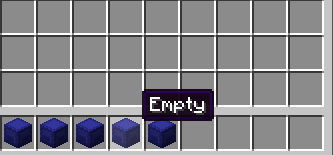
Now empy shulkers donot show the ui and says empty instead.
Added NeoForge 1.21.11 support
Initial Fabric release remains unchanged
Added NeoForge 1.21.10 support
Initial Fabric release remains unchanged
Added Forge 1.21.9 support
Initial Fabric release remains unchanged
Added Forge 1.21.10 support
Initial Fabric release remains unchanged
Added Forge 1.21.9 support
Initial Fabric release remains unchanged


