
SkyGridx - Official Support & Downloads
Join our Discord Community for help, support, issues, feedback, and discussions!
Click here to join: Join Our Discord
Download Links:
Overview
The SkyGrid Plugin offers access to the latest blocks (26.2) and empowers users to fully customize the grids in the Overworld, Nether, and End dimensions. The initial generation process, which typically takes ~1 minute, adapts to the server's capabilities. Subsequently, all generation activities occur efficiently in real-time.
This plugin also includes a built-in random teleport command for each dimension, ensuring that players can safely explore their chosen realm. Furthermore, it features an ore generator that can modify stone generation to create various blocks of your choice. While currently configured primarily for ores, the possibilities are virtually endless.

Key Features:
Block Selection:
- Create a unique SkyGrid with a variety of blocks from the Bukkit Material page.
- Customize block types and percentages effortlessly.
Real-time Generation:
- SkyGrid generates in real-time as you explore.
Built-in Fog Feature:
- Fog feature accompanied by a texture pack. Admins can enable it using
/fogonand disable with/fogoff. This feature allows lower render distances without disrupting immersion. - Feature is included in the settings file if you would like to enable it by default, it will come as disabled by default.
Material Distribution:
- Define personalized materials for block placement per world.
- Fine-tune material distribution percentages for a distinct experience.
- Choose parent materials as well as materials for all the sides and ends of said parent block material
Biome-Specific Grids:
- Customize grids in Overworld, Nether, and End with unique blocks at the biome level.
Ore Generation:
- Seamlessly integrated into the gameplay, this feature replaced generated stone, cobblestone or basalt with any blocks you want.
- The block types generated, and their percentages can be effortlessly modified to suit your preferences in the ores.yml file inside the OreGenBlock folder, and work on all worlds where stone, cobblestone or basalt can be generated.
Teleportation Command:
- Securely teleport to random locations in
- Overworld (/tpr overworld) or (/tpro)
- Nether (/tpr nether) or (/tprn)
- End (/tpr end) or (/tpre).
- Range can be customized in the settings
- Settings also include cooldown for per world command reuse
- All have their own individualize permissions
Spawner Settings:
- The available entities for use can be found at here
- Fine-tune spawner settings for entities, delay, max nearby entities, and more.
- Random entity selection based on spawn weights for added unpredictability.
- Customize spawners for specific biomes at the block level, adding a new layer of customization. For example, if you specify the biome as
DEEP_DARK,you can configure spawners to spawnWARDENentities exclusively in that biome.
Chest Loot Customization:
- Tailor chest loot settings with precision, specifying items, percentages, amounts, custom names, Enchantments , lore colors and more.
- Tiered loot distribution for added variety, each tier with its own set of items and probabilities.
- Customize chest loot for specific biomes, allowing for a more immersive and thematic distribution of items based on the environment.
Mini Chunk Regeneration
- Periodically regenerate selected chunks on a timer without touching the surrounding world.
- Configure with
/miniregenorMiniRegen/mini_regen_settings.ymlonce chunks have been chosen. - Supports custom material distributions and grouping for bulk removal.
Enhanced Eye of Ender
- Eyes follow a smooth arc to the nearest registered portal, hover for 5 s with particles, then refund the eye.
- If no portal exists, they pop instantly with a small explosion and refund.
- Portal coordinates stored in an efficient binary file (
portals.dat). - This is only for
END_PORTALmaterials used in the grid, and serves as a replacement for the missing stronghold structure.
Commands:
/tpr [world]: Random teleport in the Overworld, Nether, or End./tpro: Random teleport in the Overworld./tprn: Random teleport in the Nether./tpre: Random teleport in the End./fogon: Enable fog./fogoff: Disable fog./eclogson: Enable Event Control logging./eclogsoff: Disable Event Control logging./patch: Patch files to update materials and entities to the newest version./miniregen add [interval in seconds] [alias] [distribution] [group(optional)]: Schedule mini chunk regeneration for your current chunk./miniregen remove [alias]: Remove a mini chunk regeneration setting by alias./miniregen remove group [groupName]: Remove all mini regeneration settings in a given group.
Permissions:
(Default all)
sg.tpr: Allows teleportation to Overworld, Nether, and End using the/tpr [world]command.sg.tpr.overworld: Grants permission to use the/tprocommand for teleportation in the Overworld.sg.tpr.nether: Grants permission to use the/tprncommand for teleportation in the Nether.sg.tpr.end: Enables usage of the/tprecommand for teleportation in the End.
(Default OP)
sg.tpr.*: Provides access to all teleportation commands.sg.fogon: Allows enabling fog using the/fogoncommand.sg.fogoff: Allows disabling fog with the/fogoffcommand.sg.eclogson: Grants permission to enable Event Control logging using/eclogson.sg.eclogsoff: Grants permission to disable Event Control logging using/eclogsoff.sg.patch: Allows patching files to update materials and entities to another version.sg.regen: Grants permission to regenerate all loaded chunks using the/regencommand.sg.miniregen: Grants permission to manage mini chunk regeneration using the/miniregencommand.sg.*: Provides access to all SkyGrid commands.
Installation Instructions
For detailed installation instructions, click here.
Configuration Files
- Plugin Settings
- Ore Generator Settings
- Mob Spawner Settings
- Chest Settings
- SkyGrid World Block Selection Guide
Additional Mechanisms:
How to Install SkyGridx (Plugin)
SkyGridx by Go0fy_Go0ber is verified for Bukkit, Folia, Paper, Purpur, Spigot across Minecraft versions 1.20, 1.20.1, 1.20.2, 1.20.3, 1.20.4, 1.20.5, 1.20.6, 1.21 (latest release: 26.2-1.21-backport, file size: 13.9 MB). Follow the steps below to install it safely from ModCraft.tv:
- Click the Download button above and select your Minecraft version (1.20, 1.20.1, 1.20.2, 1.20.3, 1.20.4, 1.20.5, 1.20.6, 1.21) and platform (Bukkit, Folia, Paper, Purpur, Spigot).
- Make sure you have the compatible loader or environment installed for Bukkit, Folia, Paper, Purpur, Spigot.
- Move the downloaded SkyGridx file into your Minecraft
.minecraft/pluginsfolder and launch the game.
All Versions
+ Add Version


- Backported SkyGrid 26.2 from Java 25 to Java 21
- Get all new features and improvements from 26.2 for older versions
- One plugin build now supports Paper & Folia 1.21 through 1.21.11
- Fresh installs detect the server version & add the blocks, items, mobs & biomes available in that release
- Newer 1.21 servers also get content from every earlier 1.21 update
- Older servers won't receive content added in later versions
- Existing config files are left unchanged when updating
- Fixed version differences for mooshrooms, snow golems, chains & biome names
Commands haven't changed. Existing servers keep their current settings, while fresh servers get defaults matched to their Minecraft version.
- Updated for Paper and Folia 26.2
- Added the new 26.2 blocks to SkyGrid world generation:
- Cinnabar
- Sulfur
- Potent Sulfur
- Sulfur Spike
- Cinnabar and Sulfur can now show up as normal SkyGrid blocks
- Potent Sulfur and Sulfur Spike were added as rare blocks since they have special behavior
- Material lists in the config files were cleaned up and sorted
- Config comments were rewritten to be easier to read
- Existing config help, examples, and format notes were kept
- Fixed a YAML spacing issue that could cause config loading problems
This update mainly keeps SkyGrid ready for Paper and Folia 26.2 and adds the new 26.2 blocks to world generation. Cinnabar and Sulfur should appear more often because they are normal blocks. Potent Sulfur and Sulfur Spike are much rarer because they behave differently from normal blocks. Old config setups should still work. If you already changed your config files, compare them before replacing them.
- Updated for Paper and Folia 26.1.2
- SkyGrid now requires Java 25
- SkyGrid now focuses on Paper and Folia only (removed support for spigot and bukkit)
- Folia has been update to remove the need for Datapack, as well as moved over to using the sql light system for chest
- Better handling for beds, respawn anchors, portals, and SkyGrid world respawns
- New compatibility settings for Multiverse, CMI, and other spawn/world plugins
- Mini regen, fog, custom chests, Eyes of Ender, teleporting, and resource pack handling were updated for the new Paper/Folia scheduler system
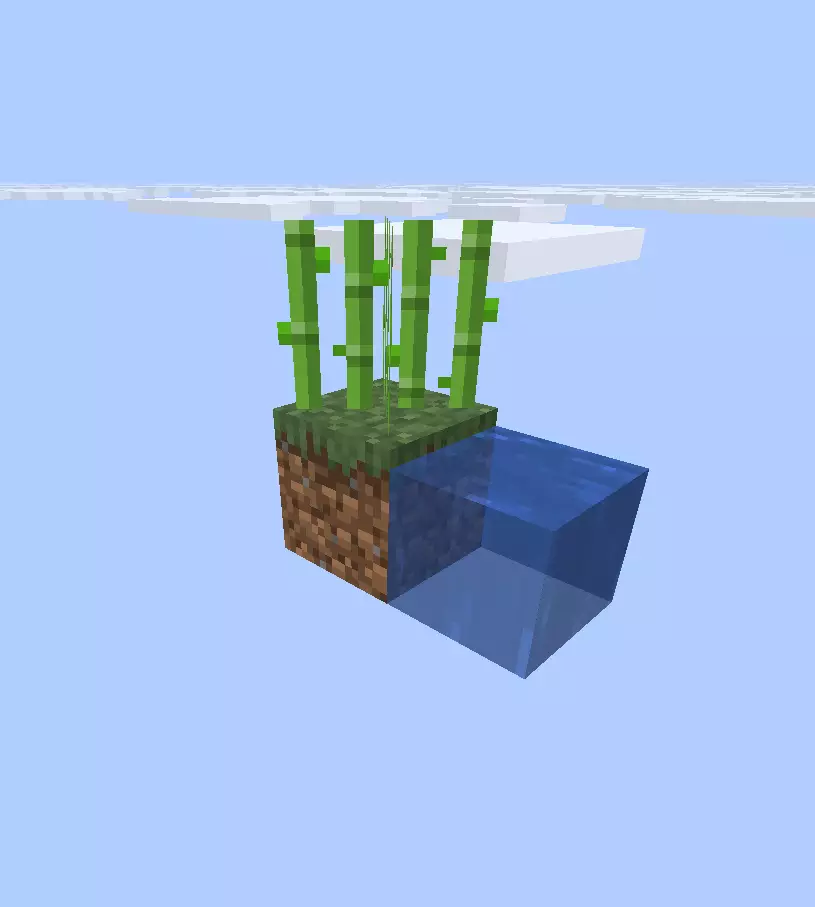
- New grid-face material options for more detailed SkyGrid block setups
The biggest config feature is grid-face materials.
Server owners can now attach blocks to the top, bottom, or sides of a picked SkyGrid block.
Example:
``
yml
distributions:
  custom_mushroom_fields:
    GRASS_BLOCK: 25
      top:
        SUGAR_CANE: 20
      east:
        WATER: 10
``
Old block config entries still work, so simple setups do not need to change.
- Note**: A lot changed in the plugin code for this version. Please report any bugs you run into, especially if your server uses Multiverse, CMI, Folia, or another world/spawn manager.
- Boosted pregenerator performance by up to 25%
- Enhanced generator, custom chest, spawner, and related utility classes to utilize the fastutil library, yielding a performance increase of up to 3-7% and significantly reducing memory usage (observed differences of up to 1.5GB in certain scenarios).
- Optimized the custom chest class by minimizing the number of times the chest block is accessed. Used a "fake" chest represented by an array for item placement calculations, accessed the chest instance only twice, and implemented multithreading to significantly reduce processing time to get random chest items.
- Improved material loading by adopting a new alias, resulting in more balanced loading between materials with and without biomes. Fetching random materials for both world and biome is now notably faster, reducing thread blocking during operations like **/tpr**. Additionally, precomputing wherever feasible and implementing caching mechanisms have been employed to further reduce fetch times for random materials. CPU usage during **/tpr** decreased from consistently hitting 100% across all cores for 2-3 seconds to a range of 80-90% for less than a second (test done with simulation-distance=8 and view-distance=8).
Note: Many main classes have been almost fully overhauled to use the fastutil library. If you encounter any issues, please submit them on the [GitHub](https://github.com/DavidS-Repo/SkyGridx/issues) issue page. I tried my best to test every scenario I can think of, but I can't always catch every issue.
/gclogs(on)/(off): Updated to/eclogs(on)/(off). This change comes as the more general event control has been introduced and it's no longer just growth control.
## Updated Permissions:
gc.gclogson: Updated toec.gclogson. Grants permission to enable event control logging using /eclogson. (Default OP)gc.gclogsoff: Updated toec.gclogsoff. Grants permission to disable event control logging using /gclogsoff. (Default OP)
## New Configuration Settings:
### TPR Command Settings:
- Added a new option for the server to randomly teleport players on first join,
onFirstJoinby default is false, this provides servers without a spawn the option to random teleport the player only the first time they connect to the server. - Added a new delay option for usage of
/tprcommands,b2bDelayadds a fourth timer to prevent players from using the/tprcommand back-to-back. Players must wait for this duration before they can use any/tprcommands again. - Moved the list of blocks considered unsafe to teleport to settings file, under
DANGEROUSBLOCKS, this list is used by the code to determine what materials you do not want the player to be teleported on top of when they use the /tpr command.
### Event Control Settings:
EventControl: Lets you turn off and on all the newly added grid integrity checks, these monitor server events to prevent the following: BlockIgniteEvent, BlockFadeEvent, BlockFromToEvent, StructureGrowEvent, BlockSpreadEvent, BlockGrowEvent, BlockFormEvent, and EntityChangeBlock.- There is also a new list of materials in
GRAVITY_AFFECTED_BLOCKSwhich is used to determine what blocks you do not want snow to form on in the grid or general gravity-affected blocks that you do not want to fall due to server overload.
```YML
# Configuration
# Generator settings
generator:
# Delay in ticks before processing chunks after chunk load event.
# A shorter delay increases server load, while a longer delay may affect player immersion.
processDelay: 5
# Max and Min height for blocks placed in the Grids for all Environments.
# Keep within increments of 4 starting from the current min or max.
# i.e. 0, 4, 8, 12, 16 ... or 128, 124, 120, 116, 112 ...
# Exceeding max heights for worlds will result in errors.
# Nether settings (min 0, max 128)
nether:
minY: 0
maxY: 128
# End settings (min 0, max 128)
end:
minY: 0
maxY: 128
# Normal world settings (min -64, max 256)
normal:
minY: -64
maxY: 64
# Default settings for unspecified environments (min and max depend on your custom environment)
default:
minY: 0
maxY: 128
# TPR Command settings
tprCommand:
# Randomly teleports the player using /tpr when they first join.
# Set to true to enable.
onFirstJoin: false
# The delay in seconds to prevent players from using the /tpr command back-to-back.
# Players must wait for this duration before they can use the /tpr command again.
b2bDel
...
## New Features and Commands:
### New Commands
- /tpro**: Random teleport in the Overworld.
- /tprn**: Random teleport in the Nether.
- /tpre**: Random teleport in the End.
- These are shorthand versions of the previous **/tpr [world]** command with the advantage of being able to set the permissions individually.
### Updated Command
- /tpr [world]**: Random teleport in the Overworld, Nether, or End. Updated to add
overworldto the autocomplete. Using/tprwith no arguments still defaults tooverworld.
## Permissions:
### Added Permissions for every command
sg.tpr: Allows teleportation to Overworld, Nether, and End using the/tpr [world]command. (Default all)sg.tpr.overworld: Grants permission to use the/tprocommand for teleportation in the Overworld. (Default all)sg.tpr.nether: Grants permission to use the/tprncommand for teleportation in the Nether. (Default all)sg.tpr.end: Enables usage of the/tprecommand for teleportation in the End. (Default all)sg.tpr.*: Provides access to all teleportation commands. (Default OP)sg.fogon: Allows enabling fog using the/fogoncommand. (Default OP)sg.fogoff: Allows disabling fog with the/fogoffcommand. (Default OP)sg.gclogson: Grants permission to enable GrowthControl logging using/gclogson. (Default OP)sg.gclogsoff: Grants permission to disable GrowthControl logging using/gclogsoff. (Default OP)sg.pregen: Grants permission to use the pre-generation command with customizable parameters. (Default OP)sg.pregenoff: Grants permission to disable pre-generation using the/pregenoffcommand. (Default OP)sg.patch: Allows patching files to update materials and entities to another version. (Default OP)sg.regen: Grants permission to regenerate all loaded chunks using the/regencommand. (Default OP)sg.*: Provides access to all SkyGrid commands. (Default OP)
## Configuration:
### New Configuration File
settings.yml#### Generator Settings
processDelay: Delay in ticks before processing chunks after chunk load event (default: 10).- Environment-specific grid generation height minY and maxY settings for Nether, End, and Normal worlds.
#### TPR Command Settings
- Delay in seconds before using the /tpr commands again (default: 30). You can change it individualy for each environment.
- Max and Min coordinates for random teleportation.
- Default Y coordinate for teleport destination.
#### Fog Settings
autoEnable: Automatically enable fog when the plugin starts (default: false).
```YML
# Configuration
# Generator settings
generator:
# Delay in ticks before processing chunks after chunk load event.
# A shorter delay increases server load, while a longer delay may affect player immersion.
processDelay: 10
# Max and Min height for blocks placed in the Grids for all Environments.
# Keep within increments of 4 starting fro
...
## New Features:
- /regen Command:
- Introducing the **/regen** command, allowing you to refresh all currently loaded areas with new materials from your configuration file. This is useful for those who modify biomes in the files and helps fix any bugged areas with empty chunks.

## Performance Improvements:
- Material Manager Enhancements:
- Made the plugin run faster and handle large amounts of data more efficiently.
- Reading files is now quicker, making the plugin respond faster.
- Optimized how materials are loaded and distributed to improve overall performance.
## Material Loading Process:
- Separated Loaders:
- The process of loading materials is now divided into two types:
- Basic Material Loader:
- For simpler setups without specific biomes.
- Ensures materials are evenly distributed across all biomes.
- Advanced Material Loader:
- For setups that include specific biomes.
- Uses a system that distributes materials based on their specified weights.
- Requires all biomes to be listed in the configuration file to prevent missing areas in the game.
- You can play around with using either one or see what works best for you, all the biomes are listed in the world text files.
## Bug Fixes:
- Teleportation Cooldown:
- Fixed an issue where players could bypass the cooldown for teleportation by disconnecting and reconnecting. Now, cooldowns are enforced properly.
## Additional Improvements:
- Updated Descriptions:
- Improved world text file descriptions to better explain the new material loaders, making it easier to understand and use all the features.
I hope you enjoy the new features and improvements!
Feel free to reach out with any feedback or issues :)
## **What’s New:**
- Updated generator to add randomly sized bamboo leaves when bamboo is picked.
- Fixed a bug where the first boot message was displayed after first boot.
- Other general improvements to generator performance.
Resolved an issue where spawn chunks were not generating properly in experimental versions of 1.20.6 for Paper.
Fixed issues with block distribution logic, Updated world files to explain how to use the generation features.
When using 1.20.6 paper there might be issues cause by the experimental build. If you get any errors in console, send them over.
## **What’s New:**
### Armadillo Scuttles in Chest Loot Tables
- I've temporarily added Armadillo Scuttles to the chest loot tables for the overworld, giving players quick access to new update items.
### Armadillos in Overworld Spawner Settings
- Armadillos have been permanently added to the Overworld entity list in Spawner Settings.
### Introducing the /patch Command
- The new /patch command allows for the forced patching of files to their new versions, ideal for servers with default settings. It replaces old files with new ones containing updated materials or entities. For heavily modified files, manual updating is recommended.
### New Items and Entities
- The new items introduced are ARMADILLO_SCUTE and WOLF_ARMOR, while the ARMADILLO entity has been added as well.
I plan to further enhance compatibility by adding support for specific versions to the /patch command in the future and their associated items and entities.
## **Pre-Generator Feature:**
- Built in async pregenerator feature that allows for efficient world generation. This feature is accessible through the /**pregen** command, with customizable parameters for chunks per cycle and print update delay.
- Works best on paper servers, on none paper servers the async functionality will not be used. Recommend you go into your paper server **paper-global.yml** and update these.
``
chunk-system:
  gen-parallelism: 'true'
  io-threads: 12
  worker-threads: 12
- Adjust **io-threads** and **worker-threads** to match your CPU’s thread count. Default settings utilize only half.
- Usage: /**pregen** _chunksPerCycle_ _PrintUpdate_(DelayinMinutes)
- For "**chunksPerCycle**" It’s recommended to match the number of threads your system has. For example, 12 threads yielded 50-80 chunks per second on a 5600x CPU, depending on server activity and other system tasks.
- I left some headroom on CPU usage to decrease the likelihood of unintended block updates. I don't recommend playing while the pregeneration is happening, you can just let it run for a while if you don't want to play in a server and just want to generate the world, about 24 hours should be good enough.
## **Command Updates:**
- Removed the "**/sgon**" command, eliminating the need for user-triggered commands to turn on SkyGrid generation. It now starts automatically during the first boot or subsequent server restarts/reloads. This modification improves the user experience by providing a more user-friendly and automated approach to SkyGrid generation, making the plugin more intuitive for server administrators.
This update is all about making your life easier and your server more efficient. I have been testing pregen for the last two months, if you run into any issue, please let me know ([here](https://github.com/DavidS-Repo/SkyGridx/issues)).
## Updated Generator for enhanced biome generation, Fog feature Improvements and performance improvements
- Added support for multiple biomes**: Modified the code to support multiple biomes in the header of the material files. You can now specify multiple biomes separated by commas.
- OCEAN,COLD_OCEAN,DEEP_COLD_OCEAN,DEEP_FROZEN_OCEAN,DEEP_LUKEWARM_OCEAN,DEEP_OCEAN,FROZEN_OCEAN,LUKEWARM_OCEAN-
SAND:80
SANDSTONE:9.0
SEA_PICKLE:1.0
TUBE_CORAL:1.0
TUBE_CORAL_FAN:1.0
HORN_CORAL:1.0
HORN_CORAL_FAN:1.0
FIRE_CORAL:1.0
FIRE_CORAL_FAN:1.0
BUBBLE_CORAL:1.0
BUBBLE_CORAL_FAN:1.0
BRAIN_CORAL:1.0
BRAIN_CORAL_FAN:1.0
- WARM_OCEAN-
SAND:80
SANDSTONE:20
- Updated Generator**: Previously, the biome generation was done once per chunk, but it has been updated to check the biome for every block generated in the grid. This change ensures more accurate biome-specific generation and avoids issues where biomes don't extend all the way underground.
- Generator optimizations**: Optimized to improve performance. Changes include storing constant values in local variables, minimizing block data modifications inside the loop, and reducing exception handling to enhance efficiency.
- Updates to Fog feature**: Improved user experience by changing how the resource pack is installed. Previously, the resource pack was installed every time a player joined the server while the plugin was enabled. Now, the resource pack is only asked to be installed when the **fogon** command is used. This change provides a better experience for users who do not use the fog feature but were previously asked to install the resource pack every time they joined.
These changes allow for more precise biome-based block generation and improve the overall performance of the plugin. The updates ensure that the generated biomes are accurately represented throughout the world, overcoming limitations of the previous chunk-based approach.
## New Feature and Improvements
### Check out the updated installation Instructions
- Generator Overhaul**: Completely revamped the generator for a 2x efficiency boost. Eliminated unnecessary chunk clearing checks, relying entirely on the datapack for smoother operation. Moved away from reliance on files to keep track of data, the only files now needed are in the OreGenBlock folder and SkygridBlocks folder.
- Introduction of GrowthControl Class**: Ensures regulated growth of sugarcane and cactus generated by the system. Includes optional log commands (toggleable with 'gclogson' and 'gclogsoff') for tracking controlled plants, enhancing server management. This maintains the integrity of the skygrid over time with minimal performance impact. Even under simulated heavy loads, such as a high 'randomtickspeed' for 300 players, no discernible TPS drop occurred.
- Built-in Fog Feature**: Added a new fog feature accompanied by a texture pack. Admins can enable it using '/fogon' and disable with '/fogoff'. This feature allows lower render distances without disrupting immersion. Upon server connection, users will receive a prompt to install a datapack for the fog; failure to install may result in a white bar at the top when the fog feature is activated. The texture pack conceals this UI change, crucial for the feature to function properly, as it cannot be implemented directly into the server's datapack files due to its nature.
- Reworked Ore Generation**: Enhanced control allowing customization of stone and cobblestone generation via a new yml format. Preserves existing txt files for those with modifications, enabling an easy port-over to the new format.
```yml
# Ore Replacement Chances
# This file is used to specify the chances of different ores being chosen for replacement
# when lava or water generates stone blocks in the world. The stone generate in the world can be replaced by any block you want as long as its in the bukkit materials list https://hub.spigotmc.org/javadocs/bukkit/org/bukkit/Material.html
# Format: Material_Name:Percentage
# The percentage represents the chance (in whole numbers) of the ore being chosen
# for replacement out of the total replacements when lava or water generates stone.
# Each line represents one ore with its corresponding replacement chance.
# Lines starting with '#' are considered comments and will be ignored by the code.
# Example:
# DIAMOND_ORE:5
# This means that there is a 5% chance of a diamond ore block being chosen
# when lava or water generates a stone block.
# The total sum of percentages should be less than or equal to 100.
# If the sum exceeds 100, the probabilities will be scaled down proportionally
# to fit within the 0-100 range.
# For example, if the total sum of percentages exceeds 100 as follows:
# DIAMOND_ORE:40
# COAL_ORE:60
# IRON_ORE:30
# GOLD_ORE:20
# The total sum is 40 + 60 + 30 + 20 = 150, which exceeds 100.
...
## Synchronized Chunk Clearing:
- Resolved an issue with out-of-sync chunk clearing between the Void Worldgen Data pack and the plugin's block placement, preventing blocks from being placed in chunks not yet processed by the data pack. Increased delay for chunk processing after loading to minimize potential conflicts, particularly during high server loads. Despite this mitigation, during periods of extreme overload, the generator and datapack may still go out of sync intermittently. To further reduce the chance of chunk errors during high loads, consider reducing player render distance. Typically, a reasonable distance is around 6 chunks, but further reduction may be necessary on less capable servers to maintain stability and prevent chunk-related issues.
## Performance Optimization:
- Adjusted generator settings to optimize performance on less capable servers. Previously, block placements for the overworld covered a range from -64 to 256, while the nether and end were limited to 0 to 128. Modified block placements to unify the height across all dimensions, reducing load by restricting overworld block placements from -64 to 64, resulting in uniform grids of 128 blocks in height across all dimensions. This adjustment aims to alleviate server load, particularly in environments with higher user activity.
These adjustments aim to enhance synchronization between the plugin and the data pack, ensuring smoother block generation while optimizing server performance for a better user experience.


