
In my opinion any game with an inventory should have a way of sorting said inventory. That is exactly what this mod adds.
You get a button to sort manually but you can also configure any chest to sort on close or set that as the default configuration.
The sorting is done according to different algorithms based on the available space in the container and the amount of different types of items. It will initially try to fill based on the amount of rows. A double chest has 6 rows, if you have 5 different types of items and none of those exceed 9 stacks (because we have 9 columns), we will put eacht type of item in a row.

If we exceed those 6 rows, we will try to fit it in columns.

If we can't fit it into colums as well, we just put all the items ordered from left to right and top to bottom.
In any case, non-full stacks are merged with other non-full stacks of the same item type.
We also sort based on durability. The item with the least amount of damage will be first, the rest will follow in descending order.

All Versions
+ Add Version| Name | Game version | Platforms | Published | Downloads | Actions |
|---|---|---|---|---|---|
| 9mo ago | 1 | ||||
| last yr. | 1 | ||||
| last yr. | 1 | ||||
| last yr. | 1 | ||||
| last yr. | 1 | ||||
| last yr. | 1 | ||||
| last yr. | 1 | ||||
| last yr. | 1 | ||||
| last yr. | 1 | ||||
| last yr. | 1 | ||||
| last yr. | 1 | ||||
| last yr. | 1 | ||||
| last yr. | 1 | ||||
| last yr. | 1 | ||||
| last yr. | 1 | ||||
| last yr. | 1 | ||||
| last yr. | 1 | ||||
| last yr. | 1 | ||||
| last yr. | 1 | ||||
| last yr. | 1 | ||||
| last yr. | 1 | ||||
| last yr. | 1 | ||||
| last yr. | 1 |


Spreading items with custom tags didn't create the exact new item in the new stack. This has been fixed now.
Spreading items with custom tags didn't create the exact new item in the new stack. This has been fixed now.
If place permits, enchantments will form their own group (column(s) or row(s)) and the group itself will be sorted based on the level of the enchantments. At the moment this works correctly for single enchantments but for multiple enchantments the order matters. This may be addressed later.
## Durability
Items that are damaged will be sorted according to that damage in the group of the same items.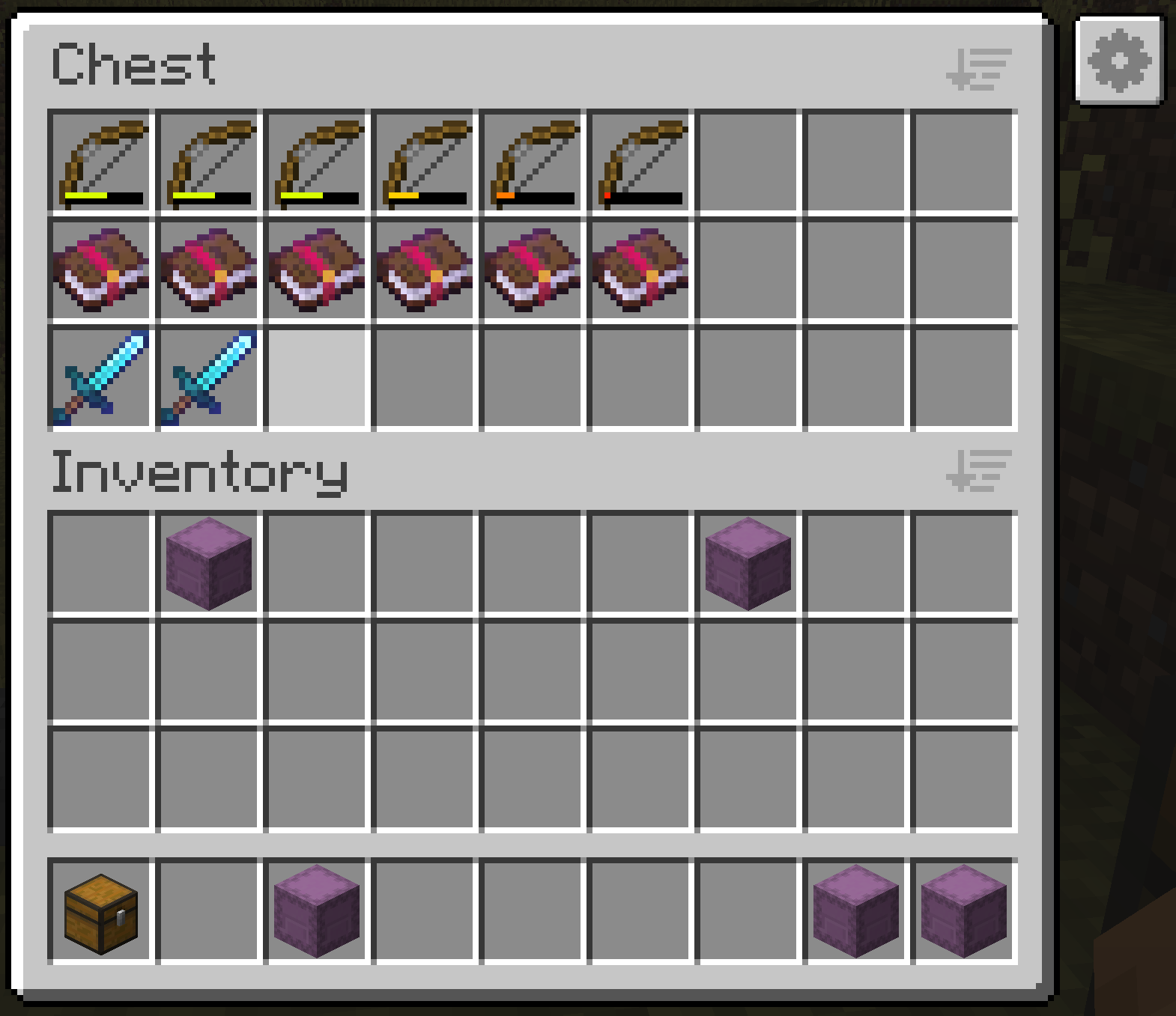
## Enchantments
If place permits, enchantments will form their own group (column(s) or row(s)) and the group itself will be sorted based on the level of the enchantments. At the moment this works correctly for single enchantments but for multiple enchantments the order matters. This may be addressed later.
## Durability
Items that are damaged will be sorted according to that damage in the group of the same items.
- Fix positioning of configuration button in inventory
The settings screen in the previous versions was something custom made. For this version I have integrated Cloth Config. An API that gives some framework for implementing configuration screens. This also adds integration to Mod Menu. Now you can configure Better Chests via there.
This means a dependency to Cloth Config API is added. The modrinth launcher will add this automatically
### Configuring containers
When you open the configuration screen via the button inside a chest, you get 2 categories. The first one, container, concerns settings for this specific container. When a setting is set to global, it will use the configuration of the global category.
The global category is the default for every container. Because we can't add specific configuration to shulker boxes at the moment, the global configuration is also used for shulker boxes.
#### UI Configuration
Under the global category there are also 2 settings for hiding or showing the sort and configuration buttons. If you don't like how the mod changes the UI you can just turn it off once you have configured your defaults.
I will be adding key bindings in the future, so you can do everything without UI interaction.
The settings screen in the previous versions was something custom made. For this version I have integrated Cloth Config. An API that gives some framework for implementing configuration screens. This also adds integration to Mod Menu. Now you can configure Better Chests via there.
### Configuring containers
When you open the configuration screen via the button inside a chest, you get 2 categories. The first one, container, concerns settings for this specific container. When a setting is set to global, it will use the configuration of the global category.
The global category is the default for every container. Because we can't add specific configuration to shulker boxes at the moment, the global configuration is also used for shulker boxes.
#### UI Configuration
Under the global category there are also 2 settings for hiding or showing the sort and configuration buttons. If you don't like how the mod changes the UI you can just turn it off once you have configured your defaults.
I will be adding key bindings in the future, so you can do everything without UI interaction.
Can sort shulkers now.
Configuration may be added later.
Can sort shulkers now.
Configuration may be added later.
All elements on the configuration screen are more centered now.
In the previous version, configuration only saved on a chest, now configuration is also saved on a barrel.
### Changed the layout of the configuration screen
All elements on the configuration screen are more centered now.
An extra button has been added to the container screen. This opens a settings screen that will be saved to the chest that is currently being interacted with.
### Spread
When enabled the contents will spread over rows or columns depending on the space available and amount of distinct item types.
### Sort on close
When enabled, will run the sorting function when the chest is closed.
You can quickly throw all your items inside of the chest and run away. Next time when you come back, the chest will be sorted.
An extra button has been added to the container screen. This opens a settings screen that will be saved to the chest that is currently being interacted with.
### Spread
When enabled the contents will spread over rows or columns depending on the space available and amount of distinct item types.
### Sort on close
When enabled, will run the sorting function when the chest is closed.
You can quickly throw all your items inside of the chest and run away. Next time when you come back, the chest will be sorted.


