
A Minecraft mod that display HUDs in a more fancy way...

Requires Cloth Config
Features
List of HUD
- Armor Durability HUD
- Coordinate & Nether Coordinate HUD
- Direction and Horizontal Yaw HUD
- Ping HUD
- FPS HUD
- System & In-Game Clock HUD (+ Weather Indicator)
- Biome Indicator HUD (+ Dimension Indicator)
- Inventory HUD (Disabled by default)
- Hand Items Indicator HUD (Durability + Item Count)
- Status Effect HUD
- Day Counter HUD
- Targetted Crosshair HUD
- TPS HUD
- Speed HUD
- Combo HUD
- Reach HUD
- Player Count HUD
- Inventory Space HUD
Others
- Drag and Drop HUD Placement
- HUD Snapping
- Automatic HUD Screen Alignment
- Multiple HUD Display Mode (Icon, Info, or Both)
- Customizable Data Collection Interval (For faster performance)
- HUD Screen Alignment Placement
- HUD Growing direction
- Grouping System
- Conditional Positioning
Configuring the HUD
Edit HUD Screen
- Press RIGHT SHIFT to Open this screen.
- Help (indicated by '?') will give you a list of keybinds.
- More Options (indicated by '+') will give you advanced HUD positioning.

- Press 'G' or Group / Ungroup HUDs.
- Set the gap between each child element on group hud for spaced layout.

Configuration Screen
- You need Mod Menu To access the configuration screen.
- Modify the General Setting to your liking.
- add a Condition Rule if your HUD is being overlapped by Minecraft's HUDs.
- Toggle HUD
Performance Concern
Yes, this mod DOES reduce your FPS. Worst case, if EVERY HUD is rendered, you will have 60% FPS loss.
I highly recommend using ImmediatelyFast for faster HUD Performance (the HUD can be 1.5x faster).
Worst to Best HUD Performance
- Inventory HUD (the more items the worse)
- Status Effect HUD (The more effects the worse)
- Targetted Crosshair HUD
- Durability HUD that uses item as it's icon
- The rest of the HUD
Performance Tips
-
Combine Background on Group HUD (set Group Background: On)\

 \
(16 Draw Calls -> 3 Draw Calls)
\
(16 Draw Calls -> 3 Draw Calls) -
Set "Icon to Info Gap": 0 or lower\

 \
(4 Draw Calls -> 3 Draw Calls)
\
(4 Draw Calls -> 3 Draw Calls) -
Set "Draw Background Rounded": False\

 \
(3 Draw Calls -> 1 Draw Call)
\
(3 Draw Calls -> 1 Draw Call) -
Set a Condition for your HUD to only render in a specific condition, disabling them dynamically.
-
Disable any HUD you rarely / never used.
For Support or Suggestion you may go to Discord or Github.
CREDITS
Color Hunt and Atom Material Icons: Color Inspirations\ MCC Island and Origin Realms: HUD Inspirations\ Status Effect Bars and Simple HUD Enchanced: Status Effect HUD Inspiration\ Jade and WTHIT: Targetted Crosshair HUD Inspiration\ MiniHUD: TPS Tracking Implementation (Code)
All Versions
+ Add Version| Name | Game version | Platforms | Published | Downloads | Actions |
|---|---|---|---|---|---|
| 1d ago | 1 | ||||
| 1d ago | 1 | ||||
| 1d ago | 1 | ||||
| 1d ago | 1 | ||||
| 1d ago | 1 | ||||
| 1d ago | 1 | ||||
| 1d ago | 1 | ||||
| 1d ago | 1 | ||||
| 1d ago | 1 | ||||
| 1d ago | 1 | ||||
| 1d ago | 1 | ||||
| 1d ago | 1 | ||||
| 1d ago | 1 | ||||
| 1d ago | 1 | ||||
| 1d ago | 1 | ||||
| 1d ago | 1 | ||||
| 1d ago | 1 | ||||
| 1d ago | 1 | ||||
| 1d ago | 1 | ||||
| 1d ago | 1 | ||||
| 1d ago | 1 | ||||
| 1d ago | 1 | ||||
| 1d ago | 1 | ||||
| 1d ago | 1 | ||||
| 1d ago | 1 | ||||
| 1d ago | 1 | ||||
| 1d ago | 1 | ||||
| 1d ago | 1 | ||||
| 1d ago | 1 | ||||
| 1d ago | 1 | ||||
| 1d ago | 1 | ||||
| 1d ago | 1 | ||||
| 1d ago | 1 | ||||
| 1d ago | 1 | ||||
| 1d ago | 1 | ||||
| 1d ago | 1 | ||||
| 1d ago | 1 | ||||
| 1d ago | 1 | ||||
| 1d ago | 1 | ||||
| 1d ago | 1 | ||||
| 1d ago | 1 | ||||
| 1d ago | 1 | ||||
| 1d ago | 1 | ||||
| 1d ago | 1 | ||||
| 1d ago | 1 | ||||
| 1d ago | 1 | ||||
| 1d ago | 1 | ||||
| 1d ago | 1 | ||||
| 1d ago | 1 | ||||
| 1d ago | 1 | ||||
| 1d ago | 1 | ||||
| 1d ago | 1 | ||||
| 1d ago | 1 | ||||
| 1d ago | 1 | ||||
| 1d ago | 1 | ||||
| 1d ago | 1 | ||||
| 1d ago | 1 | ||||
| 1d ago | 1 | ||||
| 1d ago | 1 | ||||
| 1d ago | 1 | ||||
| 1d ago | 1 | ||||
| 1d ago | 1 | ||||
| 1d ago | 1 | ||||
| 1d ago | 1 | ||||
| 1d ago | 1 | ||||
| 1d ago | 1 | ||||
| 1d ago | 1 | ||||
| 1d ago | 1 | ||||
| 1d ago | 1 | ||||
| 1d ago | 1 | ||||
| 1d ago | 1 | ||||
| 1d ago | 1 | ||||
| 1d ago | 1 | ||||
| 1d ago | 1 | ||||
| 1d ago | 1 | ||||
| 1d ago | 1 | ||||
| 1d ago | 1 | ||||
| 1d ago | 1 | ||||
| 1d ago | 1 | ||||
| 1d ago | 1 | ||||
| 1d ago | 1 | ||||
| 1d ago | 1 | ||||
| 1d ago | 1 | ||||
| 1d ago | 1 | ||||
| 1d ago | 1 | ||||
| 1d ago | 1 | ||||
| 1d ago | 1 | ||||
| 1d ago | 1 | ||||
| 1d ago | 1 | ||||
| 1d ago | 1 | ||||
| 1d ago | 1 | ||||
| 1d ago | 1 | ||||
| 1d ago | 1 | ||||
| 1d ago | 1 |


Report bugs on github and discord!
will port back to 1.20.1 later!
- [[#53](https://github.com/Finsider/starhud/issues/53)] fix Minecraft HUD got pushed to the left
- [[#53](https://github.com/Finsider/starhud/issues/53)] fix HUD on the top left corner
- fix MacOS only using 1/4 of the screen.
- fix Debug HUD Condition also includes hitbox & chunk grids
- fix Simple Voice Chat Indicator not rendered
- ([#49](https://github.com/Finsider/starhud/pull/49)) Update Missing Chinese Translation
- Ported from Yarn Mapping to Mojang Mapping, but I may have made some mistake along the way so please report any bugs / incompatibilities you've found!**
- Inventory Space HUD** \
- HUD Snapping** on Edit HUD Screen
- Automatic HUD Alignment** so you don't have to manually set the X and Y Alignment.
- Action Bar** for Clarity on Edit HUD Screen
- Text Shadow** Option \
- Saving** The current HUD State (Ctrl + S)
- Reset To Default** (Ctrl + Shift + R) (Restart Required)
- Global HUD Scale** Option
- Option to only display the name, or the mod in Targeted Crosshair HUD
- Edit HUD Screen - More Options - Button Layout are modified
- Edit HUD Screen additional dark background if you have a hard time seeing the snapping lines
- Fix changing window size does not update the hud position
- This Version was a HOTFIX for the previous 2.4.0. Please update if you felt like you haven't.**
- Combo**, **Reach**, and **Player Count** HUD! \
- Undo** (Ctrl + Z) / **Redo** (Ctrl + Y) on Edit HUD Screen!
- Child Ordering** (Sort Element by Width / Height) on GroupHUD! \
- Added "IsInSingleplayer" to Conditions
- Do Note that Undo / Redo won't work when you change some options in the configuration screen.**
Do report bugs to Discord or Github! **Merry Christmas!** 🎄
- Translation fixes
- 1.21.11 port ([#41](https://github.com/Finsider/starhud/pull/41)) (by [meowora](https://github.com/meowora))
- Status Effect Timer HUD**, you can use this by activating "Draw Clock" at Status Effect Settings.
Do report bugs on github or modrinth!
## Changelog
- 1.21.9 - 1.21.10 port ([#40](https://github.com/Finsider/starhud/pull/40)) (by [ThatGravyBoat](https://github.com/ThatGravyBoat))
- Removed Auto Clamping
- Added Clamping button to configuration screen, if you feel like one of the HUD is out of bound, you can try pressing them to clamp them inside the screen.
- Translation fixes, a bit.
- de_de translation ([#33](https://github.com/Finsider/starhud/pull/33)) (by [Hythera](https://github.com/Hythera))
- ru_ru translation ([#37](https://github.com/Finsider/starhud/pull/37)) (by [iceban](https://github.com/iceban))
There weren't any cool features for now, but I'm planning to add more exciting stuff in the next update.
Also port to older version won't come unless the content is plenty enough.
Do report some bugs to github or discord, as always!
- Fix Speed HUD Not showing vehicle's speed, added additional 3D Speed as an option.
- zh_cn translation ([#31](https://github.com/Finsider/starhud/pull/31)) (by [NayaCcR](https://github.com/NayaCcR))
- fix translation of Y Alignment, Y Direction being flipped
I was planning to release this test yesterday, along with 2.3.0, but I forgot some stuff and had to release it today (I was just lazy)
- Introducing **Draw Call Grouping**, an "optimization" that basically group every draw call on the HUD onto a list, and then called them on a batch.
- Testing shows that this reduces the frametime by a noticable amount, **but only on a high FPS**, on a lower FPS (60 - 100 FPS) the improvement is negligible, but worth the try.
- Whether this has an FPS improvement or not is not something I can answer confidently, I tested it and it shows a 4.25% fps improvement (777 - 810).
- This however, comes with a "choppy" dragging in Edit HUD Screen, this can be lowered by lowering "Data Collection Interval" In the Settings.
- This is compatible with 2.3.0**, you don't need to create a fresh instance or anything, you can just switch between this and 2.3.0 and nothing would change.
- This Will NOT be ported to older versions.**
# Testing Images
Tested on Laptop GTX 1050, i5-8300H
## Frametime
- Before** (Vsync 144 FPS)
- After** (Vsync 144 FPS)
## FPS
- Before** (Avg: 777, Max: 809)
- After** (Avg: 810, Max: 844)
- This update mainly focuses on conveniences and bug fixes.**
- Excluded some options from the configuration screen for a less cluttered screen.
- Chained child click**: you can now select a specific child from a group in the Edit HUD screen.
- Grid** added to the Edit HUD screen for convenience.
- Text on HUDs can now be configured (FPS, TPS, Speed, Ping, etc.).
- Position clamping** to ensure HUDs do not go out of bounds.
- Option to draw HUD without rounded corner
- Translations are now 90% complete, translation PR are welcome.
- ja_jp translation (see [#25](https://github.com/Finsider/starhud/pull/25)) (by [PExPE3](https://github.com/PExPE3))
### Fixes
- Fixed negative amplifier issue on 1.20.1. (see [#24](https://github.com/Finsider/starhud/issues/24)) (by [DYG-FINT](https://github.com/DYG-FINT))
- Fixed incompatibility issues with mods that redirect the same targets as StarHUD. (see [#22](https://github.com/Finsider/starhud/issues/22))
- Added **extensive null checks** to prevent HUD failures. (see [#26](https://github.com/Finsider/starhud/issues/26))
- Using 2.1.0 or older config will causes the HUD to not have a background, I do not know how to workaround this, but you need to enable the background manually in the settings.**
- Every feature 2.1.0 has
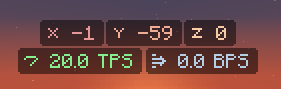
- TPS, SPEED, Nether Coordinate** HUD
- RENDER_IF_ACTIVE** mode (only render hud when condition is active)
- You can now modify the HUD Background, for Groups this acts as a "combine background"
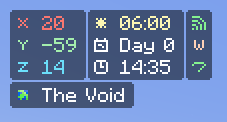
- HUD Display Mode (Icon only, Info only, both) 
- Icon To Info Gap if you want to combine the info and the icon
- Durability Display Mode (fractional, value_only, percentage, bar, compact)

- PlayerList, Held Item Tooltip, IS_ON_SERVER, IS_MOD_LOADED, IS_IN_OVERWORLD, IS_IN_NETHER, IS_IN_END condition
- Data Collection Interval is configurable (reduces frametime significantly, but doesn't improve performance)
- Added A keybind for HUD Toggling (Set to NONE by default)

First off, this update DOES NOT offer any new HUD, it only offer some new QoL that could be helpful! Thank you for using my mod and I hope you will like it!
- Added Selection Box** to Edit HUD Screen, you can now select multiple HUDs in this screen
- With that also comes **GROUPING Feature**, where you can group selected HUDs onto one new HUD.
- For that reason, I've **Removed STATIC width** entirely, now every HUD is compact and it's length is dependent to the information length (This removes the GAPS in Coordinate HUD, FPS HUD, and such)
- This also means that I've **Removed childable HUDs**, (Coordinate, Armor, Status Effect are Childable HUD), they are now splitted up to individual, this will make it easier for us to modify them in the Edit HUD Screen (But hell in configuration screen).
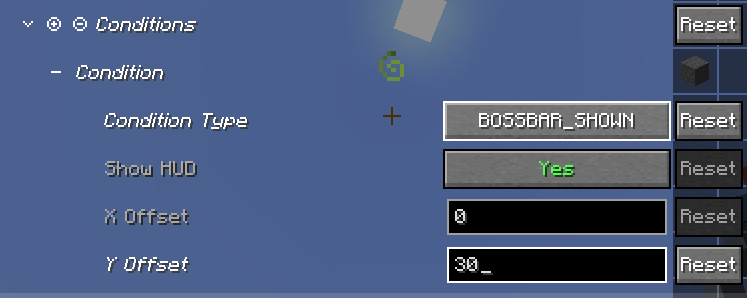
- Added (Add / Subtract) Width / Height on Condition**, ever get tired of the Boss bar getting in the way of the hud? yeah same, this feature allow you to "avoid" them.
- Added Fractional HUD Scaling**, some HUD may be too small on one scale but on the next scale it's too large, why not in the middle? The scaling is now fraction based and not integer based, allowing for scaling like 1.5, 3.5 etc.
- Added Post Load Validation to handle changed configs, this **removes the need to delete your old configuration files**, although not perfect, but it does the job most of the time.
- You do not need to install mod menu now, you can **access the configuration screen directly from Edit HUD Screen**.
- Fixed Biome Icon Color being mixed with Text Color, although shouldn't.
- Fixed Targeted Crosshair crashes on some entities
Please Report any **BUGS** or **UNINTUITIVE FEATURES** on Github or Discord!

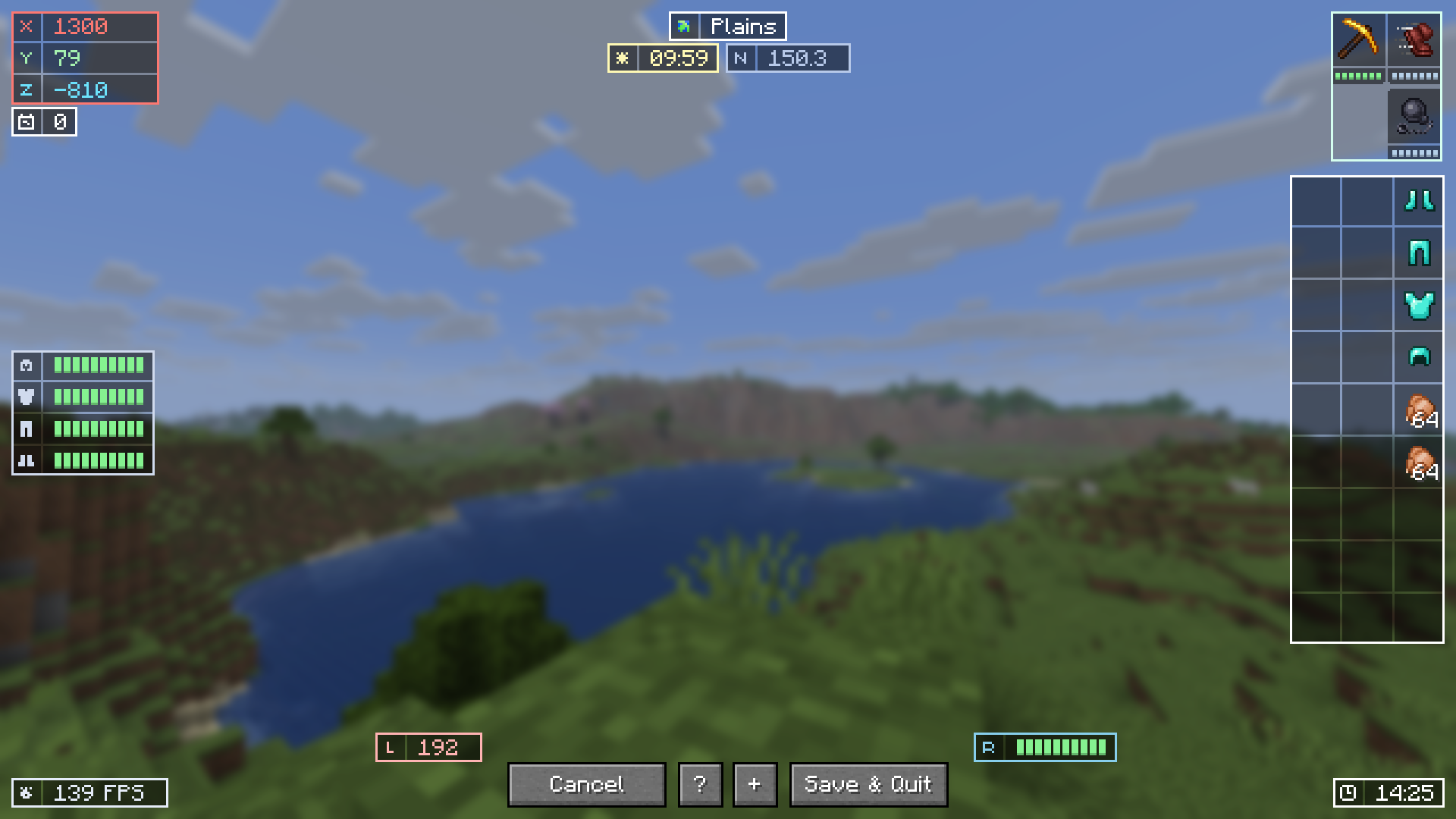
- Edit HUD Screen!** Implemented HUD Edit Screen where you can drag the HUD around to your liking!
- You can only open this screen inside a world! press **RIGHT_SHIFT KEY** to open the Screen!
- 
- Localized Biome Name, Now the biome name will be displayed with the used language.
- Moved HUD rendering system into outside hotbar rendering system.
- (1.20.1 and 1.21.1) Added an option to whether Batch the HUD with immediatelyfast both in game and edit hud screen.
Please report any bug on Github! or Discord!
- Edit HUD Screen!** Implemented HUD Edit Screen where you can drag the HUD around to your liking!
- You can only open this screen inside a world! press **RIGHT_SHIFT KEY** to open the Screen!
- 
Please report any bug on Github! or Discord!
- Older version won't be ported until the implementation is SAFE!**
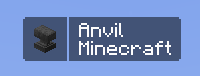
- Targeted Crosshair HUD** (Similar to JADE, WTHIT however without any functionalities except for names). Shows entity / block name and their mod originality name.



- Optional Durability HUD Using Item icon instead of HUD Icon (But VERY LARGE HUD).
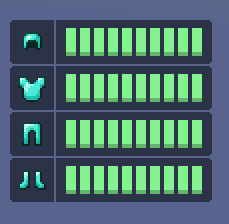
- Performance Improvement.
Report any bug on github / discord.
- The Coordinate X HUD Color has the wrong color so I change it back.
- Status Effect HUD Now has blinking effect when the timer is under 10 seconds, uses the same blinking method as Minecraft.
- Add more conditions.
- Huge Code Refactor
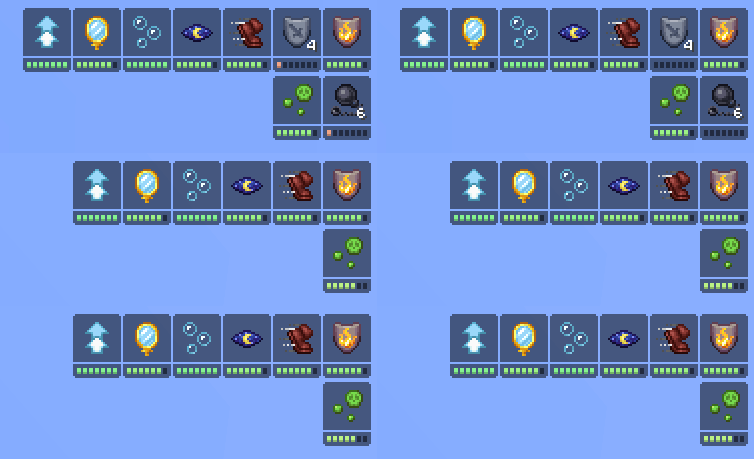
- New HUD: Day Counter, and Status Effect HUD (See image below)
- New Conditional Setting: You can modify the HUD based on a given conditions (ex: when Boss Bar is Shown). This allow you to either completely disable the rendering or just move the HUD away when a condition is met.
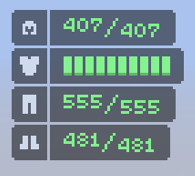
- Option to use number Durability instead of bars.
Testing has been done but does not cover most areas. So do please report any silly occurences on Github.
- 1.21.6 Port, do report some bugs on github
- I will try to add more features to StarHUD for a while since I finally got some times now.
- Late 1.21.5 port, won't be updating in a while. Report any bug to [Github](https://github.com/Finsider/starhud/issues)
- HUD Scaling Option (Integer-based scaling)
- HUD Hide Options (Hide when F3 is open, or when the Chat is focused)
- Inventory HUD (Display the player's inventory, disabled by default).
- Hand HUD (Display the Durability or the amount of item in the player's inventory).
- HUD Scaling Option (Integer-based scaling)
- HUD Hide Options (Hide when F3 is open, or when the Chat is focused)
- Inventory HUD (Display the player's inventory, disabled by default).
- Hand HUD (Display the Durability or the amount of item in the player's inventory).
- HUD Scaling Option (Integer-based scaling)
- HUD Hide Options (Hide when F3 is open, or when the Chat is focused)
- Inventory HUD (Display the player's inventory, disabled by default).
- Hand HUD (Display the Durability or the amount of item in the player's inventory).
- Rough 1.20.1 port
- Used PlayerListEntry instead of PingMeasurer for player's ping
Report bugs or crashes on [Github](https://github.com/Finsider/starhud/issues)


