
Thermal Vision Goggles
Three craftable vision devices for tactical PvP, survival, and modpacks. Choose classic thermal imaging, White Hot, or Night Vision. Originally created for a small Battle Royale server with weapon mods such as TaCZ and Superb Warfare.
New in 5.1: White Hot & Night Vision
| Device | What you see | Center crafting ingredient |
|---|---|---|
| Thermal Goggles | Living targets in a hot palette against a cold blue world | Amethyst Block |
| White Hot Goggles | White living targets against a grayscale world | Quartz Block |
| Night Vision Goggles | Green amplification of existing shadow detail, without heat highlighting | Emerald Block |
These are three separate items, not modes cycled by a key. Equip the goggles you want and press V to turn them on or off.
White Hot

White Hot highlights the actual models of supported living entities. Like the original thermal goggles, it detects targets up to 96 blocks, limited by entity render distance. Thermal highlighting is designed to respect solid-wall occlusion. Invisible entities, spectators, and armor stands are excluded.
Night Vision


Night Vision uses a green palette, grain and a vignette to amplify existing shadow detail. It does not apply a heat mask or an entity-detection radius. Completely black pixels contain no detail for the effect to recover.
Models and inventory icons

Both new devices have their own 3D models, active/inactive textures, and visor raise/lower animations visible to other players. White Hot uses pale textured lenses; Night Vision uses a wide green visor and a dark helmet-style housing.

The original thermal device remains available, including its cold-world effect, luminous-block glows, sounds, and charge HUD. Luminous-block glows are specific to the original thermal mode.
Crafting
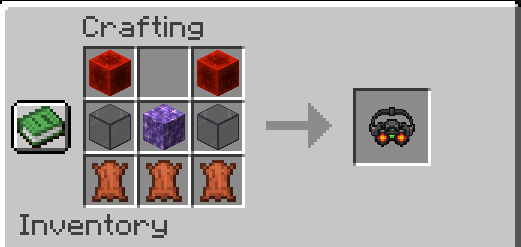
All three goggles use this shaped recipe:
| Redstone Block | Empty | Redstone Block |
| Tinted Glass | Variant block | Tinted Glass |
| Leather | Leather | Leather |
Use an Amethyst Block for Thermal Goggles, a Quartz Block for White Hot Goggles, or an Emerald Block for Night Vision Goggles.
Thermal Battery — shapeless: 1 Redstone Dust + 1 Iron Ingot.
How to use and recharge
- Craft your preferred device, or obtain it in Creative mode.
- Without Curios, equip it in the helmet slot. With Curios, use the functional Head accessory slot alongside your regular helmet. Cosmetic slots do not activate vision.
- Press V to toggle the equipped device. The binding can be changed in Minecraft's Controls settings. The HUD identifies the active vision mode and remaining charge.
- A full charge lasts 60 seconds of active use. Power is consumed only while enabled.
- Hold a Thermal Battery and right-click while wearing the goggles to fully recharge them. One battery is consumed in Survival. Running out of charge switches the effect off; the device can be recharged.
The same battery works with all three devices.
Versions and installation
| Minecraft | Loader | Build |
|---|---|---|
| 1.20.1 | Forge 47.x | 5.1, including White Hot and Night Vision |
| 1.21.1 | Forge | 4.0.0-1.21.1 Beta, separate preview without the new 5.1 devices |
For 1.20.1, use Java 17. The 5.1 build is compiled against Forge 47.4.10.
Install 5.1 on both client and server. The network protocol changed from 5.0; update everyone together. TaCZ and Superb Warfare are not required dependencies. Fabric and NeoForge builds are not currently published.
Curios API is optional. For 1.20.1 / Forge, use 5.14.1 or later in the 5.x series.
Compatibility and support
External shader packs, translucent-block behavior, custom living renderers, and the new variants with Curios at runtime have not been comprehensively verified. Compatibility can vary with your modpack.
Report a bug · Source code · Discord community
Please include your Minecraft, Forge and mod versions, rendering mods or shader pack, and screenshots/logs when reporting a problem.
How to Install Thermal Vision Goggles (Mod)
Thermal Vision Goggles by ZumaDeluxe is verified for Forge across Minecraft versions 1.20.1, 1.21.1 (latest release: 5.1, file size: 779 KB). Follow the steps below to install it safely from ModCraft.tv:
- Click the Download button above and select your Minecraft version (1.20.1, 1.21.1) and platform (Forge).
- Make sure you have the compatible loader or environment installed for Forge.
- Move the downloaded Thermal Vision Goggles file into your Minecraft
.minecraft/modsfolder and launch the game.
All Versions
+ Add Version


For Minecraft 1.20.1 / Forge. Install 5.1 on both the client and server.
## Two new craftable devices
- White Hot Goggles:** living targets appear white against a grayscale world, using model-based thermal highlighting.
- Night Vision Goggles:** a green night-vision effect that amplifies existing shadow detail, with grain and a vignette. This device does not highlight heat signatures. Completely black areas may still lack visible detail.
- These are separate items. Equip the device you want and press **V**; V toggles that device on or off.
## New models and item icons
- White Hot goggles have a dark tactical frame and pale, textured lenses.
- Night Vision goggles have a dark helmet-style housing and a wide green visor.
- Both variants have dedicated 3D geometry, active/inactive textures, visor raise/lower animations, and new 32x32 inventory icons.
- The HUD identifies the equipped vision mode. Night Vision does not display an entity-detection range.
## Crafting and power
All goggles use the same shaped crafting layout:
| | | |
|---|---|---|
| Redstone Block | Empty | Redstone Block |
| Tinted Glass | Variant block | Tinted Glass |
| Leather | Leather | Leather |
Choose the center block:
- Amethyst Block:** original Thermal Goggles.
- Quartz Block:** White Hot Goggles.
- Emerald Block:** Night Vision Goggles.
- Thermal Battery:** shapeless recipe, 1 Redstone Dust + 1 Iron Ingot. The same battery recharges all three devices. Right-click with it while wearing the goggles to restore a full **60-second active-use charge**. One battery is consumed in Survival. Charge drains only while the device is enabled; depleted goggles can be recharged.
## Equipment and multiplayer
- All variants support the helmet slot without Curios, or the functional Curios **Head** slot when Curios is installed. Cosmetic slots do not activate vision.
- Curios API is optional. For Minecraft 1.20.1 / Forge, use Curios 5.14.1 or later in the 5.x series.
- The network protocol has changed: **update both client and server to 5.1**. Do not mix 5.0 and 5.1.
- This release is for **Minecraft 1.20.1 / Forge only**. The separate 1.21.1 preview does not include the new variants.
## Rendering notes
The original orange thermal mode remains available. Warm glows around luminous blocks belong to that original mode; White Hot and Night Vision do not use that block-glow pass. Thermal entity highlighting has a maximum range of 96 blocks and respects entity render distance. Invisible entities, spectator players, and armor stands are excluded from thermal highlighting.
Compatibility with external shader packs, additional modded living renderers, and the new variants with Curios at runtime has not been comprehensively verified. Please include your Minecraft, Forge and mod versions, rendering mods, and screenshots/logs in bug reports.
- Curios support**: wear the goggles in the head accessory slot alongside a regular helmet. Without Curios, they still use the helmet slot. Cosmetic slots do not grant thermal vision.
- New 3D model**: an armored housing, a head strap, and orange lenses. Powered-on and powered-off goggles have distinct appearances.
- Smooth animations**: activating thermal vision lowers the goggles over your eyes; deactivating it raises them onto your forehead. Rapid toggling smoothly reverses the movement. Other players can see these animations too.

- Added initial support for **Minecraft 1.21.1 / Forge 52.1.16**.
- Ported thermal vision activation, charge system, networking, HUD, sounds, and goggles.
- Updated item data storage, armor materials, GUI layers, and rendering APIs for 1.21.1.
- Ported thermal entity rendering, world heat effects, post-processing, and shader pipeline integration.
- Updated networking to the Forge 1.21.1 channel API.
- This is a **preview build** — full in-game and visual testing is still pending.
### Changes:
- This update features an improved render: instead of glowing “heat aura” textures, the actual mob or player model is now highlighted.
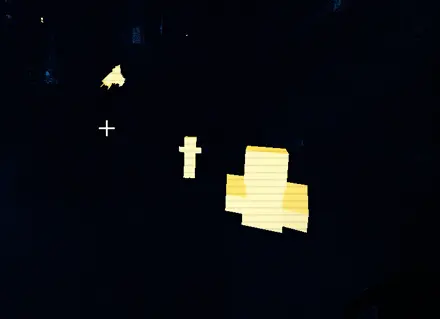
- Fixed a bug where the armor stand was highlighted.
### Thermal Vision
- Reduced thermal vision sound volume.
- Activation sound is now reduced to 35%, then reduced by an additional 50%.
- Looping ambient sound has also been reduced by an additional 50%.
### Thermal Vision Shader
- Fixed compatibility issues between the thermal vision shader and other mods in the modpack.
- The darkening effect no longer uses the shared
GameRenderer.loadEffect. - The shader is now applied through a separate
PostChain. - The effect has been moved closer to the final render stage before the HUD, preventing other mods from overriding it.
### Modpack Compatibility
- Fixed an issue where the shader only worked on the first activation and disappeared afterwards.
- Updated the fixed build:
Сборка-fixed.zip.
### New Thermal Vision Behavior
- Glowing blocks are now detected as warm objects.
- Torches, lamps, glowstone, and similar light sources now receive a warm orange-yellow thermal glow.
### Added
- New item:** Thermal Vision Battery.
- Battery recipe:** Redstone + Iron Ingot. 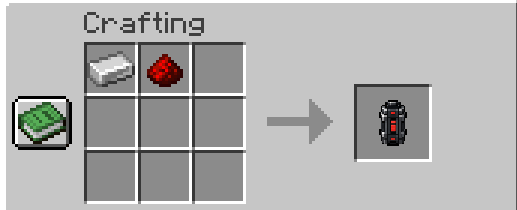
- Thermal Vision Goggles recipe:**
- Top row: Redstone Block, empty slot, Redstone Block
- Middle row: Tinted Glass, Amethyst Block, Tinted Glass
- Bottom row: Leather, Leather, Leather
- 
- The battery has been added to Creative Mode tabs.
- Right-clicking with a battery while wearing Thermal Vision Goggles fully recharges the goggles and consumes 1 battery.
- Added Russian and English localization for the battery, tooltips, and messages.
- Recipes now unlock in the vanilla recipe book after obtaining the required ingredients.
### Changed
- The battery is now the repair ingredient for the Thermal Vision Goggles material.
- The thermal aura is now less bright: glow layer opacity has been reduced to 40%.
- Removed detailed rendering of nearby blocks while thermal vision is enabled.
### Optimization
- Reduced client-side load while thermal vision is enabled.
- Removed expensive per-frame checks and rendering for block outlines.
- Reduced server-side processing for players with thermal vision turned off.
- Cached reflection access to the post-effect uniform.
- Reduced temporary object creation in the HUD.
- Added a _fullscreen shader_: the world turns dark blue and “cold.”
- Added _block outlines_ for better visibility of the environment.
- Added _smooth toggling _of the thermal vision effect.
- The goggles have become a full-fledged helmet item.
- Added a usage limit: 1 minute of total use.
- Goggles consume power only when turned on.
- Once the battery is drained, the goggles break and stop working.
- The durability of the goggles has been reduced to 5 units.
- Added sounds for turning on, operation, and breaking.
- Added a black atmospheric vignette.
- Warm targets—players, mobs, and NPCs—are highlighted in bright orange.
- Added a heat aura and distinct target outlines.
- Heat is no longer visible through solid walls.
- Transparent blocks like glass, foliage, and grilles allow for visibility.


