
Description
Gallery
Changelog
Versions

Til's Graves
This simple Datapack adds Graves on death so you never lose your stuff again!

You can use a Key you get on death to open your grave.

If you wanna give Feedback, have Feature requests or if you've found some Bugs, don't bother but reach out to me here!
How to Install Tils Graves (Datapack)
Tils Graves by MavLeague is verified for Datapack, Fabric, Forge, Neoforge, Quilt across Minecraft versions 1.21, 1.21.1, 1.21.10, 1.21.2, 1.21.3, 1.21.4, 1.21.5, 1.21.6 (latest release: 1.21.10.4.2+mod, file size: 39 KB). Follow the steps below to install it safely from ModCraft.tv:
- Click the Download button above and select your Minecraft version (1.21, 1.21.1, 1.21.10, 1.21.2, 1.21.3, 1.21.4, 1.21.5, 1.21.6) and platform (Datapack, Fabric, Forge, Neoforge, Quilt).
- Make sure you have the compatible loader or environment installed for Datapack, Fabric, Forge, Neoforge, Quilt.
- Move the downloaded Tils Graves file into your Minecraft
.minecraft/saves/<world>/datapacksfolder and launch the game.
All Versions
+ Add Version| Name | Game version | Platforms | Published | Downloads | Actions |
|---|---|---|---|---|---|
| last yr. | 1 | ||||
| last yr. | 1 | ||||
| last yr. | 1 | ||||
| last yr. | 1 | ||||
| last yr. | 1 | ||||
| last yr. | 1 | ||||
| last yr. | 1 | ||||
| last yr. | 1 | ||||
| last yr. | 1 | ||||
| last yr. | 1 | ||||
| last yr. | 1 | ||||
| last yr. | 1 | ||||
| last yr. | 1 | ||||
| last yr. | 1 | ||||
| last yr. | 1 | ||||
| last yr. | 1 | ||||
| last yr. | 1 | ||||
| last yr. | 1 | ||||
| last yr. | 1 | ||||
| last yr. | 1 | ||||
| last yr. | 1 | ||||
| last yr. | 1 | ||||
| last yr. | 1 | ||||
| last yr. | 1 | ||||
| last yr. | 1 | ||||
| last yr. | 1 |

[1.21.10.4.2+mod] Tils Graves 1.21.10.4.2
by MavLeague on Nov 23, 2025
Download
### #10 Fixed Critical Bug
Experience hasn't been stored correctly as mentioned on [Issue #4](https://github.com/MavLeague/tils_graves/issues/4).
This issue has been fixed by enhancing experience restoration with the addition of XpP and XpLevel modifications to the loot_grave function.
> **IMPORTANT**:
> There may be some issues when opening graves from an older version. Take care to avoid losing your experience while opening them.
### #11 Updated the pack up to 1.21.10
The pack has now been updated to the latest version.
# Editor's Note:
I made a mistake while packing this pack, and so backwards compatibility is not possible in this version. Please update to 1.21.10.4.1 to use it in older versions!
New versions will also work, but new features as well as bug fixes are only available in the newer Minecraft versions.
[1.21.10.4.2] Tils Graves 1.21.10.4.2
by MavLeague on Nov 23, 2025
Download
### #10 Fixed Critical Bug
Experience hasn't been stored correctly as mentioned on [Issue #4](https://github.com/MavLeague/tils_graves/issues/4).
This issue has been fixed by enhancing experience restoration with the addition of XpP and XpLevel modifications to the loot_grave function.
> **IMPORTANT**:
> There may be some issues when opening graves from an older version. Take care to avoid losing your experience while opening them.
### #11 Updated the pack up to 1.21.10
The pack has now been updated to the latest version.
# Editor's Note:
I made a mistake while packing this pack, and so backwards compatibility is not possible in this version. Please update to 1.21.10.4.1 to use it in older versions!
New versions will also work, but new features as well as bug fixes are only available in the newer Minecraft versions.
Experience hasn't been stored correctly as mentioned on [Issue #4](https://github.com/MavLeague/tils_graves/issues/4).
This issue has been fixed by enhancing experience restoration with the addition of XpP and XpLevel modifications to the loot_grave function.
> **IMPORTANT**:
> There may be some issues when opening graves from an older version. Take care to avoid losing your experience while opening them.
### #11 Updated the pack up to 1.21.10
The pack has now been updated to the latest version.
# Editor's Note:
I made a mistake while packing this pack, and so backwards compatibility is not possible in this version. Please update to 1.21.10.4.1 to use it in older versions!
New versions will also work, but new features as well as bug fixes are only available in the newer Minecraft versions.
[1.21.7.4.1+mod] Tils Graves 1.21.7.4.1
by MavLeague on Jul 05, 2025
Download
### #7 Fixed Critical Bug
Items in Equipment Slots haven't been saved. All Items are now saved properly.
### #8 Added Death location message
Theres now a Message in chat, that tells you your Location of Death.
### #9 Added Jeff from Quality Control
There's now a 0.1% Chance that Jeff from Quality Control asks you, if you've found a bug. Please help him and me to improve this datapack.
[1.21.7.4.1] Tils Graves 1.21.7.4.1
by MavLeague on Jul 05, 2025
Download
### #7 Fixed Critical Bug
Items in Equipment Slots haven't been saved. All Items are now saved properly.
### #8 Added Death location message
Theres now a Message in chat, that tells you your Location of Death.
### #9 Added Jeff from Quality Control
There's now a 0.1% Chance that Jeff from Quality Control asks you, if you've found a bug. Please help him and me to improve this datapack.
Items in Equipment Slots haven't been saved. All Items are now saved properly.
### #8 Added Death location message
Theres now a Message in chat, that tells you your Location of Death.
### #9 Added Jeff from Quality Control
There's now a 0.1% Chance that Jeff from Quality Control asks you, if you've found a bug. Please help him and me to improve this datapack.
[1.21.7.4.0+mod] Tils Graves 1.21.7.4.0
by MavLeague on Jun 28, 2025
Download
### #5.1 Updated the pack to 1.21.6/ 1.21.7
The pack has now been updated to the latest version.
### #6 Remade item model display: Grave Key
The way the item model is referenced had a complete overhaul. Instead of using custom model data, the item now directly references the item model with the ``
All existing Grave Keys will be replaced when you hold them and your inventory updates.
The pack has now been updated to the latest version.
### #6 Remade item model display: Grave Key
The way the item model is referenced had a complete overhaul. Instead of using custom model data, the item now directly references the item model with the ``
item_model`` component.All existing Grave Keys will be replaced when you hold them and your inventory updates.
[1.21.7.4.0] Tils Graves 1.21.7.4.0
by MavLeague on Jun 28, 2025
Download
### #5.1 Updated the pack to 1.21.6/ 1.21.7
The pack has now been updated to the latest version.
### #6 Remade item model display: Grave Key
The way the item model is referenced had a complete overhaul. Instead of using custom model data, the item now directly references the item model with the ``
All existing Grave Keys will be replaced when you hold them and your inventory updates.
The pack has now been updated to the latest version.
### #6 Remade item model display: Grave Key
The way the item model is referenced had a complete overhaul. Instead of using custom model data, the item now directly references the item model with the ``
item_model`` component.All existing Grave Keys will be replaced when you hold them and your inventory updates.
[1.21.5.3.2+mod] Tils Graves 1.21.5.3.2
by MavLeague on May 24, 2025
Download
### #5 Updated the pack to 1.21.5
The pack has now been updated to the latest version. All Versions to 1.21.4 have been archived as overlays. That means that it is still compatible with older versions but only the latest version will receive new features.
The pack has now been updated to the latest version. All Versions to 1.21.4 have been archived as overlays. That means that it is still compatible with older versions but only the latest version will receive new features.
[1.21.5.3.2] Tils Graves 1.21.5.3.2
by MavLeague on May 24, 2025
Download
### #5 Updated the pack to 1.21.5
The pack has now been updated to the latest version. All Versions to 1.21.4 have been archived as overlays. That means that it is still compatible with older versions but only the latest version will receive new features.
The pack has now been updated to the latest version. All Versions to 1.21.4 have been archived as overlays. That means that it is still compatible with older versions but only the latest version will receive new features.
[1.21.4.3.2+mod] Tils Graves 1.21.4.3.2
by MavLeague on Mar 16, 2025
Download
### #3 Added Decay Message
### #4 Added support for all 1.21.x Versions again
- A Message has been added to the graves.
- Whenever you try to open a grave without a key, if it cannot be opened you'll receive a message about how long you have to wait.
- It uses internal translations so it works in any language in the game.
### #4 Added support for all 1.21.x Versions again
- In the past, the datapack was compatible with older versions.
- But by adding a texture to the key, the methods differentiated into different versions. That resulted in two releases for different versions.
- But by using the overlay method, it is now possible to have multiple versions of the same datapack in one pack.
- That makes the datapack compatible with all 1.21.x versions again.
[1.21.4.3.2] Tils Graves 1.21.4.3.2
by MavLeague on Mar 16, 2025
Download
### #3 Added Decay Message
### #4 Added support for all 1.21.x Versions again
- A Message has been added to the graves.
- Whenever you try to open a grave without a key, if it cannot be opened you'll receive a message about how long you have to wait.
- It uses internal translations so it works in any language in the game.
### #4 Added support for all 1.21.x Versions again
- In the past, the datapack was compatible with older versions.
- But by adding a texture to the key, the methods differentiated into different versions. That resulted in two releases for different versions.
- But by using the overlay method, it is now possible to have multiple versions of the same datapack in one pack.
- That makes the datapack compatible with all 1.21.x versions again.
[1.21.4.3.1+mod] Tils Graves 1.21.4.3.1 Hotfix
by MavLeague on Mar 11, 2025
Download
### #2 Fixed critical Bug!
Items will be dropped again when opening a Grave!
Items will be dropped again when opening a Grave!
[1.21.4.3.1] Tils Graves 1.21.4.3.1 Hotfix
by MavLeague on Mar 11, 2025
Download
### #2 Fixed critical Bug!
Items will be dropped again when opening a Grave!
Items will be dropped again when opening a Grave!
[1.21.4.2.3+mod] Tils Graves 1.21.4.2.3 Hotfix
by MavLeague on Mar 11, 2025
Download
### #5 Fixed critical Bug!
Items will be dropped again when opening a Grave!
Items will be dropped again when opening a Grave!
[1.21.4.2.3] Tils Graves 1.21.4.2.3 Hotfix
by MavLeague on Mar 11, 2025
Download
### #5 Fixed critical Bug!
Items will be dropped again when opening a Grave!
Items will be dropped again when opening a Grave!
[!1.21.4.3.0+mod] Tils Graves 1.21.4.3.0
by MavLeague on Mar 09, 2025
Download
### #1 Added Grave Key Texture
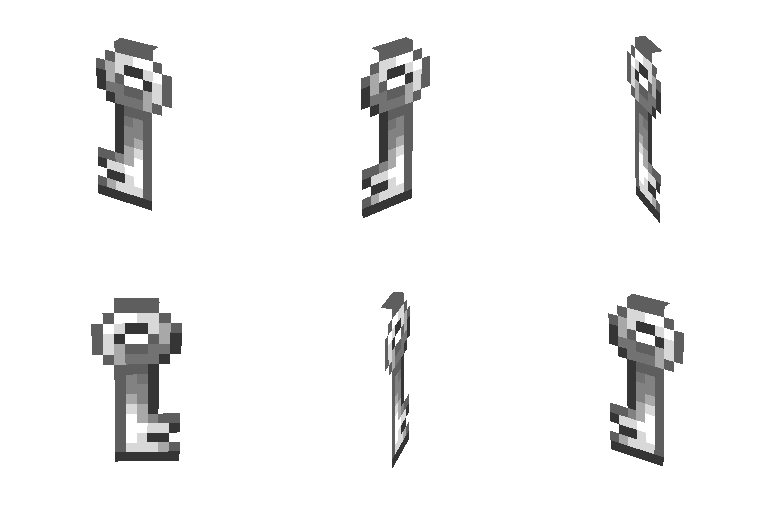

- The Grave Key has a texture now when using the ressourcepack. If not, the Key will now look like a poisonous potato.
- The Poisonous Potato has been chosen because, with the component consumable removed, it's truly a completely useless item, which means that the key has no hidden second functionality.
- The retexturing uses the new custom model data introduced in 1.21.4. This means that the datapack is no longer compatible with older versions!


