### Added
- **Live auction overhaul** — complete rewrite of the live auction engine with new interactive features:
- **`/bid` command** (alias `/livebid`) — dedicated command for all live auction interactions: place bids, join/leave sessions, and manage preferences. Bids can also be placed by clicking the suggestion in chat.
- **Clickable bid messages** — the bid announcement in chat includes a clickable link that auto-fills `/bid <next-minimum>` for one-click bidding.
- **Item hover previews** — the item name in chat announcements shows enchantments, potion effects, and shulker box contents on hover.
- **EzCountdown integration** (optional soft-dependency) — configurable countdown display per-player via `ACTION_BAR`, `BOSS_BAR`, `TITLE`, `SCOREBOARD`, or `CHAT`. Defaults to chat-only reminders when EzCountdown is absent or disabled.
- **Per-player notification preferences** — players toggle notifications with `/bid notify [on|off]` and choose display types with `/bid notify display <types…>`. Preferences persist across sessions (stored in `live-preferences.yml` or the MySQL table `{prefix}live_player_preferences`).
- **Live auction picker GUI** — `/liveauction` opens a 54-slot inventory when multiple auctions are running, letting players select which one to join.
- **Opt-in chat filter** — when `chat-filter-feature-enabled: true`, players can run `/bid mutechat on` to suppress non-auction chat while in an active session.
- **Bidding configuration** — `minimum-bid-increment-percent` and `minimum-bid-increment-fixed` in `auction.yml` control the minimum raise required per bid.
- **Five new Bukkit events**: `LiveAuctionStartedEvent` (cancellable), `LiveAuctionBidPlacedEvent` (cancellable), `LiveAuctionEndedEvent`, `LiveAuctionPlayerJoinedEvent`, `LiveAuctionPlayerLeftEvent`.
- **New permissions**: `ezauction.bid` (default: true), `ezauction.auction.live.notify` (default: true).

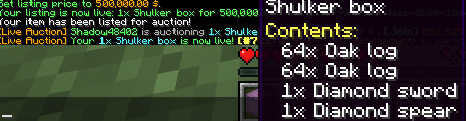

- **Live auction seller management** — sellers can enter and manage the live queue directly from the GUI or commands:
- **Sell button in the Live Auction GUI** — a lit sell button (slot 44) appears in the live browser for players with `ezauction.auction.live.sell`; clicking it opens the sell menu pre-configured for the live queue. A grey button is shown to players without the permission.
- **`/liveauction sell`** — command shortcut to open the live sell menu without navigating to the GUI first.
- **Queue position feedback** — on enqueue, the seller receives a chat confirmation with their position (e.g. *"Your Diamond Sword has been added to the live queue at position #2"*). If the queue is disabled the auction starts immediately and a separate instant-start message is shown instead.
- **Cancel button in the Live Auction GUI** — a cancel button (slot 37) appears only while the viewer has a queued entry; clicking it dequeues the item and refunds the deposit.
- **`/liveauction cancel`** — removes the sender's own item from the live queue and refunds the deposit.
- **`/liveauction cancel <id>`** (admin) — force-cancels an active live auction by ID, refunds all bidders, and returns the item to the seller.
- **Duplicate-entry guard** — players who already have an item queued receive an `already-queued` message and cannot enqueue a second entry until the first is sold or cancelled.
- **New permissions**: `ezauction.auction.live.sell` (default: true), `ezauction.auction.live.admin` (default: op).
### Fixed
- **JaCoCo Java 25 compatibility** — upgraded `jacoco-maven-plugin` from `0.8.12` to `0.8.13` to resolve `Unsupported class file major version 69` during test instrumentation on JDK 25.
- **Live auction first-bid minimum** — the first bid on a live auction now only requires meeting the starting price. Previously, the minimum bid increment (percent and fixed) was incorrectly applied before any bid existed, making the starting price unreachable.
- **Empty chat input bids the minimum** — during the custom-bid chat prompt, pressing Enter with no input now automatically places a bid at the minimum amount instead of cancelling or erroring.
- **Claim GUI** — `/auction claim` and the **Claims** button in the browser now open a dedicated 54-slot inventory instead of a bare command response. The GUI shows each pending return item with its expiry date in the lore, a **Claim All** button (slot 49), and a **Back** button (slot 45) that returns to the auction browser.
- **Configurable claim expiry** — pending return items now carry an expiry timestamp. New `claim.expiry-days` key in `auction.yml` (default `7`). The expiry is shown in the item lore inside the Claim GUI and resets whenever a new item is stored for the player.
- **Live Auctions shortcut in the browser** — a **Live Auctions** beacon button (slot 47) has been added to the main auction browser GUI. Clicking it opens the live auction picker directly, without needing to type `/liveauction`.
Optional dependencies
DiscordSRV
Any compatible version
Teams API
Any compatible version
PlaceholderAPI
Any compatible version
EzShops
Any compatible version
Developer information
Projects on Modrinth are automatically available through a Maven repository for use with JVM build tools such as Gradle.
maven { name = "Modrinth"; url = "https://api.modrinth.com/maven" }