* Fixed: Custom blocks can't be opened in caves.
* Improved: Dropped-type custom blocks can be created when there are no other items dropped within a 1-block range, instead of 5.
* Simplified: Removed the credit link display.
* Custom Craft Version: 5 (compatible with the same version)
---
# README
I made the backpack, which is
- Craft a 9-slot backpack, upgradable to 18 and 26 slots.
- Dyeable through the crafting table.
- Easily renamable using an anvil.
## How to Use Backpacks
* To store or retrieve items, simply drop the backpack on the ground. It will transform into a barrel, allowing you to manage your items. Click the "Exit" button slot to revert it to a backpack item.
> These backpacks can be placed in your chest slot for decorative purposes.
## Crafting Recipes
- **Spawning a Working Table:**
To craft the backpacks, start by creating the essential "Working Table". Simply drop a stone pickaxe onto a crafting table block.
- **Crafting a 9-Slot Backpack:**
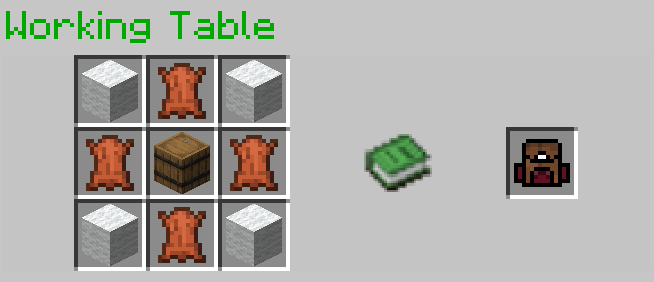
- **Upgrading to an 18-Slot Backpack:**
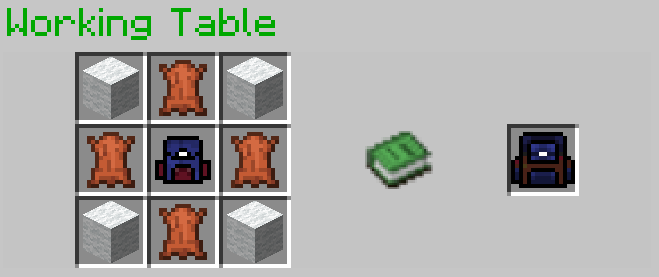
- **Upgrading to a 26-Slot Backpack:**
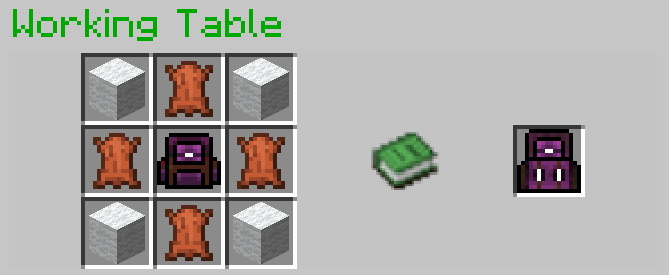
## Optional Installation
- To see the backpack on your character's back when placed in the chest slot, you may install [Optifine](https://optifine.net/downloads); it's optional.
## References
- GUI code is generated by [Easy GUI](https://github.com/paul90317/Minecraft-Easy-GUI)
- The Working Table is a crafting block in [Custom Craft](https://github.com/paul90317/custom-craft/wiki).
- [ChatGPT](https://chat.openai.com/) for gramma improving
## Demo Video
Watch this video to see the backpacks in action!
<iframe width="560" height="315" src="https://www.youtube.com/embed/xaCST1obzZE" title="YouTube video player" frameborder="0" allow="accelerometer; autoplay; clipboard-write; encrypted-media; gyroscope; picture-in-picture; web-share" allowfullscreen></iframe>
Developer information
Projects on Modrinth are automatically available through a Maven repository for use with JVM build tools such as Gradle.
maven { name = "Modrinth"; url = "https://api.modrinth.com/maven" }


