First stable release of Jade Trades for NeoForge 1.21.1.
### New Features
#### 1. Villager Trade HUD (Jade Integration)
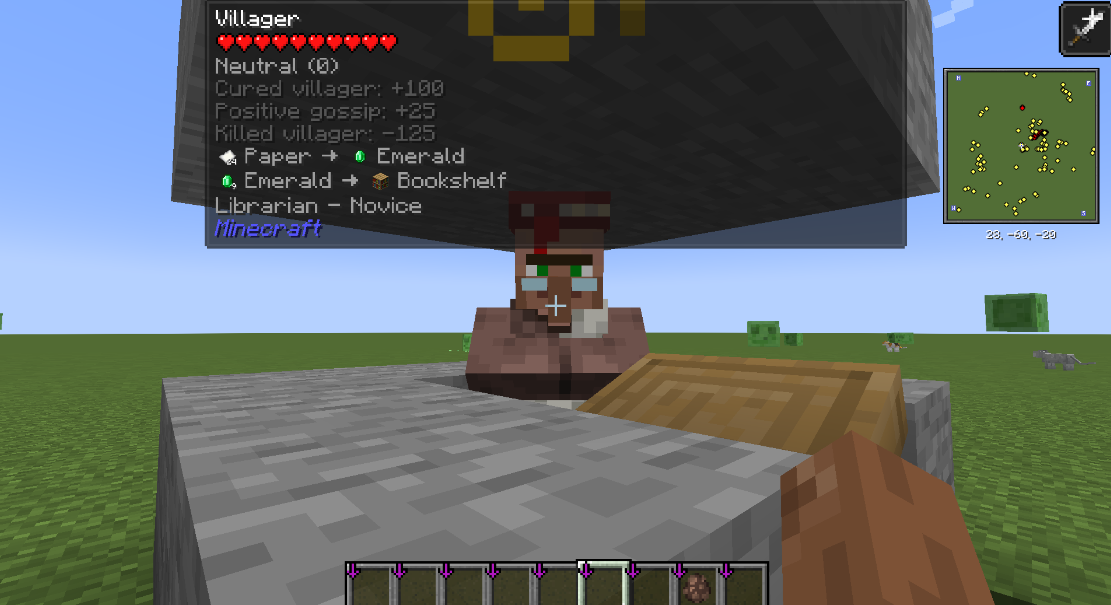
- Shows villager trades directly in Jade tooltip/HUD.
- Default mode shows the first 2 trades.
- Hold Shift to expand the full trade list.
- In Shift mode, mouse wheel scrolling is supported for paging.
- Scroll position resets automatically when switching target villagers.
#### 2. Villager POI Marker (Bed / Workstation)
- Adds a configurable keybind (unbound by default).
- Key behavior is toggle-based:
- Press while looking at a villager: mark or unmark that villager.
- Press while looking at a non-villager: clear all marks.
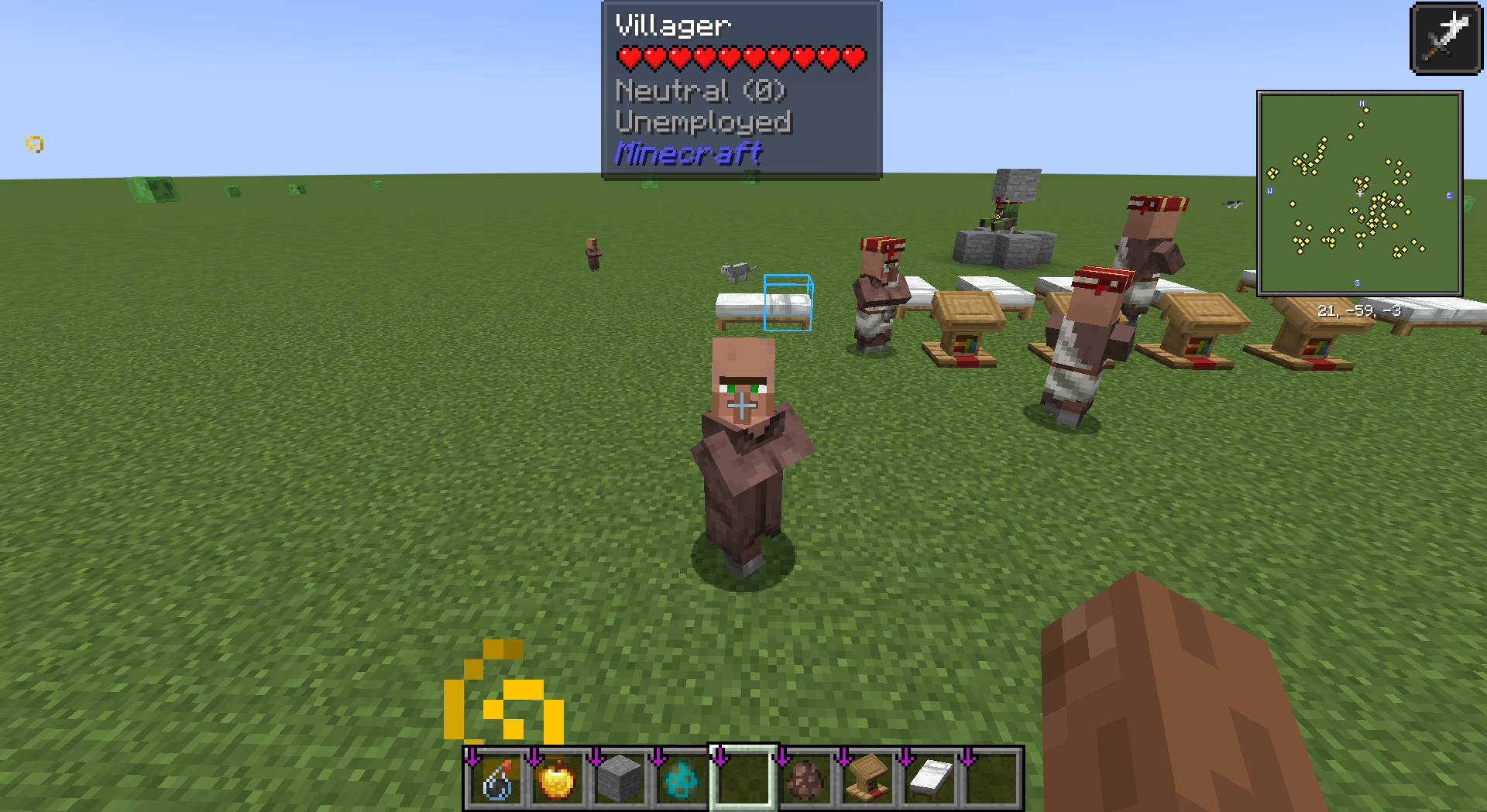
- Renders villager POI boxes in world space:
- Bed: blue
- Workstation: orange
- Supports villagers without workstation POI (bed can still be shown).
- Uses server-to-client synchronization for reliable rendering.
#### 3. Reputation Display
- Shows player-to-villager reputation.
- Normal mode: compact status + total value (for example: `Friendly(130)`, `Neutral(0)`).
- Shift mode: detailed contribution breakdown (curing, trading, harming, killing, etc.).
- Discount detail lines are removed to keep the tooltip focused.
#### 4. Tooltip Readability Improvements
- Fixes overflow when expanded Shift tooltip becomes too long.
- Uses visible-line-based paging to avoid going beyond HUD height.
#### 5. Localization
- Adds Chinese localization (`zh_cn`).
- Adds English localization (`en_us`).
- Covers keybinds, hints, reputation labels, and detailed contribution texts.
---
## How to Use
### 1. Installation and Requirements
1. Install NeoForge 1.21.1.
2. Make sure Jade is installed (this mod depends on Jade).
3. Put `jade-trades-1.0.0.jar` into your `mods` folder.
4. Start the game and enter a world.
### 2. Viewing Trade Information
1. Look at a villager and wait for Jade info to appear.
2. By default, the first 2 trades are shown.
3. Hold Shift to expand the trade list.
4. While holding Shift, use mouse wheel to scroll pages.
### 3. Using the POI Marker
1. Open key settings and find the Jade Trades POI marker keybind.
2. Bind it to a key (it is unbound by default).
3. Press while looking at a villager to mark that villager's bed/workstation.
4. Press again on the same villager to unmark.
5. Press while looking at a non-villager target to clear all marks.
### 4. Reading Reputation
1. Normal view: compact result only (status + total), e.g. `Friendly(130)`.
2. Hold Shift: see detailed source breakdown (curing, trading, harming, killing, etc.).
### 5. Tips
- If POI does not show immediately, keep looking at the villager briefly so synced data can arrive, then press the marker key.
- If trade list is long, hold Shift and use mouse wheel paging.
Developer information
Projects on Modrinth are automatically available through a Maven repository for use with JVM build tools such as Gradle.
maven { name = "Modrinth"; url = "https://api.modrinth.com/maven" }


